Using the Anomali Threat Model
The Anomali Threat Model is STIX (v1.2, v2.0, and v2.1) compatible and supports
Note: For a complete list of STIX v1.2, v2.0, and v2.1 attributes supported for each entity type in ThreatStream, see Supported Attributes for STIX Entities. Only the attributes listed in this appendix are supported.
Although the Threat Model is pre-populated with a large set of information, you can add additional Actors, Campaigns, Incidents, TTPs, and Signatures through the ThreatStream UI or import this information. Observables can be imported using Import Assistant. See Importing Observables with Import Assistant for more information. You can also export the Threat Model information from ThreatStream.
Maintaining relationships across Threat Model entities provides additional context around threats and allows you to use ThreatStream for a deeper analysis of observables rather than viewing atomic observables. The rich contextual data and relationship information can also be useful in making better policy decisions for SIEM and other security automation use cases for your infrastructure.
The Anomali Threat Model provides bidirectional associations between entities of all threat model types, including entities of the same threat model type. Therefore, the UI always displays a bidirectional relationship between two entities. For example, if an Actor is shown to be related to a Campaign then that Campaign is also shown as related to the Actor. Bidirectional associations can also be created between Threat Model entities and Observables, Threat Bulletins, and Vulnerabilities.
Threat Bulletins
The Threat Model also supports the Threat Bulletin feature. Threat Bulletins—news flashes, articles on Malware or attacker infrastructure, data dumps, and so on—provide simple write-ups on events. Although the information in a Threat Bulletin depends on the template used when the Threat Bulletin was created, a typical Threat Bulletin consists of a summary of the event, source of the Threat Bulletin, any tags associated with the event (an alias by which the event may also be known), details of the event, and any observables associated with the event.
See Viewing Threat Bulletin Details for more information.
Vulnerabilities
ThreatStream imports a large number of Vulnerabilities from outside sources, such as the National Vulnerability Database, on a daily basis. These system imported Vulnerabilities can be distinguished from non-system imported Vulnerabilities as they display a MITRE EXTERNAL LINK in the Attributes section of the details page.
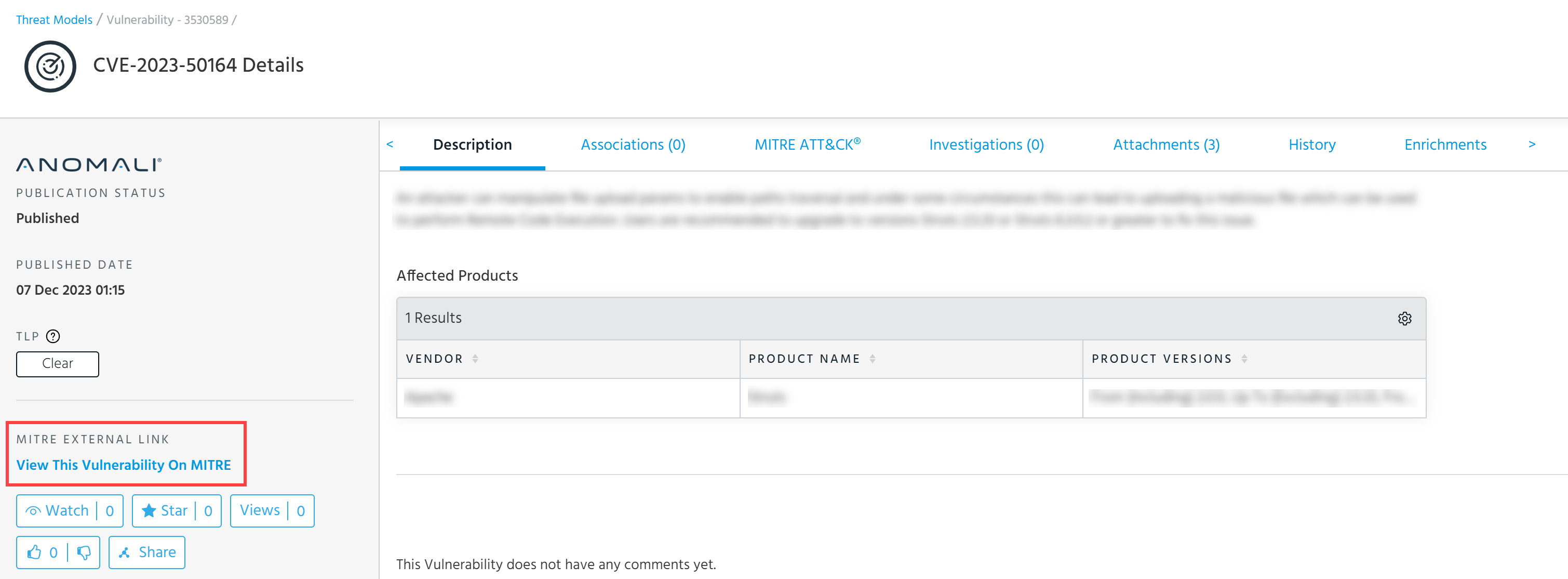
You can create associations between Vulnerabilities and all threat model entities, Observables, Threat Bulletins, Sandbox Reports, and other Vulnerabilities. System imported Vulnerabilities can be associated with observables during import by adding Vulnerability titles as tags to the import session. See Importing Observablesfor more information.
 Read More...
How to Use the Threat Model
If you are new to the Threat Model concept and do not know how to use it, the information in this section will come in handy.
Discover and Explore
Threat model is a categorization of threat information into various STIX entities--such as Actors, Campaigns, Incidents, and so on--which may be related. For example, an observable may be related to a specific Campaign that may also be related to a specific Actor. Once you see this relationship in ThreatStream, you can strengthen your security posture against not only the observable but also the Actor and the Campaign .
Visit the Threat Model dashboard frequently. The dashboard displays the most recently updated threat model entities on ThreatStream. The update on these entities implies "recent activity". Therefore, these entities may be of interest. See Accessing Threat Models for more information.
Drill down further on various entities on the dashboard to learn more about them. Details about an entity can unveil additional information such as aliases associated with an Actor, last activity date, and known victims. For example, if the known victims list shows organizations from your business vertical, you want to ensure your organization is protected against it. Additionally, details pages show Associations—an important element of the STIX model. Associations show how various Threat Model entities are related.
Search information on a specific entity. For example, you hear about an Actor Axiom and want to learn more this Actor. Search for the Actor name on the top navigation search bar, or from the Threat Model Dashboard.
Maintain a Repository
By creating your own Threat Model content, you can start maintaining your own repository of STIX-formatted threat intelligence on ThreatStream. Your private repository and the public information present on ThreatStream is merged and presented to you in one integrated view, which gives you a holistic view of the Actors, Campaigns, Incidents, etc.
Add a new Threat Bulletin, Actor, Campaign , TTP, Incident, or Signature by using the ThreatStream UI. See Adding New Threat Model Entities for more information.
Public vs Private
The Threat Model information you add to ThreatStream follows the same privacy paradigm that all other methods of intelligence (import, sandbox, Threat Bulletin) follow. You can select whether the data you are adding is available to everyone (Anomali Community), accessible to your organization only (My Organization), or shared with Trusted Circles.
Threat Model Operations
Adding New Threat Model Entities
Reviewing Threat Model Entities for Publication
Bulk Tag Management of Threat Models
Adding Private Tags to Threat Model Entities
Adding Threat Model Entities to Investigations
Sharing Threat Model Entities via Email
Deleting Threat Model Entities
Creating Description Templates From Threat Models
Restricting Threat Model Entities to Workgroups
Exporting Threat Model Entities in PDF Format
Exporting Threat Model Entities in STIX Format
Performing Advanced Threat Model Searches
Saving Threat Model Search Filters
Using MITRE ATT&CK Frameworks in Threat Models