Deleting Threat Model Entities STIX constructs—Actors, Campaigns, Incidents, Malware, Signatures, TTPs, and Vulnerabilities—and Threat Bulletins that can be managed through ThreatStream.
Org Admins can delete threat model entities that belong to their organization. Once deleted, threat model entities cannot be restored.
Org Admins can track threat model entity deletion on the Audit page. For more on auditing user activity, see User Activity Audit.
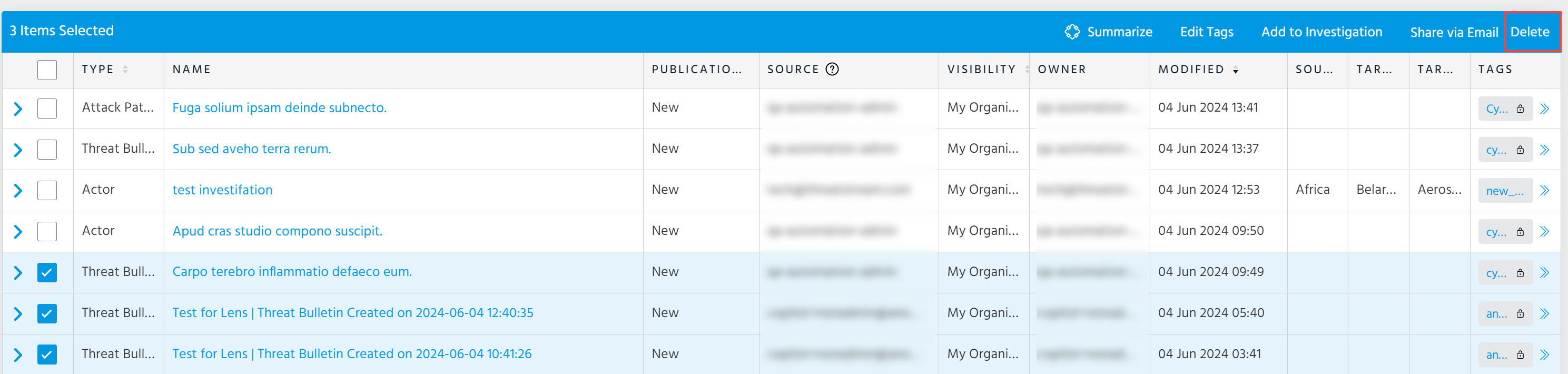
To delete one or more threat model entities:
-
Navigate to ThreatStream > Analyze > Threat Model.
- Select threat model entities that you want to delete.
- Click Delete.
If the Delete option is grayed out, you are not authorized to delete threat model entities.
- Click OK to confirm.
To delete a single threat model entity from a threat model details page:
-
Navigate to the details page of the entity you want to delete.
-
Under Actions, click Delete.
If Delete does not appear in the Actions menu, you are not authorized to delete the entity.
- Click OK to confirm.