Importing Observables with Import Assistant
ThreatStream provides an easy-to-use wizard for importing intelligence into the platform from the following sources:
- Files (CSV, HTML, IOC, JSON, PDF, TXT)
- Raw text
- Plain-text intelligence streams
- Direct links to files
- Emails
- STIX 1.2 XML files
- STIX 2.0 or 2.1 JSON files
Note: STIX 1.2 XML and STIX 2.0 or 2.1 JSON files must be imported from the STIX tab of the import assistant. See Importing STIX Data into the Anomali Threat Model for more information.
The ThreatStream Import Assistant can parse structured and unstructured data for the following observable types: domains, mails, hashes (MD5, SHA1, SHA256 & SHA512), IP addresses (v4 and v6), phone numbers, and URLs.
You can select whether the imported data is available to everyone (Anomali Community) or accessible to your organization only (My Organization), or shared with Trusted Circles.
Imported data must be reviewed and approved before it becomes part of your threat intelligence on ThreatStream. Once you approve the imported data, ThreatStream analyzes it further and adds additional context—such as the confidence ThreatStream has in observables being associated with a given indicator type. You must have the Approve Import privilege to approve an import.
Once approved and added to your threat intelligence on ThreatStream, imported observables are pushed to your downstream integrations via ThreatStream Integrator at the time of your next scheduled synchronization. See ThreatStream Integrator for more information.
In addition to importing new observables, ThreatStream enables you to re-import observables previously imported by your organization. Re-importing observables is helpful when you want to update observable details or set the status of inactive Anomali Community or Trusted Circle observables to active. See Re-importing Observable Values for more information.
Observables imported to ThreatStream are filtered through your organization Exclude List enabling you to prevent users in your organization from importing specified CIDRs, Domains, Email Addresses, IP Addresses, Hashes, URLs, or User Agents. Observables are also filtered through the Anomali global exclude list, which prevents all ThreatStream users from importing known benign observables, including but not limited to the top 500 domains on the Internet. Observables that match either your organization's Exclude List, or Anomali global exclude list are excluded from imports. However, users are not prevented from importing URLs associated with domains on the Anomali global exclude list.
Email addresses associated with top public webmail domains, such as gmail.com or yahoo.com, are also filtered through the Anomali global exclude list but treated differently. They are included in imports unless they are part of your organization's Exclude List (Settings > Exclude List). If you experience that expected email address observables are not being imported, contact Anomali Customer Support to allow these observables to be imported to your organization's threat intelligence.
Observables, even with the same value, are considered unique or distinct on ThreatStream if any of the following factors associated with these observables are different:
Observable Type (IP, Domain, URL, Email, Hash)
Feed IDs or source from which the observables were ingested into ThreatStream
Organizations to which they belong on ThreatStream
Therefore, an import operation will allow an import of the observables with the same value if any of the above factors for those observables are distinct. Similarly, the observable details page will show multiple observables with the same value.
Refer to the following sections for details on how to import observables from various sources:
General Guidelines for Importing Observables
Importing Observables from Plain Text Intelligence Feeds
Importing Observables from an Email
General Guidelines for Importing Observables
For ThreatStream to correctly parse observables and successfully import them, follow these import rules.
-
IPv6 addresses must be in either collapsed notation or in eight 16-bit blocks when imported.
- URLs must not exceed 2000 characters. URLs longer than 2000 characters are truncated.
- String-type iTypes (for example, crypto wallets or Web3 malicious contract addresses) can only be imported as structured data (CSV). See Importing Structured Data.
- Malware associated ports or ports associated with a compromised device or session must be entered in one of the following formats:
- <ip_address>:<port_number>
- <ip_address>|<port_number>
For example, 192.168.1.10|7443 OR 192.168.1.10:7443
- Phone numbers must be entered in one of the following formats:
- +XXXXXXXXXXX (E.164 format)
- XXX-XXX-XXXX
- XXX.XXX.XXXX
- (XXX)XXX-XXXX
For example, +99999999999; 555-555-5555; 666.777.0000; (555)555-5555
Additionally, you can successfully import phone numbers only if the following threat types are selected: Actor, Fraud, and Gaming.
Importing Unstructured Data
When the data is in unstructured format, the ThreatStream platform parses the raw data and extracts observables from it. All observables are associated with the same mapping information—Threat Type, visibility, confidence, and tags. For example, if a file has two IP addresses, each IP will be assigned the same indicator type—mal_ip or apt_ip. You can edit mapping information when reviewing import sessions.
Note: For ThreatStream to correctly parse URLs, protocols must be included in the data you enter. This ensures that ThreatStream maps URLs to the correct indicator type. For example, to import the URL example.com, you must enter https://example.com.
Importing Structured Data
You can also use Import Assistant to import data in structured format. This involves creating a CSV file and compiling the data you want to import using the Guidelines for Structured Data. CSV files submitted to ThreatStream for import must be UTF-8 encoded or compatible.
When the data is in structured format, you can specify a different indicator type mapping and tags for each observable in the structured file. It also enables you to import host-based observables.
Note: If you do not specify an indicator type when importing URLs via structured data, the URL values must include their respective protocols.
Guidelines for Structured Data
 Read More...
Follow these guidelines when importing structured data:
-
The structured data must be contained in a valid CSV file with the following header line: value, itype, tags. Optional columns include private_tags, is_anonymous, and tlp.
value itype tags private_tags is_anonymous tlp 1.2.3.4 brute_ip exploitation,phishing true green https://example.com phishing sensitive amber 4d68462ca6071f9b6ad0fabea8bd1c9f mal_md5 false red %.skydome.com mal_ wildcard_ domain malware_ domains https://bluebird.com/% suspicious_ wildcard_url sus_urls Note: The percent symbol (%) indicates wildcard observables. To learn more about wildcard observables, refer to Wildcard Observables.- The "value" header label is mandatory. This column must contain data.
- The "itype", "tags", and "private_tags" header labels can be omitted if no data will be specified for these columns. See Indicator Types in ThreatStream for more information.
- "tags" is a comma-separated list of tags. Tags included in the "tags" column are assigned the Anomali Community visibility setting and visible to all users with access to the observable.
- "private_tags" is a comma-separated list of tags. Tags included in the "private_tags" column are assigned the My Organization visibility setting and visible only to users in your organization.
-
ThreatStream replaces white spaces in values specified under the "tags" or "private_tags" headers with "-" characters.
- "is_anonymous" sets whether the organization and user information for the observable is anonymized. Possible values include true and false. If no value is specified, observables will not be anonymized.
- "tlp" sets a TLP color for the observable. Possible values include red, amber, amber+strict, green, clear.
-
The data specified in the "itype" column in the CSV file overrides the mapping and tags values specified on the Import page of the ThreatStream UI. If this column is empty, the values from the UI page are assigned. If importing a URL and an indicator type is not specified, URL values must include their respective protocols.
Example 1: The structured CSV contains the following:
value=1.2.3.4
itype=phish_ip
tags = empty
private_tags=may2018The Threat Type setting on the Import UI page is set to Bot. Regardless of the Threat Type set on the Import UI, the observable 1.2.3.4 will be assigned the indicator type phish_ip as information in the CSV file overrides settings specified on the UI. The tag "may2018" will be added to the observable and visible only to your organization.
Example 2: The structured CSV contains the following:
value = 1.2.3.4
itype=empty
tags=empty
private_tags=emptyThe Threat Type setting on the Import page is set to Malware. As no indicator type was specified in the CSV file, the observable is assigned the indicator type Malware_ip.
-
To import observables containing the backlash character (
\) in their value, escape each backlash replacing it with double backlash (\\). This prevents sequences such as\nand\tfrom being interpreted as newline and tab characters.For example,
malware_sample_v1.2\\nqa_test
Importing Host-Based Observables
Host-based observables can only be imported using structured CSV files.
Host-based observables on ThreatStream include: Adware Registry Keys, APT File Names, APT File Paths, APT Mail Transfer Agents, APT Registry Keys, APT Service Descriptions, APT Service Display Names, APT Service Names, Malware File Names, Malware File Paths, Malware Registry Keys, Malware Service Descriptions, Malware Service Display Names, Malware Service Names, and Spam Mail Transfer Agents.
Follow these guidelines when importing host-based observables:
- If importing host-based observables only, the structured data must be contained in a valid CSV file with the following header line: value, itype, tags.
Optional columns include private_tags, is_anonymous, and tlp.
value itype tags private_tags is_anonymous tlp Malware.exe mal_file_name exploitation,phishing true badguy.docx apt_file_name private_information red -
You can use the same format when importing host-based and non–host-based observables in the same file.
value itype tags private_tags is_anonymous tlp Malware.exe mal_file_name exploitation,phishing true badguy.docx apt_file_name clear example.domain.com apt_domain private_information false For a complete list of indicator types, see Indicator Types in ThreatStream.
Note: The "itype" and "value" header labels are mandatory. These columns must contain data. All other header labels are optional and can be omitted if no data will be specified for these columns.
-
Importing Observables from Plain Text Intelligence Feeds
Import Assistant enables you to perform one-time scrapes of plain text intelligence feeds. Simply provide the URL for the intelligence feed. ThreatStream connects to the URL and parses the code for observable data.

Only unformatted, plain text intelligence feeds are supported. An example of an unformatted feed is displayed below.
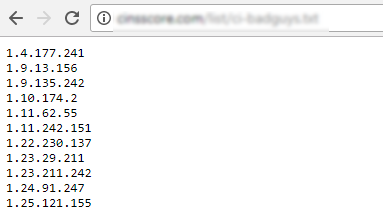
Providing the URL for a feed that includes formatting will result in false positives.
Importing Observables From Direct Links to Files
Import Assistant also enables you import observable data from a CSV, HTML, IOC, JSON, PDF, TXT, or XML files that are hosted online. Simply provide the URL for the file. ThreatStream connects to the URL, downloads the file, and parses it for observable data. Only the file types listed above are supported.
Importing Observables from an Email
ThreatStream can also import observables from a free-form email. You do not need to connect to ThreatStream to import observables in this case. You can simply forward an email containing one or more observables to a designated email address. ThreatStream parses the received email, extracts observables from it, and creates an import job. To learn more about importing observables from an email, see Importing Observables From an Email.
In addition to importing observables from free-form emails, you can also submit emails that appear to be phishing scams. This involves sending the email as an .eml attachment to a designated email address on ThreatStream. For more information, see Ingesting Phishing Emails.