Restricting Observables Visibility to Workgroups During Import
When you import observables and choose to share them with your organization only, you have the opportunity to select specific workgroups with which to share the imported observables. Only users that are members of the workgroups you select will be able to see the observables.
To share observables with workgroups during import:
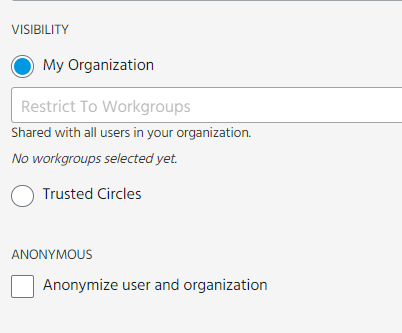
- During the import process, select My Organization to make the data private to your organization and click the Restrict to Workgroups drop-down list to select the workgroups with which you want to share the observables.
- Complete the import process. When the import job is approved, the observables will be visible only to the members of the workgroups you selected.
The workgroups you select are displayed under the menu.
Note: You can only select workgroups you are a member of during import. At least one user in the workgroups you select must have the Approve Import privilege.
You can also configure Import Email mailboxes to restrict imported data to selected workgroups.
Note: If an observable already exists in ThreatStream whose visibility is restricted to workgroups within your organization, you cannot import a duplicate observable that is also private to your organization or restricted to other workgroups—even in cases where the existing observable is not visible to you.