Viewing Attack Pattern Details
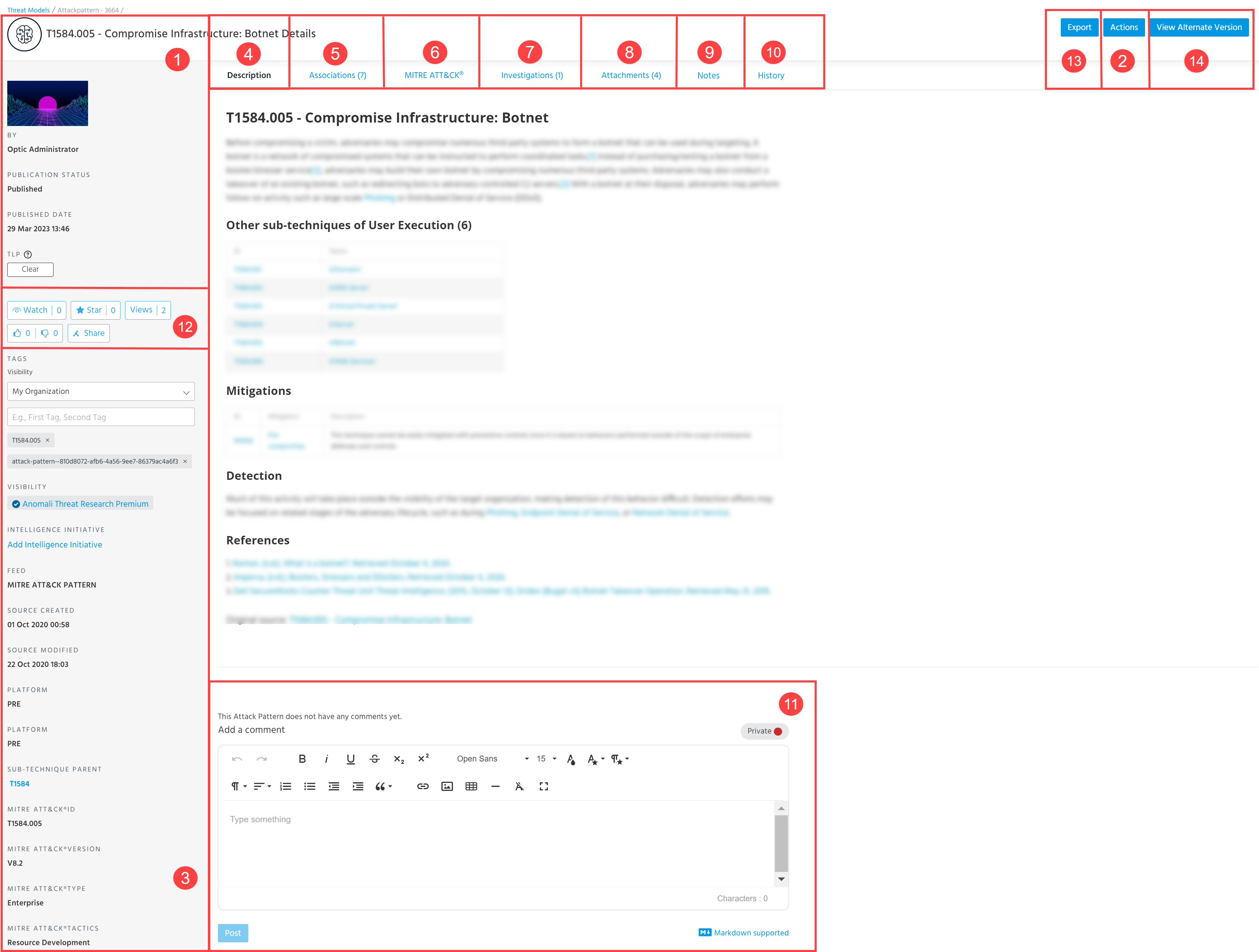
 Summary
Summaries contain high-level information, such as the Attack Pattern title, the user who created the Attack Pattern entity, publication status, publication date, and TLP setting.
 Actions
The Actions menu is based on the source or stream of an Attack Pattern. It may include the following actions:
- Edit: Edit Attack Pattern details. For more information, see Editing Attack Patterns.
- Assign User: Assign the Attack Pattern to a user in your organization for further work on the entity.
- Publication workflow: Move the Attack Pattern through the publication review workflow. Possible actions include Assign User, Request Review, Complete Review, and Publish.
- Add to Investigation: Add the Attack Pattern to a new or existing investigation. When adding an Attack Pattern to an investigation, you can additionally add observables associated with the Attack Pattern to the investigation. See Managing Investigation Entities for more information.
- Anonymize: Change the user and organization information anonymization setting. If enabled, users outside of your organization with access to the data will see "Analyst" in all fields that would otherwise display an organization or user name.
- Delete: Delete the Attack Pattern.
- Clone: Create a private copy of the Attack Pattern.
- Retrospective Search: Run a Forensics & Retrospective search on your Security Analytics instance to see the matches for the observables associated with the Attack Pattern.
 Attributes
Depending on a source of an Attack Pattern, attributes may include Tags,
For a complete list of fields and definitions, see Editing Attack Patterns.
MITRE ATT&CK patterns may include the following attributes: data sources, system requirements, permissions required, MITRE ATT&CK ID, MITRE ATT&CK version, MITRE ATT&CK type, MITRE ATT&CK tactics.
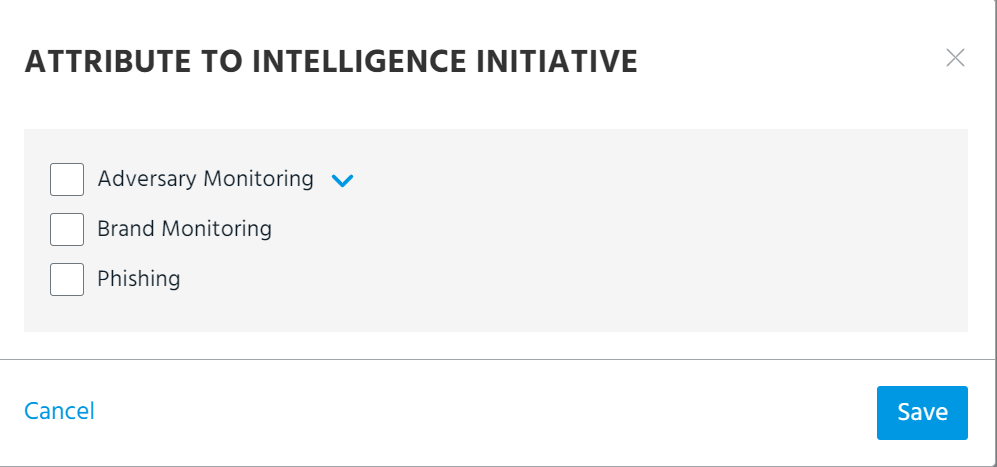
To assign an intelligence initiative to an Attack Pattern:
-
Click Add Intelligence Initiative.
-
Select the intelligence initiatives with which you want to associate the Attack Pattern.
-
Click Add.
 Description
Full text description of the Attack Pattern.
 Associations
Associated Observables, Threat Models, Import Sessions, and Sandbox Reports.
 MITRE ATT&CK
MITRE heat map displaying all attack patterns or TTPs associated with the Attack Pattern. See Using MITRE ATT&CK Frameworks in Threat Models for details.
 Investigations
Investigations in which the threat model entity appear. Click the Investigation Name to drill down on the investigation. For information on adding threat model entities to investigations, see Managing Investigation Entities.
Investigations do not appear in this list until they are saved.
If a user has created an analyst note for a specific threat model entity inside of an investigation, the analyst icon is displayed in the Investigations tab for that threat model entity.
 Attachments
External references relating to the Attack Pattern.
 Notes
Notes
STIX 2.1 notes associated with the Attack Pattern.
 History
When a change is made to an Attack Pattern, a log entry of the change is created in this section for future reference. If the change is made by the owner of the Attack Pattern, the organization name is shown in the log entry; all other organization names are hidden.
 Comments
View and add comments to the threat model entity. Posted comments are displayed in reverse chronological order based on the timestamp in the created_ts field, with the most recently added comments appearing first and the oldest comments appearing last.To add private comments visible to your organization only, assign the Private red color to them. Comments with the Public white color assigned to them are visible to any user with access to the threat model entity. If the Public white color is not available, your Organization Administrator has enabled the Restrict Public Comments setting to restrict users in your organization from posting public comments. This is done to prevent your organization’s comments from being shared publicly.
 Intelligence Actions
- Watch: Receive notifications when the intelligence is updated.
- Star: Bookmark the intelligence.
-
Views: Total view count of the intelligence by organization users.
- Like: Tell the Anomali community if you like or dislike the intelligence.
- Share: Send the intelligence to another ThreatStream user. Users receive in-app notifications when intelligence is shared with them.
 Export
- Create Report (PDF): Generate a PDF using a template for sharing Threat Model entities outside of ThreatStream. See Creating PDF Reports for more information.
- Share via Email: Share the Attack Pattern with ThreatStream users (within or outside your organization) or non-ThreatStream users through email. See Sharing Threat Model Entities via Email for more information.
- Export IOCs to CSV: Export observables associated with the Attack Pattern in CSV format. You can select specific Fields to Export. You can export up to 1000 associated observables.
- Export to STIX: Export the Attack Pattern in STIX format. See Exporting Threat Model Entities in STIX Format for more information.
 View Alternative Version
View Attack Pattern details with one of the following ATT&CK versions: v8.2, v9.0, v10.0, v10.1, v11.0, v11.3, v12.1, v13.1, v14.1, v15.1, v16.1, v17.0, v17.1, v18.0, v19.0, v19.1, and v19.2.