Performing Advanced Threat Model Searches
ThreatStream provides advanced threat model search functionality for cases involving specialized searches. Advanced Search queries are formed by constructing filters.
Constructing Advanced Threat Model Search Filters
Advanced Search filters are composed of expressions that adhere to the following format:
intelligence_field operator value
Filters can contain any number of expressions joined together by the logical operators AND, OR, and NOT.
As you type, ThreatStream suggests context specific valid operators and fields.
The Filter Options in the left panel are not available for advanced threat model searches.
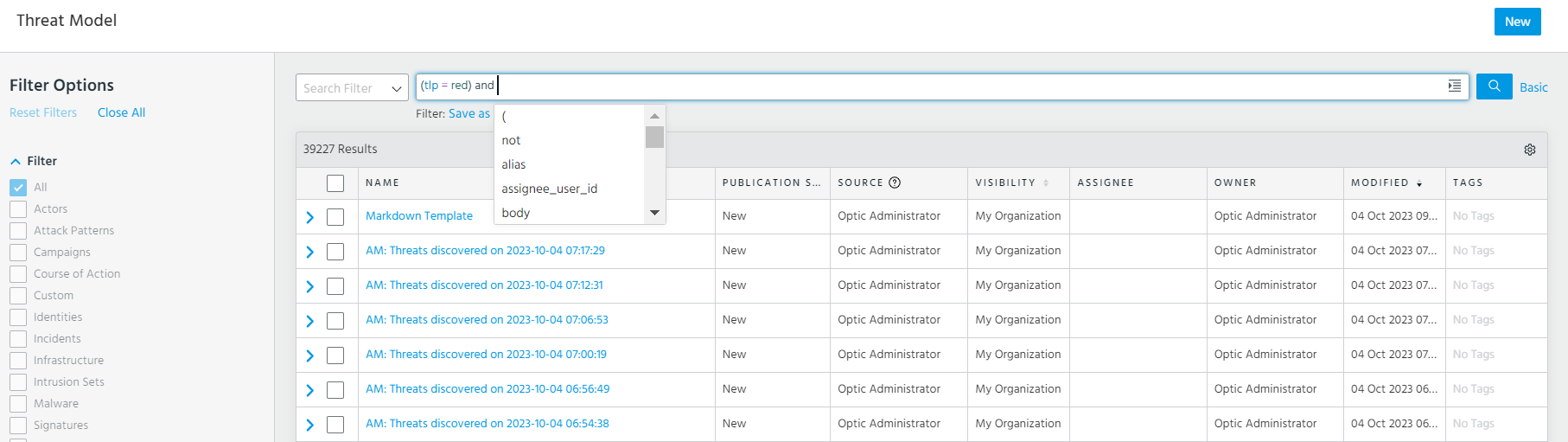
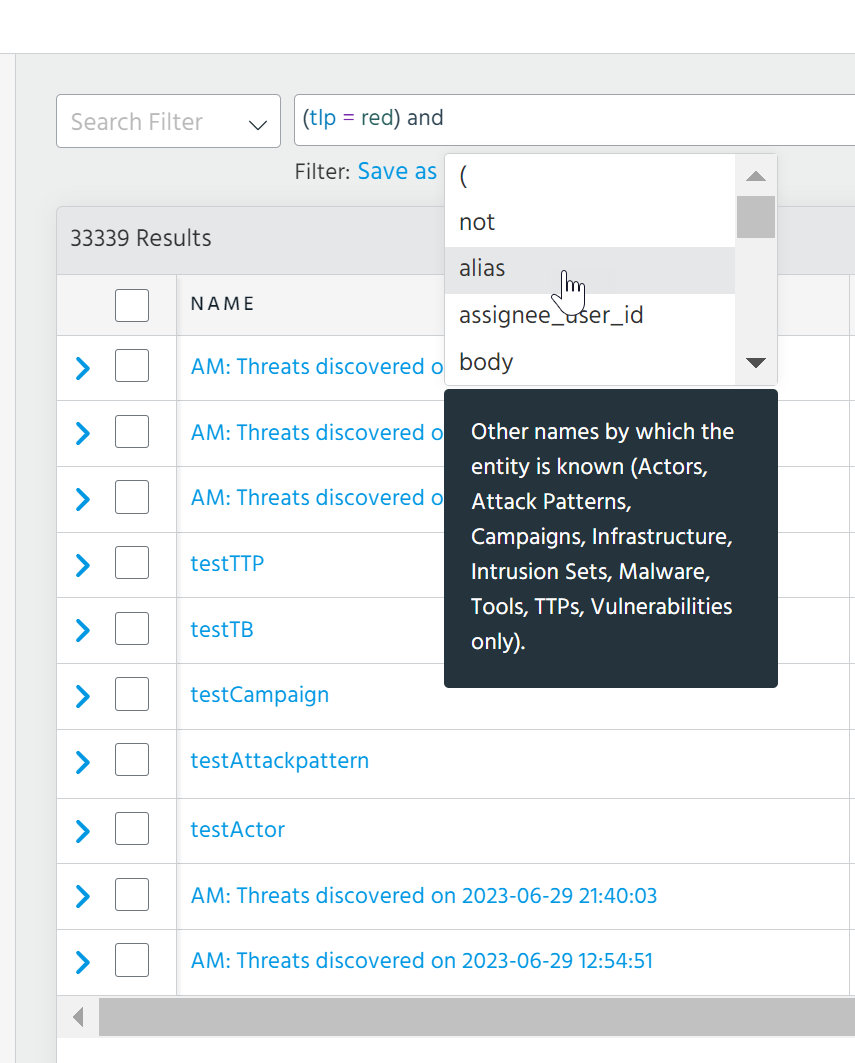
You can hover over fields in the suggestion window to view descriptions for the selected field.
ThreatStream color codes your advanced search queries for ease of use.

-
Fields are blue
-
Operators are purple
-
Values are green
-
Warnings are underlined in yellow
Tip: Warnings occur when you use the
=or!=operators and enter an unexpected value for the specified field. Click the warning to view a list of suggested values. -
Errors are underlined red
Tip: Errors occur when queries exhibit missing parenthesis, misplaced tokens, or unknown fields, operators, or values (such as an unsupported date format).
Click the expand icon to see your search query in an expanded view.

Note: Advanced search queries must be 4,000 characters or less.
ThreatStream enables you to save threat model advanced search filters. See Saving Threat Model Search Filters.
ThreatStream automatically saves the most recent advanced search query you executed. Select Last Search in the Search Filter menu to execute this search filter again.
Note: Saved threat model advanced search filters are not supported for use with ThreatStream Integrator, custom dashboards, or the ThreatStream TAXII server.
Supported Intelligence Fields
Note: Values specified in advanced search filters are case-insensitive unless otherwise noted. However, field names are case-sensitive. For example, including Tag instead of tag creates an invalid search filter that will not return any results. To create a valid search filter, you must enter the field name exactly as it appears in the table below. For more on case sensitivity, see Case Sensitivity in ThreatStream Search.
| Field Name | Type | Description |
|---|---|---|
alias
|
String | Other names by which the entity is known (Actors, Attack Patterns, Campaigns, Infrastructure, Intrusion Sets, Malware, Tools, TTPs, Vulnerabilities only). |
assignee_user_id
|
Numeric | ID of the user to whom the entity is assigned. |
body
|
String | Body of the entity. |
created_ts
|
Date |
UTC time stamp of when the entity was created in ThreatStream. Date can be specified as follows:
Note: The creation time of an entity, as given by |
cvss2_score
|
Numeric | CVSS 2.0 Score (Vulnerability entities only). Scores range from 0-10. |
cvss3_score
|
Numeric | CVSS 3.0 Score (Vulnerability entities only). Scores range from 0-10. |
feed_id
|
Numeric | ID of the feed from which the entity originates. |
feed_name
|
String | Name of the feed from which the entity originates. |
is_email
|
Boolean |
Whether the entity was created as a result of ingesting a phishing email. This attribute applies to Threat Bulletins only. Therefore, an invalid query is created if you specify a value for |
is_public
|
Boolean | Whether the entity is public or private (including belonging to a
trusted circle). Possible values include: false and true . |
model_type
|
String |
Threat model entity type. Possible values include: You can also use For example, Note: |
modified_ts
|
Date |
UTC time stamp of when the entity was last modified in ThreatStream. Date can be specified as follows:
|
name
|
String | Name of the entity. |
organization_id
|
Numeric | ID of the organization on ThreatStream that owns the threat model entity. |
owner_user_id
|
Numeric | ID of the user that owns the entity. |
publication_status
|
String |
Publication status of the threat model entity. Possible values include: Note: |
source_created
|
Date |
UTC time stamp of when the entity was created by its original source. Date can be specified as follows:
|
source_locations
|
String |
Source locations associated with the threat model entity (as defined by STIX 2.1). Possible values include letter codes of regions, countries, and administrative areas (US States and Washington DC only). For example, Note: ThreatStream returns threat model entities associated with all source locations that are part of the specified region/country/administrative area. For example, if you enter
source_locations = europe, ThreatStream will return threat model entities associated with all source European countries such as Germany, Poland,France, Belgium, and so on. |
source_modified
|
Date |
UTC time stamp of when the entity was last modified by its original source. Date can be specified as follows:
|
tag
|
String | Tags assigned to the entity. |
target_industry
|
String |
Target industry associated with the threat model entity. Possible values are defined by the STIX 2.1 Industry Sector vocabulary. For example, |
target_locations
|
String |
Target locations associated with the threat model entity (as defined by STIX 2.1). Possible values include letter codes of regions, countries, and administrative areas (US States and Washington DC only). For example, Note: ThreatStream returns threat model entities associated with all target locations that are part of the specified region/country/administrative area. For example, if you enter
target_locations = europe, ThreatStream will return threat model entities associated with all target European countries such as Germany, Poland,France, Belgium, and so on. |
tlp
|
String |
TLP (Traffic Light Protocol) color. Possible values include: Note:
|
trusted_circle_ids
|
Numeric | ID of the trusted circle with which the threat model entity is shared. |
type
|
String |
Threat model entity subtypes. Possible values for Actor entities include: Possible values for Infrastructure entities include: Possible values for Malware entities include: Possible values for Signature entities include: Possible values for Tool entities include: Note: |
workgroups
|
Numeric | ID of the workgroups with which the threat model entity is shared. |
Search Operators
Advanced search on ThreatStream supports the search operators listed in the table below.
| Operator | Description |
|---|---|
=
|
Searches for results that are identical to the value after the operator. Note: The behavior of the |
!=
|
Searches for results that exclude the value after the operator. |
contains
|
Searches for data that starts with or end with the value after the operator. Values specified after the Note: The behavior of the |
startswith
|
Searches for results that begin with the value after the operator. |
endswith
|
Searches for results that end with the value after the operator. |
~
|
Searches for results that match the regular expression after the operator. Only valid for use in filter expressions that contain regular expressions.
Note: Avoid using regular expression operators in search queries. As an alternative, use the
contains, endswith, or startswith operators to search for specific phrase matches. If these alternative operators do not fulfill your use case, contact Anomali Support for assistance. |
!~
|
Searches for results that do not match the regular expression after the operator. Only valid for use in filter expressions that contain regular expressions. Note: Avoid using regular expression operators in search queries. As an alternative, use the
contains, endswith, or startswith operators to search for specific phrase matches. If these alternative operators do not fulfill your use case, contact Anomali Support for assistance. |
<
|
Searches for results that are less than the numerical value or date after the operator. |
<=
|
Searches for results that are less than or equal to the numerical value or date after the operator. |
>
|
Searches for results that are greater than the numerical value or date after the operator. |
>=
|
Searches for results that are greater than or equal to the numerical value or date after the operator. |
AND
|
Searches for results that are included in both the filter expression before and the filter expression after the operator. |
OR
|
Searches for results that are included in either the filter expression before or the filter expression after the operator. Results included in both filter expressions are also returned. |
NOT
|
Searches for results that are excluded from the filter expression after the operator. |
Each data type is compatible with certain search operators. The table below displays all of the valid operators and fields associated with each data type.
| Data Type | Valid Operators | Field Names |
|---|---|---|
| String | =, !=, contains, startswith, endswith, ~, !~, insubnet, !insubnet |
|
| Numeric | =, !=, <, <=, >, >= |
|
| Date | =, !=, <, <=, >, >= |
|
| Boolean | =, != |
is_public
|
| Logical | AND, OR, NOT |
Joins together multiple expressions. Example: |
Name and Tag Queries in Advanced Search
Unlike other string type threat model fields, name and tag can contain multi-word phrases. Therefore, advanced search behavior for name and tag differs from other string type fields for certain operators.
- When applied to the
tagandnamefields, the=operator returns all threat models in which the query string appears as a whole word anywhere in the field. For example,tag = "attack"will match the following tags: "attack", "attack pattern", and "zero day attack", but not "attacker". Similarly,name = "Huge Database"will match threat models with the name "huge database" but not "huge databases". - When applied to the
tagandnamefields, thecontainsoperator returns all threat models in which the query string appears as a contiguous substring anywhere in the field. For example,tag contains "of Ant"will match "of Antarctica", but not "of the Antarctic". Similarly,name contains "Huge Database"will match threat models with both names, "huge database" and "huge databases". - The
startswithoperator does not support multi-word queries, such astag startswith "coronavirus pandemic". This also includes hyphenated word queries, such astag startswith "mustang-panda". Therefore, you can use thestartswithoperator to query tags that contain a word beginning with the specified value only. For example,tag startswith "pan"can yield any of the following tags: "panda", "mustang panda", "panama papers", "pan", and so on. - The
endswithoperator does not support multi-word queries, including hyphenated word queries. Instead,endswithinserts an OR between words specified after the operator. Therefore, you can use theendswithoperator to query tags whose ending characters or words match the value specified after the operator. For example,tag endswith "security testing"can yield any of the following results: "testing", "pentesting", "enterprise security", and so on.
Behavior of the Contains Operator on Multi-Word Body Queries
For the body field of a threat model, the contains operator matches text in the following manner:
-
Exact match for IP addresses. For example,
body contains "1.2.3.4". -
Exact match for domains. For example,
body contains "yahoo.com". -
For a multi-word phrase, all words must occur together in a threat model body for a match. For example,
body contains "malware file"will yield any of the following results "malware file", "malware files", and "malware filename".Tip: Anomali recommends using the
=operator to match the whole phrase. For example, results forbody = "bank Scotland"will include all matches that contain the specified value in sequence. For example, "bank Scotland" and "this bank Scotland is located in Scotland" will both be matches. -
Special characters in a multi-word phrase may yield unpredictable search results. For example,
body contains "bank-of-scotland"will not match the phrase "bank-of-scotland" in the body because the hyphen is treated as a word delimiter. Therefore, Anomali recommends removing special characters from search terms. For this example,contains "bank of scotland"is recommended as it will match the threat model that contains "bank-of-scotland". -
For email addresses and URLs, Anomali recommends using the
=operator.
Example Advanced Search Filters
name contains aptmodel_type = actor AND (type = hacker OR type = criminal)model_type = signature AND tlp = clearmodel_type = vulnerability AND (cvss3_score >= 2 AND cvss3_score <= 5)(tag = covid19 OR tag = coronavirus) AND model_type = campaignname contains APT AND modified_ts > 2021-01-01T00:00:00 AND is_public = truepublication_status = review requested AND assignee = me@company.com