Understanding AURA
AURA (Anomali Unified Response Agent) is the orchestrator behind the Agentic Fleet and the agentic SOC workflow. AURA triggers every specialized agent—the Alert Triage Agent, Incident and Investigation Agent, and Case Management Agent—and tracks all of their tasks from start to finish, returning the results as a single, accountable outcome. You do not need to invoke or manage individual agents yourself.
Information AURA Uses
Depending on the data sources, integrations, permissions, and memory available in your environment, AURA can use:
-
The rule that triggered the activity and the matching activity
-
Involved entities and related activity
-
ThreatStream intelligence and enrichment results
-
Organizational context for your organization. See Understanding Organizational Context and Memory for more information.
-
User memory and operational memory, when relevant to the task
-
Relevant prior agent work
-
Targeted searches of available security data
-
Severity and its confidence in the available evidence. See Understanding Severity and Confidence for more information.
AURA uses only information available to the current run. Missing, unavailable, or failed data sources do not become evidence that the activity did not occur.
Understanding Severity and Confidence
Severity indicates how serious the activity could be, while confidence indicates how strongly the available evidence supports the recommendation. The two are independent. A high-severity alert can still carry low confidence if the available evidence is insufficient or conflicting.
AURA's confidence score is calculated by backend logic from the evidence available to the run. The LLM explains the resulting confidence and its contributing factors, but it does not select or change the score.
The calculation can consider:
-
Evidence collected during enrichment and investigation
-
Findings that corroborate or contradict the current assessment
-
Checks that failed or could not be completed
-
Missing or incomplete evidence
-
Deterministic policy adjustments
Confidence factors are tied back to the evidence available to the run so that you can understand why confidence increased or decreased.
A lower confidence score does not mean that the agent run failed. It means that the available evidence is weaker, incomplete, or more conflicting.
Understanding Organizational Context and Memory
AURA draws on two distinct sources of organization-specific information:
-
Organizational context describes who your organization is and what your environment looks like, including entities, connected integrations, and approved operational information.
-
Long-term memory holds relevant prior work the agents have performed for your organization, such as earlier triage and investigation results.
Long-term memory is retrieved at runtime and is used only when it is relevant to the current task. It is not used to train or fine-tune the underlying model. Each organization on the Anomali platform is isolated from every other organization, and one organization's context and memory are never available to another.
When Data is Not Available
AURA can use only the data your deployment can access. The sources and integrations configured on your side determine what runtime context exists for any given run. If identity data, asset data, event data, or an enrichment provider is not connected or not reachable, AURA does not substitute an assumption for the missing evidence. Instead, it:
-
Reports which sources were unavailable for the run
-
Evaluates the evidence it does have
-
Returns a recommendation with a correspondingly lower confidence score
A recommendation produced with reduced evidence is fully traceable in the platform. The agent run shows which sources were consulted and which were unavailable, to provide you a full visibility into the basis of the recommendation that was made by it.
Governance, Permissions, and Human Control
AURA makes recommendations, while the platform governance and human-in-the-loop controls determine whether a human must approve the recommendation.
Agents inherit the permission set of the user who initiates the action. When a user manually invokes an agent, it operates within the scope of that user's assigned role and permissions.
Note: Agents that run automatically in the background typically use a designated service account and its assigned permissions.
If your assigned role does not include the permissions an agent action requires, the agent does not perform the action. When you manually invoke an agent without sufficient permissions, the platform displays a message indicating that you do not have the required access. Contact your Organization Administrator to request the permissions you need.
An agent that stops for this reason has not failed. It is operating within the limits of the permissions assigned to it.
In the overall agentic SOC workflow, the following remain your responsibility:
-
Configure detection rules. See Creating Detection Rules.
-
Configure alert rules. See Creating Alert Rules.
-
Examine the Approval Queue for tasks that require your input: an alert that needs to be triaged to the Promote verdict or an incident that should be Escalated to a case or Closed. See Using Approval Queue.
-
Review cases on the Cases page. See Cases.
-
Perform the recommended response actions. See Using the Response Workbook.
Agent Visibility And Control
The Approval Queue is where you typically make day-to-day decisions in the agentic SOC workflow. For broader visibility, use Agentic Fleet View to monitor agent and sub-agent activity across the platform. Use My Agents to inspect individual agent runs, including what triggered the run, the reasoning and evidence used, the tools and capabilities invoked, and the resulting output.
-
An agent run shows information such as:
-
What triggered the run
-
The context available to the agent
-
The evidence used
-
The tools and capabilities invoked
-
The permissions used
-
The resulting output or recommendation
See Viewing Agent Details for more information.
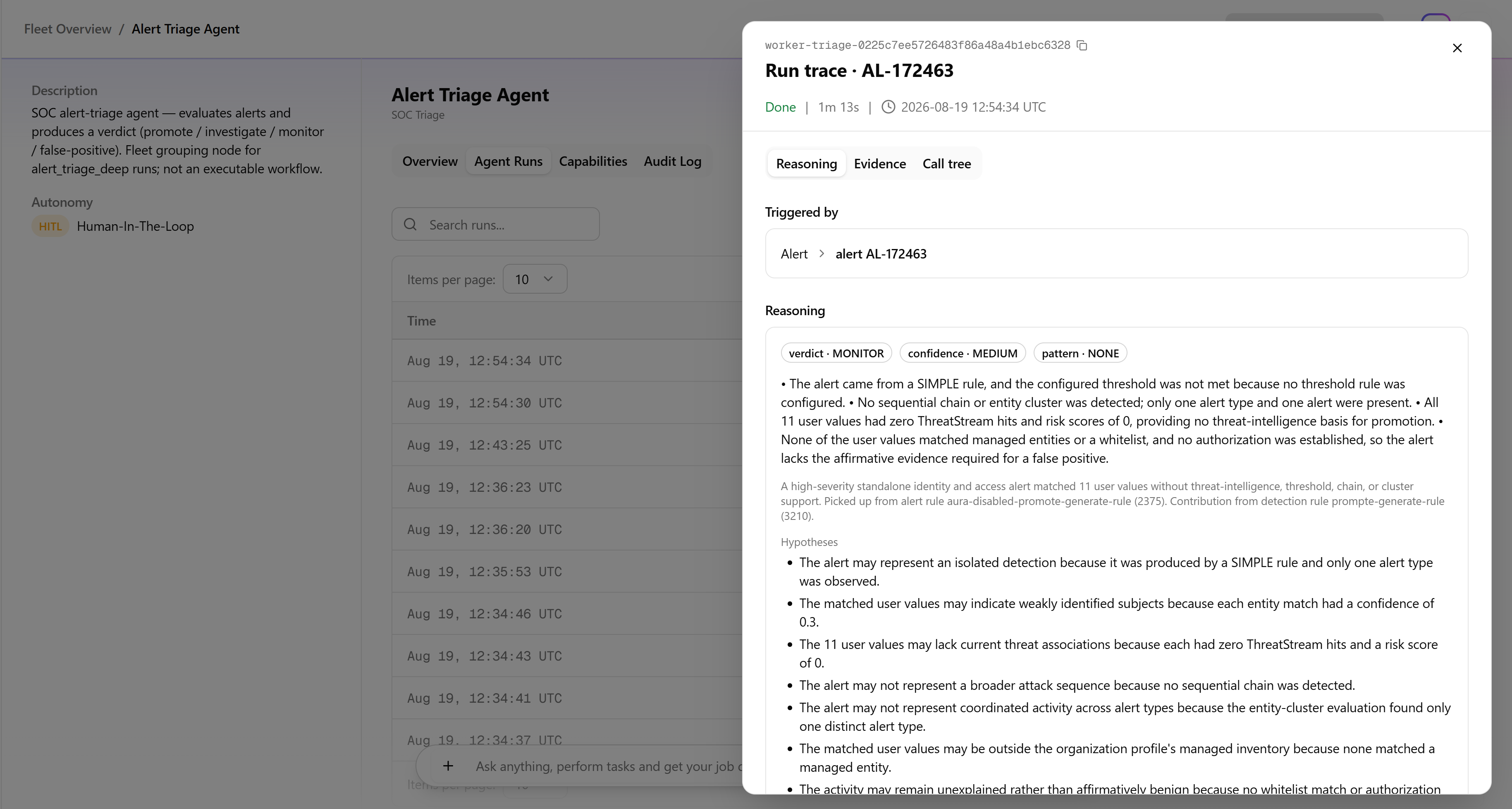
This information helps you understand how AURA reached a recommendation and troubleshoot an agent run when it does not produce the expected result.
Agent actions and service executions are also recorded in an immutable audit record. The audit record distinguishes activity performed by an agent, a system component, or a human user and records human approvals, rejections, and overrides.
Controlling Agent Activity
Agent activity can be controlled at the run level or through administrative agentic fleet controls.
Run-level controls (a single run)
For an active AURA triage or investigation run, an analyst may be able to pause, resume, or stop the run, depending on the workflow. These controls apply only to that specific run and do not affect other agent activity. See Overview Tab for an example.
Agentic Fleet Controls
Organization Administrators can pause agent activity for an individual agent or across the entire fleet.
-
Individual agent: Pause an agent to prevent it from accepting new work while other agents in the fleet continue to operate. Resume the agent when you want it to begin accepting new work again. See Viewing Agent Details for an example.
-
All agents: In Fleet Overview, click Pause all agents to prevent the agent fleet of the organization from accepting new work. The fleet remains paused until an Organization Administrator resumes agent activity. See Agentic Fleet Overview for details.
Fleet-level and individual-agent pause and resume actions are governance-controlled, available only to Organization Administrators, and are recorded in the audit history.
Pausing an agent or the fleet does not affect work that agents have already completed. These administrative controls are separate from controls used to pause, resume, or stop an individual in-progress triage or investigation run.