Agentic Fleet Overview
Anomali Agentic SOC Operation includes purpose-built agents that automate triage and investigation work at different stages of the SOC Operations workflow. See Security Operations Overview for details.
The Fleet Overview page provides an at-a-glance view of agent activity and fleet health. Agents can work individually or as part of coordinated workflows, with AURA orchestrating agent activity and handoffs. See Understanding AURA for details. Each agent provides traceable reasoning and evidence and operates within the platform governance and human-in-the-loop controls.
To access your agentic fleet, navigate to ThreatStream Next Gen > Anomali Agentic Fleet > Fleet Overview.
On the Fleet Overview page, you can see which agents are running, how much work each agent has completed, and how many decisions are waiting for human approval. You can also pause all agents, filter activity by time range, and select an individual agent to view more detailed information.
(Click the image to enlarge it.)
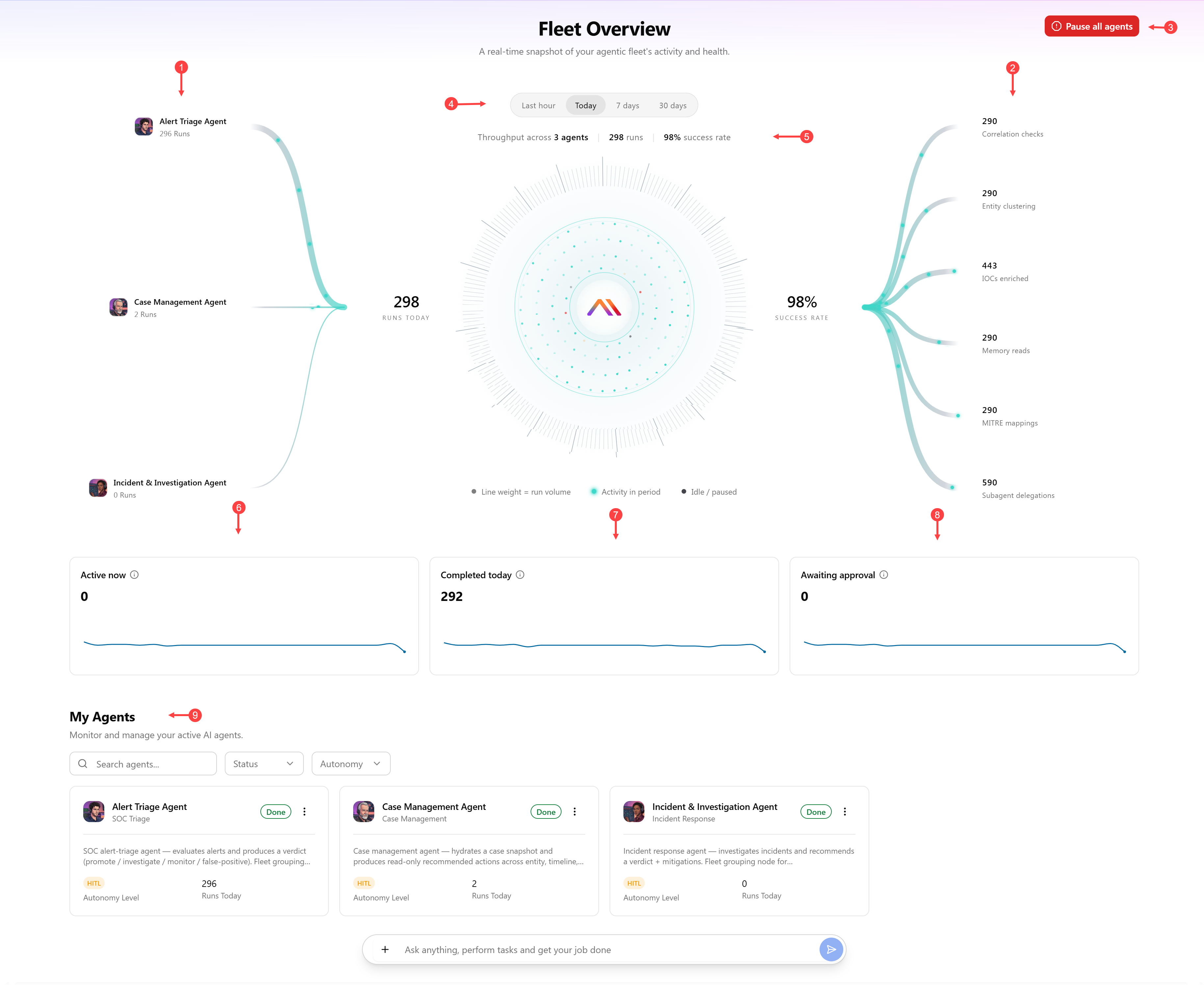
 Agents to which you have access and the number of their runs during the selected period.
 Actions taken by the agents
 Pause all agents: Click Pause all agents if you want to pause all agents in you environment from accepting new work.
 Select the time range to review agents' activity.
 View the total number of agents in the current view, their combined runs, and overall success rate for the selected time range.
 View agents that are currently executing.
 View runs that finished successfully in the selected period.
 View the number of decisions currently waiting on a human approval.
 View agents' status and their activity details. See Monitoring Status and Activity of Individual Agents for more information.
Available Agents
| Agent | Description |
|---|---|
|
Alert Triage Agent |
Automatically evaluates alerts generated by an alert rule, using enrichment data, entity risk, historical activity, and threat intelligence. Based on this analysis, it recommends promoting, investigating further, monitoring, or dismissing the alert as false positive. See Alert Triage Agent for details. |
| Incident & Investigation Agent | Automatically assigned when an alert or group of alerts is promoted to an incident. Performs a hypothesis-driven investigation of the associated alerts and entities, resulting in an Escalate or Close outcome. See Incident & Investigation Agent for details. |
| Case Management Agent | Deeply enriches cases with intelligence context, attack narratives, and actionable recommendations by synthesizing all attached incidents, evidence, and threat intelligence. Also serves as the case export engine for sharing with internal and external audiences. See Case Management Agent for details. |
Monitoring Status and Activity of Individual Agents
The My Agents section of the Fleet Overview page is where you can view details of the agents to which you have access. The tile view on this page gives you high-level details about each agent, including its status, autonomy mode, and run count.
Status
Each agent tile shows one of the following status values:
-
Running— agent is actively working — executing its current stage, calling tools, or processing evidence. This is the active, in-progress state for a triage or investigation run.
-
Idle—agent is available and waiting for new work. No alert, incident, or task currently requires its attention.
-
Paused—agent current run has been manually paused by an Organization Administrator. Progress up to this point is retained, and the agent will resume from the last completed stage rather than starting over.
-
Done—agent has completed its current run and produced a final result—a verdict, report, or recommendation. The output is available for review.
-
Error—agent encountered a problem it could not resolve on its own (for example, a tool timeout, an unavailable data source, or a failed validation) and could not complete its run. The issue is logged for review, and the run may need to be retried.
-
Disabled—agent has been turned off, either by an Organization Administrator or by configuration, and will not pick up or process any new work until it's re-enabled. Any items normally routed to it remain unclaimed and available for manual handling.
Autonomy mode
Each agent tile also shows one of the following autonomy modes:
-
HITL (Human-in-the-Loop)—Agent proposes an action, but a human must approve it before anything executes. The task is mandatory and blocks until the decision is resolved.
-
HOTL (Human-on-the-Loop)—Agent acts on its own, while a human supervises and can override the action if needed. A task is created for visibility, but it doesn't block the agent from proceeding.
-
HOOTL (Human-out-of-the-Loop)—Agent acts autonomously within a defined scope, with no human action required. A task is still logged for audit purposes, but only after the fact.
For a deeper look at an agent activity, select the agent you want to review to view its details. See Viewing Agent Details for more information.