Creating Detection Rules
The detection rule creation process includes defining the rule and its detection logic, configuring the OCSF category, look-back window, run schedule, risk score, and optional MITRE ATT&CK techniques, and then validating and testing the rule before publishing it. Query validation enables you to identify issues that could result in noisy, duplicate, or unusable detections before the rule runs in production.
Validation happens in two tiers, run in sequence:
| Validation | Description |
|---|---|
| Tier 1 |
Checks if the rule is correctly constructed. Runs automatically on every field or query edit. Hard blocks disable further rule testing. |
| Tier 2 |
Checks if the rule works well with data in your environment. When Tier 1 validation passes successfully, simulates runs using the lookback and run interval of the rule to check volume, entity resolution, and duplicates. |
To create a new detection rule:
-
Navigate to ThreatStream Next Gen > Security Operations > Detection Rules.
-
Click New Rule.
-
On the New Detection Rule page, configure the following fields:
Field Description Name Enter a unique name for the detection rule.
For example, Failed API activity.Description (Optional) Enter a description for the detection rule.
For example,
Detects failed API activity attempts by human user accounts, excluding machine-generated noise.
AQL/NL Prompt Define the rule detection logic in one of the following ways:
-
AQL: write an AQL query.
For example,Copyocsf | where class_name = 'API Activity' AND activity_id = 2 AND status = 'Failure'
AND actor.user.name IS NOT NULL AND actor.user.name NOT LIKE '%$'
| fields actor.user.name, actor.user.uid, src_endpoint.ip, message, severity, activity_name -
AI Prompt: describe what this rule should detect.
For example, Alert when a user logs in from two different countries within 30 minutes.
Click Generate AQL to generate an AQL query for this request.
OCSF Category Select an OCSF category associated with this detection rule. See Supported OCSF Categories for details. Look Back Select how far back into the data lake a detection rule must reach every time it runs: 15 minutes, 1 hour, 4 hours, 24 hours, or 7 days. Note that Lookback Window should always be equal to or greater than the Run Schedule interval, to ensure no log data falls outside the query window between runs. For example, if a rule runs every 30 minutes, but only looks back 15 minutes, there is a 15 minute gap of logs that never gets evaluated by any run. Run Schedule Select how often you want to run this detection rule: every 5 minutes, every 15 minutes, every 30 minutes, hourly, every 6 hours, every 12 hours, or daily. Risk Score Set the risk score for the detection rule. For more information on risk scores, see Entity Risk Scores. MITRE ATT&CK Techniques (Optional) Select MITRE ATT&CK techniques associated with this detection rule. 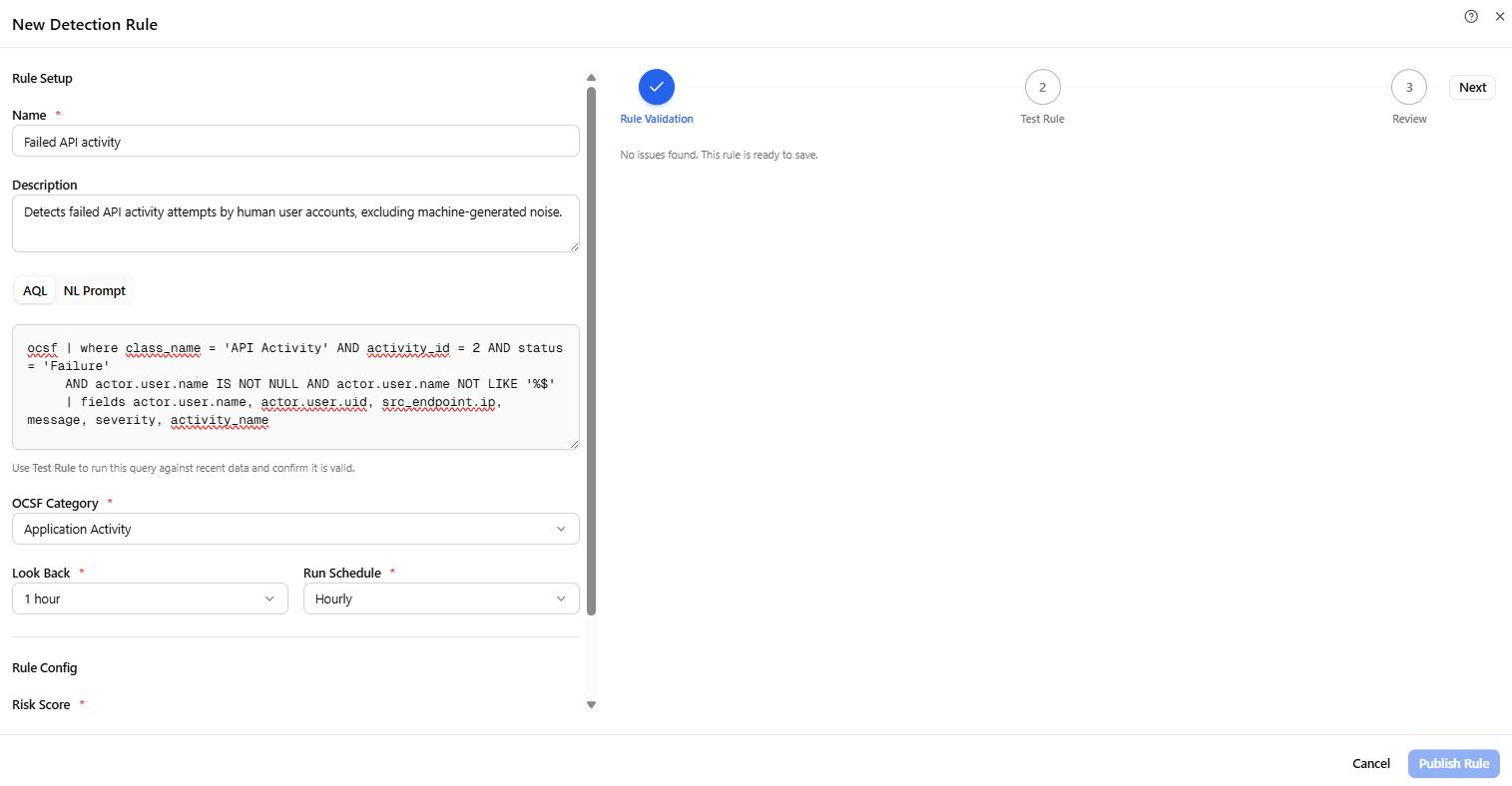
The validation agent performs a static analysis of AQL structure and rule configuration, including detection configuration, AQL query, and alert-rule checks (Tier 1). The analysis is performed automatically when a rule field or AQL query is created or modified. If a hard block is found, the Test Rule action and activation are disabled until the issue is resolved. Warnings do not prevent testing. See Troubleshooting Rule Validation and Test Issues for troubleshooting recommendatins.
-
-
When no issues are detected, click Next.
-
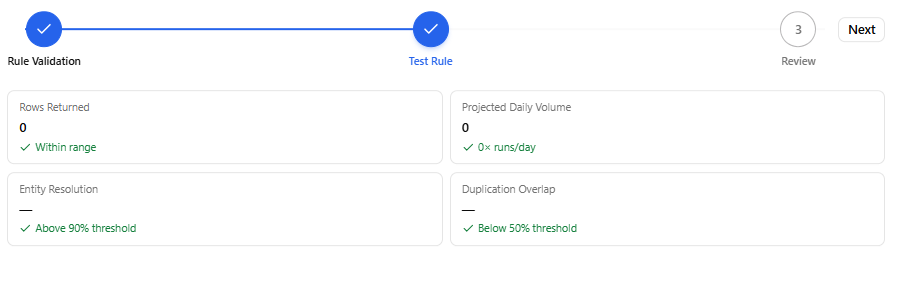
Click Test Rule to run the specified query against recent data from your environment and confirm it is valid (Tier 2 ). If the test is unsuccessful returns no results, see Troubleshooting Rule Validation and Test Issues for troubleshooting recommendations.
-
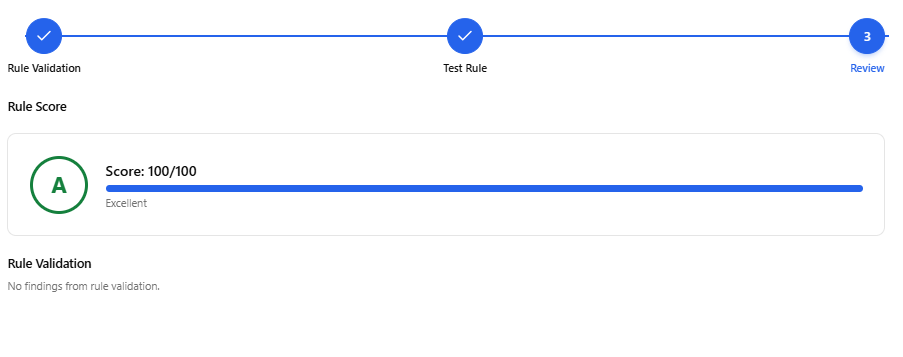
Review the rule score. The rule readiness score ranges from 0 to 100 and reflects the results of validation. The score includes warning deductions from Tier 1 and Tier 2 runtime calibration results. It is broken down in the UI into AQL Query, Detection Config, Alert Rules, and Runtime.
A score below 50 is classified as poor and indicates high risk. Review the category breakdown and address the warnings or runtime findings that have the greatest effect on the score. A low score does not by itself indicate that the rule is blocked, but it is a strong indication that improvements are recommended before activation.
-
Click Publish Rule.
The detection rule is added to the list of rules on the Detection Rules page.
Troubleshooting Rule Validation and Test Issues
During detection rule creation, validation checks the rule configuration and AQL query before you activate the rule. Tier 1 performs static validation automatically when you create or modify the rule. After Tier 1 completes without blocks, use Test Rule to run Tier 2 validation against recent data from your environment. Use the validation results to identify issues that could prevent the rule from running correctly or reduce the quality of the detections it produces. The validation agent provides recommendations for addressing detected issues, but it does not modify the rule automatically. You must make the required changes and run validation again.
If validation reports a block
A block indicates an issue that must be resolved before you can continue with testing or activation. Tier 1 blocks disable Test Rule and Activate. Review the block details and follow the recommendation to correct the rule configuration or AQL query.
For example, a block can occur when the query does not return a recognized entity field. Entity context is required for downstream functions such as alert rule binding, suppression, UEBA risk accumulation, and investigation of the Incident and Investigation Agent. Another entity-related block can occur when an aliased output field cannot be traced back to a recognized entity source field.
After you correct the rule, Tier 1 validation runs automatically again. You can proceed to Test Rule when no Tier 1 blocks remain.
If validation reports a warning
Warnings identify issues that may affect rule quality but do not prevent testing. When Tier 1 has no blocks, Test Rule remains available even if warnings are present.
Review each warning and determine whether you should correct the issue or acknowledge the warning. For example, a warning can indicate that the look-back window is long enough that Tier 2 results may be partial. Address warnings where possible to improve the rule readiness score and detection quality.
Warnings can contribute to the rule readiness score. If you acknowledge a warning rather than correcting it, the acknowledgement is recorded.
If the rule test is unsuccessful
Test Rule runs Tier 2 validation against recent data from your environment. Tier 2 checks runtime behavior such as result volume, entity resolution, duplication, log source availability, and threshold calibration.
If Tier 2 reports a block, review the result details and make the recommended changes to the rule. For example, an excessive result volume can indicate that the query scope is too broad. A duplication result can indicate that the rule is producing overlapping detections across its simulated runs.
Tier 2 uses two offset simulation windows to identify duplicate detections. An overlap of 50% or more between the runs, based on entity and event timestamp, is identified as a duplication issue. If excessive overlap is reported, review the query logic, look-back window, and run schedule to determine whether the rule is evaluating overlapping data unnecessarily.
After changing the rule, run Test Rule again to rerun Tier 2 validation.
If the test returns no results
A test that returns zero results does not necessarily mean that the query is invalid. The relevant OCSF class may simply have no data available for your tenant.
For example, the ZERO_RESULTS_MISSING_SOURCE check is triggered when the test returns zero results and the OCSF class has no data for the tenant in the last seven days. The validation engine cross-references the OCSF parser catalog and surfaces the active parsers for the class and tenant.
In this situation, activation can remain enabled. Review the available data sources and parsers before changing a query that may otherwise be valid.