Using Macros
A macro is a reusable, modular piece of an AQL search query that you can insert into other searches. It is designed to help you avoid manually constructing lengthy strings of parameters for complex search queries. You can use pre-built, out-of-the-box ThreatStream macros or create custom macros tailored to your organization's needs. Custom macros created within your organization can be reused in Search, edited, cloned, and deleted.
When Schema RBAC is active for your organization, the schema filters in your assigned roles determine which data this feature returns. An eventlog filter limits your results to only the eventlog data your role permits, and an OCSF filter limits your results to only the OCSF data your role permits. If a query runs against a schema for which your role has no filter assigned, the query returns a forbidden error. For details, see Role-Based Access Control for Schemas.
Key Benefits of Macros
Macros provide the following search benefits:
-
Simplicity
You can significantly reduce the complexity of search queries by using macros.
-
Maintainability
You can automatically update all search queries that include macros by configuring only macro definitions (custom macros only).
-
Consistency
You can reduce the amount of search errors due to the same logic used in macros across various queries.
Note: Macros support both the eventlog and OCSF Version 1.2 schema fields with dotted notation. For OCSF schema fields, array indexes start at array[1] and not array[0]. See OCSF Schema Overview for more information on the OCSF fields and naming conventions.
For details on creating custom macros, refer to Creating a Macro.
For details on accessing your organization macros, refer to Viewing Custom Macros.
For details on managing custom macros, refer to Managing Custom Macros.
For details on using macros in Search, refer to Using Custom Macros in Search.
For details on using out-of-the-box macros in Search, refer to Using ThreatStream Macros in Search.
Overview
To access all macros available, navigate to Search > Macros.
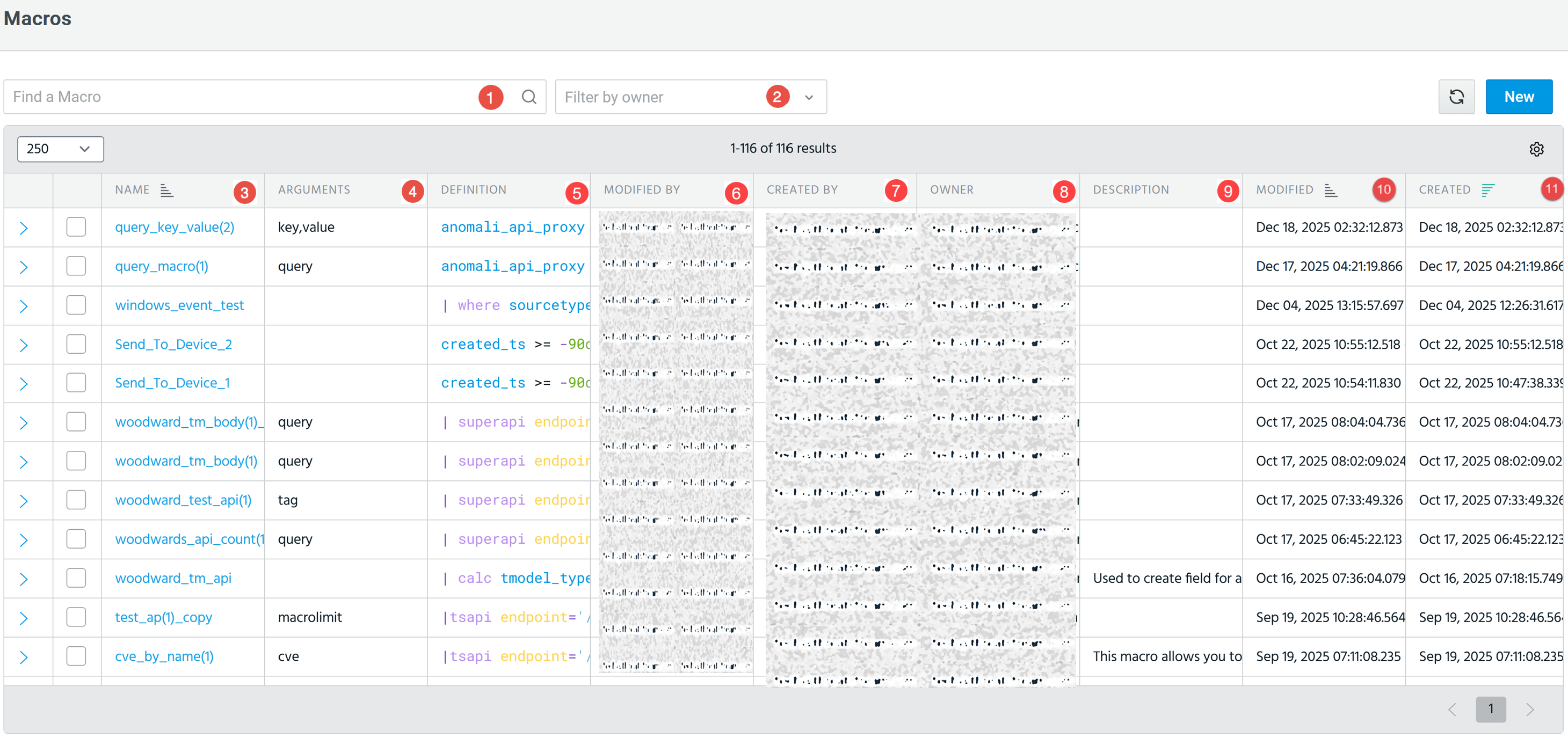

|
Search: Enter the macro name that you want to find. You can also search by name, description, modified by, created by, or owner, with the search being incremental, that is, results update as you type. |

|
Filter by owner: You can filter macros by owner. Possible values include:
Note: A user can always only view and edit macros they own. See User Sharing and Permissions for more information. |

|
Name: Name of the macro. |

|
Arguments: The input parameters that the macro accepts when invoked. |

|
Definition: The AQL query that defines the macro. This definition includes arguments the macro accepts when it is invoked. |

|
Modified by: The user who most recently updated the macro. Note: A user can always only view and edit macros they own. See User Sharing and Permissions for more information. |

|
Created by: Indicates the owner of the macro. By default, the creating user is the owner and is private (not shared). The owner can:
Note: A user can always only view and edit macros they own. See User Sharing and Permissions for more information. |

|
Owner: The user or role that currently owns and manages the macro. |

|
Description: A brief explanation of the purpose or functionality of the macro. |

|
Modified: The date and time when the macro was last updated. |

|
Created: The date and time when the macro was initially created. |

|
New: Create a new macro. Refer to Creating a Macro for details. |
User Sharing and Permissions
When it comes to macros, the following rules apply to all the different actions users can take:
All Users
-
Can always view and edit macros they own.
-
See only macros they are entitled to view, based on their role(s) and granted permission(s).
-
If no sharing is specified, by default, the macro is private (not shared).
-
You can use the yieldtable operator as it supports ownership and sharing parameters, if you have write permissions.
User Roles with Writer Permissions
Write permission only: you can modify the macro, but not sharing or permission rights.
User Roles with Read Permissions
-
Read permission only: cannot edit the macro.
Organization Administrators
-
Owner can modify all details and sharing or permission rights for individual users or all users in your org; owner can delete the macros.
-
If no owner is specified, by default, owner becomes the user who creates the macro.
-
If no sharing is specified, by default, the macro is private (not shared).
Referencing Macros in AQL Search:
-
Only visible macros can be referenced.
-
Auto-complete feature does not expose macros to which you lack access.
-
Structured search also does not expose macros to which you lack access.
Referencing Macros in Copilot:
-
Generated queries never include macros a user cannot access.