Using ThreatStream Macros in Search
Anomali offers out-of-the-box macros that enable you to fetch and analyze ThreatStream data without building complex search queries. For example, the image below demonstrates the search query that returns 20 most recent Actors and their field details. 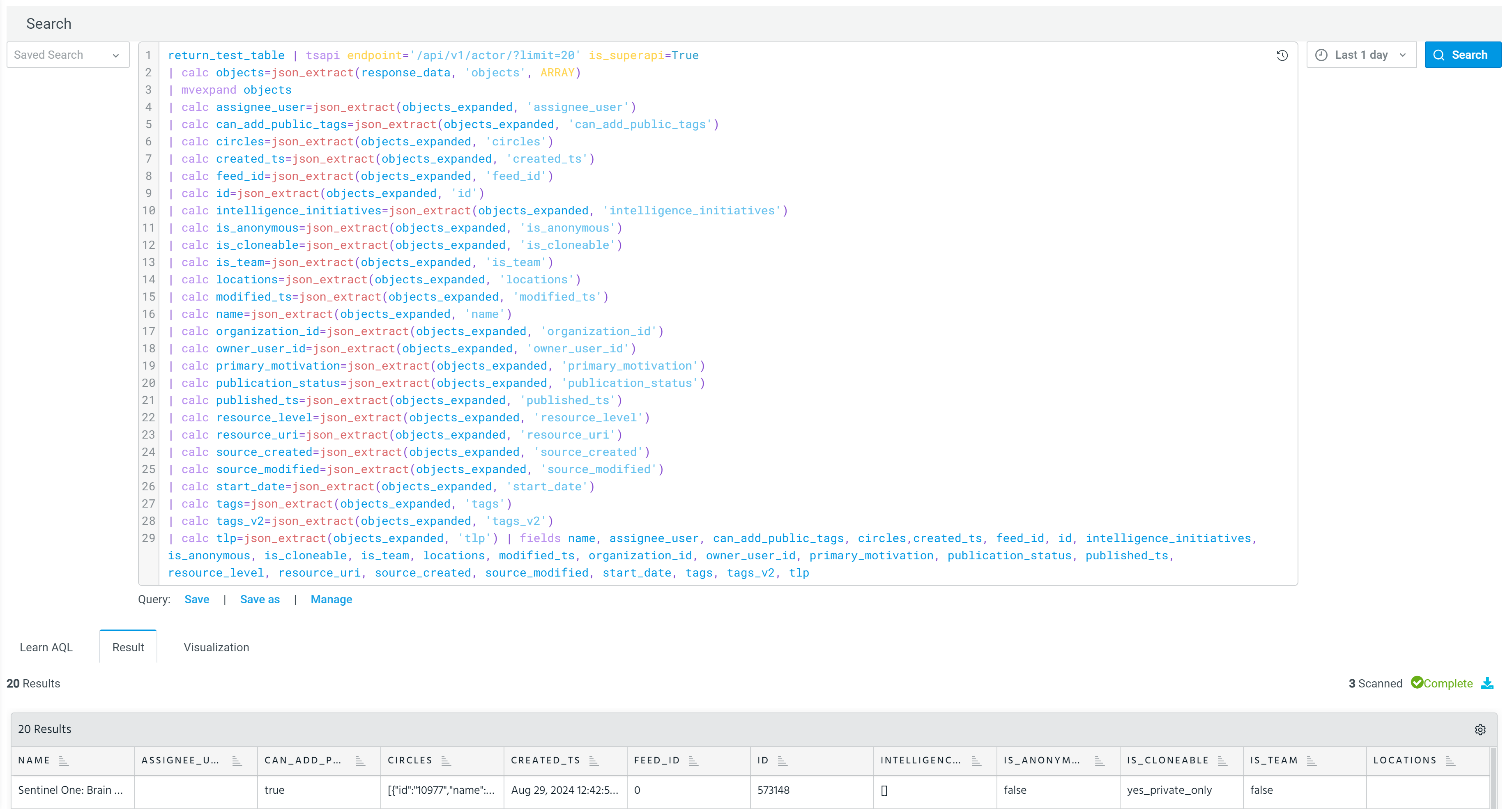
To avoid building such a complex search query, you can use the `actors(20)` macro to return the same results.
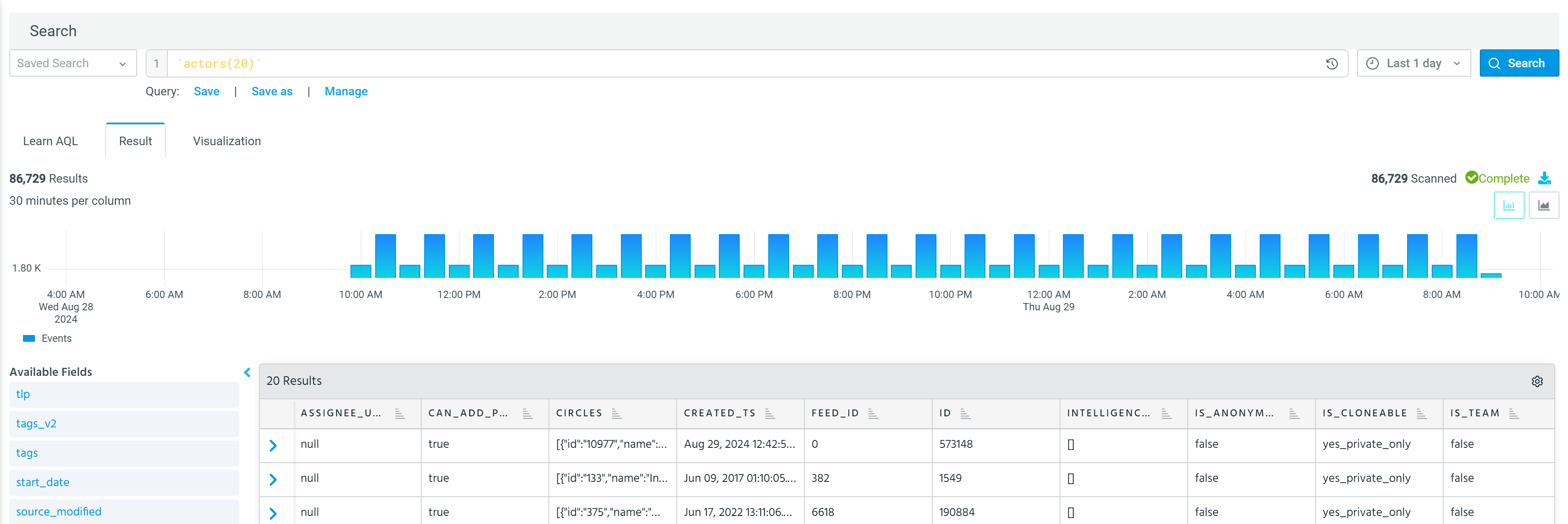
Similar to custom macros, out-of-the-box macros are entered in the Search field with a back tick character (`) before and after the macro name. For example, `ioc_feeds`, `malwarethreats(50)`, `rules(30)`.
After running a search query with a macro, you can continue analyzing and filtering data displayed on the Result tab. This can be done by building conditions with available macro fields. See Available Macros for more information about available macros and their fields.
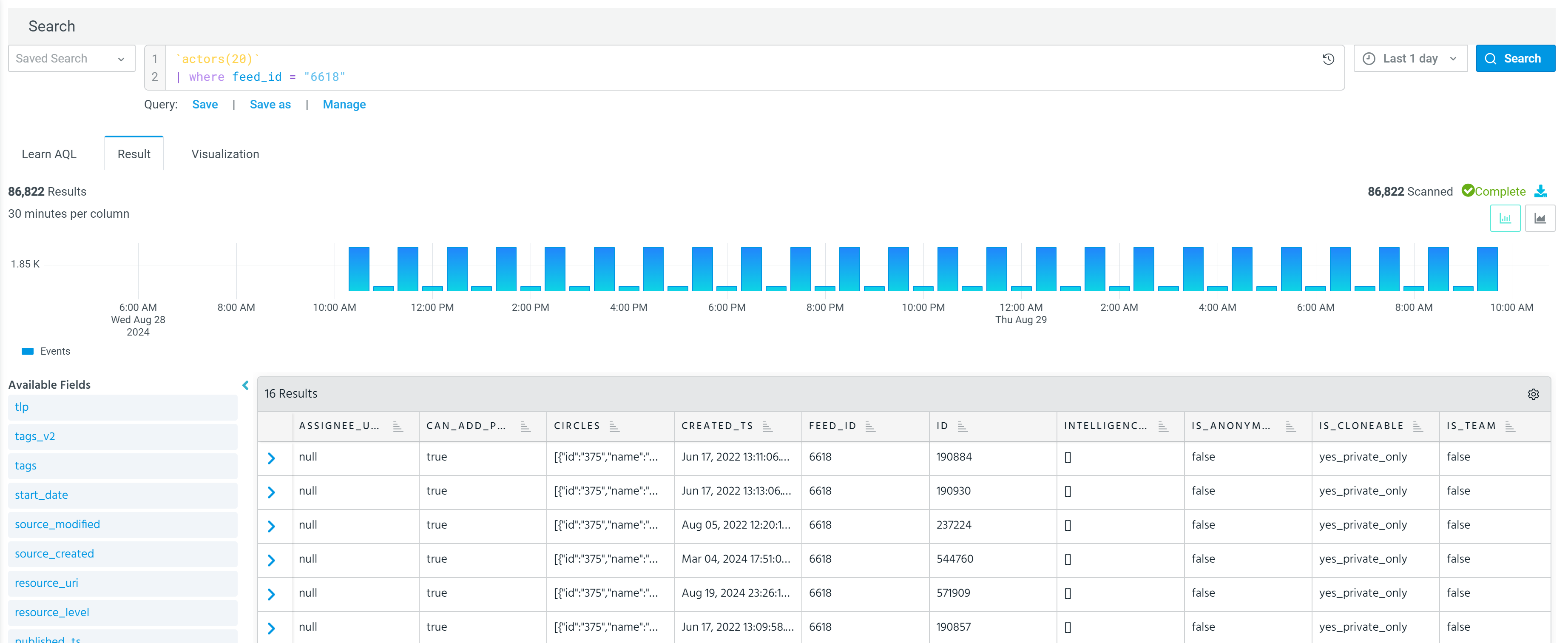
Out-of-the-box macros can be used independently or within a search query.
Search queries containing macros can be saved and managed the same way as regular search queries. See Anomali Search for details.
Additionally, they can be used to create custom dashboards. See Creating a Dashboard for details.
Available Macros
Use this section as a reference for all out-of-the box macros available in Search. Note that some macros require you to specify a limit for the number of returned results. The maximum limit you can specify is 1,000. The results are returned based on modified timestamp.
Available macros can be cloned or copied, but they cannot be modified.
actors (limit)
This macro allows you to query the data related to Actors. When used in Search, it returns the fields containing Actor details, which then can be included in the operators for further analysis.
 Read more...
| Fields | Description |
|---|---|
| assignee_user | User assigned to this Actor |
| can-add_public_tags |
Indicates whether the assigned user can add public tags or not. Possible values: true, false. |
| circles | Trusted circles with which the Actor is shared. |
| created_ts |
UTC time stamp of when the Actor was first created in ThreatStream. Date must be specified in this format: YYYYMMDDThhmmss where T denotes the start of the value for time, in UTC time. For example, 2014-10-02T20:44:35 |
| feed_id | Numeric ID of the threat feed that provided the threat model entity. |
| id |
ID of the Actor. This ID is automatically assigned to the entity by ThreatStream at the time of creation. You can use this ID to associate the Actor with other threat model entities. |
| intelligence_initiatives | Intelligence Initiatives associated with the Actor. |
| is_anonymous |
Indicates whether the Actor user and organization information is anonymized. is_anonymous=1 for true (anonymous) is_anonymous=0 for false (not anonymous) |
| is_cloneable | Indicates whether the Actor entity can be cloned. |
| is_team |
Indicates whether the Actor is a team or known to work as an individual (as specified in the Team check box in the UI). True—Actor is a team False—Actor is an individual Default: False |
| locations |
locations applied to the Actor. Possible values include letter codes of regions, countries, and administrative areas (US States and Washington DC only) as defined by STIX 2.1. For example, eastern-africa, central-asia, europe, africa, NL, GB, US-FL, and US-MO. |
| modified_ts |
When the Actor was last updated on the ThreatStream Cloud platform. Date must be specified in this format: YYYYMMDDThhmmss where T denotes the start of the value for time, in UTC time. For example, 2014-10-02T20:44:35 |
| name |
Name of the Actor. Actor name is associated with your organization. Therefore, the name must be unique within your organization. However, two Actors with the same name can exist on ThreatStream as long as they belong to different organizations. The name can contain up to 255 characters. |
| organization_id | ID of the organization that owns the Actor. |
| owner_user_id | ID of the ThreatStream user that created the Actor. |
| primary_motivation | Actor's primary motivation |
| publication_status |
An Actor can be in the new, pending_review, review_ requested, reviewed, published statuses. |
| published_ts |
Time stamp of when the entity was published on ThreatStream, in UTC format. Date must be specified in the following format: YYYYMMDDThhmmss where T denotes the start of the value for time. For example, 2014-10-02T20:44:35. |
| resource_level | For internal use only. |
| resource_uri | The API URL to the Actor information. |
| source_created | Timestamp to when the Actor was first created. |
| source_modified | Timestamp to when the Actor was last updated. |
| start_date |
Specify the time when the Actor was first known to be active. Date must be specified in the following format: YYYYMMDDThhmmss where T denotes the start of the value for time. For example, 2014-10-02T20:44:35. |
| tags |
Tags assigned to the Actor. A tag is a meaningful name or any other string value assigned to identify the information. For example, spear phishing, exploitation. |
| tags_v2 | Additional information on the tags assigned to the Actor. |
| tlp |
Traffic Light Protocol assigned to the Actor. Possible values: red, amber, amber+strict, green, and clear. |
attackpattern(limit)
This macro allows you to query the data related to Attack Patterns. When used in Search, it returns the fields containing Attack Pattern details, which then can be included in the operators for further analysis.
Read more...
| Fields | Description |
|---|---|
| aliases | Other names by which the Attack Pattern is known. |
| assignee_user | ID of the user to which the Attack Pattern is assigned |
| can_add_public_tags | Indicates whether a user can add public tags to the Attack Pattern. |
| circles | All trusted circles to which the Attack Pattern belongs. |
| created_ts |
Time stamp of when the Attack Pattern was created on ThreatStream, in UTC format. Date is in this format: YYYYMMDDThhmmss where T denotes the start of the value for time. For example, 2014-10-02T20:44:35. |
| feed_id | Numeric ID of the threat feed that provided the Attack Pattern. |
| id | ID of the Attack Pattern. This ID is automatically assigned to the entity by ThreatStream at the time of creation. |
| intelligence_initiatives |
Intelligence Initiatives associated with the Attack Pattern. |
| is_anonymous |
Indicates whether the Attack Pattern user and organization information is anonymized. True—if information is anonymized False—if information is not anonymized |
| is_cloneable |
Indicates whether the Attack Pattern can be cloned. |
| is_mitre |
Indicates whether the Attack Pattern is described in the MITRE list. True—if the Attack Pattern is described False—if the Attack Pattern is not described |
| is_public |
Indicates whether the Attack Pattern is public or private (including belonging to a trusted circle). False—if the Attack Pattern is private or belongs to a trusted circle True—if the Attack Pattern is public |
| is_team |
Indicates whether the Attack Pattern is a team or known to work as an individual. True—Attack Pattern is a team False—Attack Pattern is an individual |
| killchainstages |
List of attack structure phases. Values: |
| locations |
Locations applied to the Attack Pattern. Possible values include letter codes of regions, countries, and administrative areas (US States and Washington DC only) as defined by STIX 2.1. For example, eastern-africa, central-asia, europe, africa, NL, GB, US-FL, and US-MO. |
| modified_ts |
Timestamp of when the Attack Pattern was last updated on ThreatStream, in UTC format. Date is in this format: YYYYMMDDThhmmss where T denotes the start of the value for time. For example, 2014-10-02T20:44:35. |
| name |
Name of the Attack Pattern. The Attack Pattern name is associated with your organization. Therefore, the name must be unique within your organization. However, two Attack Patterns with the same name can exist on ThreatStream as long as they belong to different organizations. The name can contain up to 255 characters. |
| org_id | ID of the organization that created the entity on ThreatStream. |
| owner_user_id | ID of the user that created the Attack Pattern on ThreatStream. |
| primary_motivation | Primary motivation of the Attack Pattern. |
| publication_status |
Attack Pattern entities can be in new, pending_review, review_requested, reviewed, or published statuses. |
| published_ts |
Timestamp of when the Attack Pattern was published on ThreatStream, in UTC format. Date is in this format: YYYYMMDDThhmmss where T denotes the start of the value for time. For example, 2014-10-02T20:44:35. |
| resource_level | |
| resource_uri | URI of the Aattack Pattern entity on ThreatStream |
| source_created | Timestamp to when the Attack Pattern was first created. |
| source_modified | Timestamp to when the Attack Pattern was last updated. |
| system | System associated with the Attack Pattern. |
| start_date |
Specify the time when the Attack Pattern was first known to be active. Date must be specified in the following format: YYYYMMDDThhmmss where T denotes the start of the value for time. For example, 2014-10-02T20:44:35. |
| tags |
Tags assigned to the Attack Pattern. A tag is a meaningful name or any other string value assigned to identify the information. For example, spear phishing, exploitation. |
| tags_v2 | Additional information on the tags assigned to the Attack Pattern. |
| target_industry |
Target industries associated with the Attack Pattern. |
| tlp |
Traffic Light Protocol assigned to the Attack Pattern. Possible values: red, amber, amber+strict, green, and clear. |
| uuid | UUID (universally unique identifier) assigned to the Attack Pattern for STIX compliance. |
| workgroups | Workgroups to which the Attack Pattern is visible. |
campaign(limit)
This macro allows you to query the data related to Campaigns. When used in Search, it returns the fields containing Campaign details, which then can be included in the operators for further analysis.
Read more...
| Fields | Description |
|---|---|
| assignee_user | ID of the user to which the Campaign is assigned. |
| can_add_public_tags | Indicates whether a user can add public tags to the Campaign. |
| circles | All trusted circles to which the Campaign belongs. |
| created_ts |
Time stamp of when the Campaign was created on ThreatStream, in UTC format. Date must be in this format: YYYYMMDDThhmmss where T denotes the start of the value for time. For example, 2014-10-02T20:44:35. |
| end_date |
The time when this Campaign is known to have ended. Date must be in this format: YYYYMMDDThhmmss where T denotes the start of the value for time. For example, 2014-10-02T20:44:35. |
| feed_id | Numeric ID of the threat feed that provided the Campaign. |
| id | ID of the Campaign. This ID is automatically assigned to the entity by ThreatStream at the time of creation. |
| intelligence_initiatives |
Intelligence Initiatives associated with the Campaign. |
| is_anonymous |
Indicates whether the Campaign user and organization information is anonymized. True—if information is anonymized False—if information is not anonymized |
| is_cloneable |
Indicates whether the Campaign can be cloned. |
| is_public |
Whether the Attack Pattern is public or private (including belonging to a trusted circle). False—if the Attack Pattern is private or belongs to a trusted circle True—if the Attack Pattern is public |
| modified_ts |
Time stamp of when the Campaign was last updated on ThreatStream, in UTC format. Date is in this format: YYYYMMDDThhmmss where T denotes the start of the value for time. For example, 2014-10-02T20:44:35. |
| name |
Name of the Campaign. The Campaign name is associated with your organization. Therefore, the name must be unique within your organization. However, two campaigns with the same name can exist on ThreatStream as long as they belong to different organizations. The name can contain up to 255 characters. |
| organization_id | ID of the organization that created the Campaign on ThreatStream. |
| owner_user_id | ID of the user that created the Campaign on ThreatStream. |
| publication_status |
Campaign entities can be in new, pending_review, review_requested, reviewed, or published statuses. |
| published_ts |
Time stamp of when the Campaign was published on ThreatStream, in UTC format. Date is in this format: YYYYMMDDThhmmss where T denotes the start of the value for time. For example, 2014-10-02T20:44:35. |
| resource_uri | URI of the Campaign entity on ThreatStream. |
| source_created | Timestamp to when the Campaign was first created. |
| source_modified | Timestamp to when the Campaign was last updated. |
| start_date |
Specify the time when the Campaign was first known to be active. Date must be specified in the following format: YYYYMMDDThhmmss where T denotes the start of the value for time. For example, 2014-10-02T20:44:35. |
| tags |
Tags assigned to the Campaign. A tag is a meaningful name or any other string value assigned to identify the information. For example, spear phishing, exploitation. |
| tags_v2 | Additional information on the tags assigned to the Campaign. |
| target_industry |
Target industries associated with the Campaign. |
| tlp |
Traffic Light Protocol assigned to the Campaign. Possible values: red, amber, amber+strict, green, and clear. |
| uuid | UUID (universally unique identifier) assigned to the Campaign for STIX compliance. |
| workgroups | Workgroups to which the Campaign is visible. |
incident(limit)
This macro allows you to query the data related to Incidents. When used in Search, it returns the fields containing Incidents details, which then can be included in the operators for further analysis.
Read more...
| Fields | Description |
|---|---|
| assignee_user | ID of the user to which the Incident is assigned. |
| can_add_public_tags | Indicates whether a user can add public tags to the Incident. |
| circles | All trusted circles to which the Incident belongs. |
| created_ts |
Time stamp of when the Incident was created on ThreatStream, in UTC format. Date must be in this format: YYYYMMDDThhmmss where T denotes the start of the value for time. For example, 2014-10-02T20:44:35. |
| end_date |
The time when this Incident is known to have ended. Date must be in this format: YYYYMMDDThhmmss where T denotes the start of the value for time. For example, 2014-10-02T20:44:35. |
| feed_id | Numeric ID of the threat feed that provided the Incident. |
| id | ID of the Incident. This ID is automatically assigned to the entity by ThreatStream at the time of creation. |
| intelligence_initiatives |
Intelligence Initiatives associated with the Incident. |
| is_anonymous |
Indicates whether the Incident user and organization information is anonymized. True—if information is anonymized False—if information is not anonymized |
| is_cloneable |
Indicates whether the Incident can be cloned. |
| is_public |
Indicates whether the Incident is public or private (including belonging to a trusted circle). False—if the Incident is private or belongs to a trusted circle True—if the Incident is public |
| modified_ts |
Timestamp of when the Incident was last updated on ThreatStream, in UTC format. Date is in this format: YYYYMMDDThhmmss where T denotes the start of the value for time. For example, 2014-10-02T20:44:35. |
| name |
Name of the Incident. The Incident name is associated with your organization. Therefore, the name must be unique within your organization. However, two Incidents with the same name can exist on ThreatStream as long as they belong to different organizations. The name can contain up to 255 characters. |
| organization_id | ID of the organization that created the Incident on ThreatStream. |
| owner_user_id | ID of the user that created the Incident on ThreatStream. |
| publication_status |
Incident entities can be in new, pending_review, review_requested, reviewed, or published statuses. |
| published_ts |
Timestamp of when the Incident was published on ThreatStream, in UTC format. Date is in this format: YYYYMMDDThhmmss where T denotes the start of the value for time. For example, 2014-10-02T20:44:35. |
| resource_uri | URI of the Incident entity on ThreatStream. |
| source_created | Timestamp to when the Incident was first created. |
| source_modified | Timestamp to when the Incident was last updated. |
| start_date |
Specify the time when the Incident was first known to be active. Date must be specified in the following format: YYYYMMDDThhmmss where T denotes the start of the value for time. For example, 2014-10-02T20:44:35. |
| tags |
Tags assigned to the Incident. A tag is a meaningful name or any other string value assigned to identify the information. For example, spear phishing, exploitation. |
| tags_v2 | Additional information on the tags assigned to the Incident. |
| target_industry |
Target industries associated with the Incident. |
| tlp |
Traffic Light Protocol assigned to the Incident. Possible values: red, amber, amber+strict, green, and clear. |
| uuid | UUID (universally unique identifier) assigned to the Incident for STIX compliance. |
| workgroups | Workgroups to which the Incident is visible. |
investigations
This macro allows you to query statistics of the investigations accessible via Anomali platform. When used in Search, it returns the fields containing information about investigations, which then can be included in the operators for further analysis.
Read more...
| Fields | Description |
|---|---|
| created_ts | Timestamp when the investigation was created. |
| description |
Short description of the investigation. |
| id | Unique investigation ID. This identifier is assigned to the investigation when it is created on ThreatStream. |
| modified_ts |
Timestamp when the investigation was last modified. |
| name | Investigation name. |
| priority |
Priority assigned to the investigation. Possible values: very low, low, medium, high, very high |
| status |
Status assigned to the investigation. Possible values: completed, in-progress, pending, unassigned |
| tags |
Tags associated with the investigation. |
| tlp |
TLP setting for the investigation. In the context of investigations, the TLP color sets the maximum level of information that users outside your organization have access to when viewing your investigation. |
| assignee_id |
ID of the user or workgroup to which the investigation is assigned. |
| assignee_type |
Type of assignee: "user" or "tsworkgroup" |
| elements |
Number of entities associated with the investigation. |
| r_type |
Type of entity associated with the investigation. Possible values listed below. l Actors:actor l Campaigns:campaign l Incidents:incident l Observables:intelligence2 l Signatures:signature l ThreatBulletins:tipreport l TTP:ttp l Vulnerabilities:vulnerability |
| r_id | Unique ID assigned to the entity. |
| add_related_indicators |
When enabled, observables related to the entity you are associating with the investigation are also added. add_related_indicators=1 for true (add) add_related_indicators=0 for false (do not add) |
| tips | For internal use only. |
| workgroups |
Workgroups with which the Investigation is shared. |
| assignee |
User or workgroup to which the investigation is assigned. |
| circles | Trusted circles with which the investigation is shared. |
| intelligence_initiatives | Intelligence Initiatives associated with the Investigation |
| owner_org | Organization of the owner. In most cases, this is the same as the assignee organization. |
| owner_org_id | Organization ID of the owner. In most cases, this ID is the same as the assignee organization ID. |
| resource_uri | Internal URL for the Investigation within ThreatStream. |
| source_type | Source from which the investigation was created. |
ioc(limit)
This macro allows you to query details of observables. When used in Search, it returns the fields containing observable details, which then can be included in the operators for further analysis.
Read more...
| Attribute | Description |
|---|---|
| asn | Autonomous System (AS) number associated with the indicator. |
| can_add_public_tags | Indicates whether a user can add public tags to an observable. |
| confidence |
Level of certainty that an observable is of the reported indicator type. Confidence scores range from 0-100, in increasing order of confidence, and is assigned by ThreatStream. |
| country | Country associated with theobservable. |
| created_by | User that created the intelligence. |
| created_ts |
When the observable was first seen on the ThreatStream cloud platform. Date must be specified in this format: YYYYMMDDThhmmss where T denotes the start of the value for time, in UTC time. For example, 2014-10-02T20:44:35. |
| description | This attribute is for internal use and can be ignored. |
| detail2 | This attribute is for internal use and can be ignored. |
| expiration_ts |
Time stamp of when intelligence will expire on ThreatStream, in UTC time. |
| feed_id |
Numeric ID of the threat feed that generated the observable. feed_id = 0 for user-created observables. |
| id |
Unique ID of the observable. This identifier is assigned to the observable when it is first created on ThreatStream. Unlike update_id, this identifier never changes as long as the observable is available on ThreatStream. |
| ip | The IP address associated with the observable if the imported indicator is a domain or a URL. |
| is_anonymous | Whether the organization and user information is anonymized when the observable is accessed by users outside of the owner organization. |
| is_editable |
Indicates whether the imported entity can be updated by an intelligence source. This attribute is reserved for intelligence source providers and can be ignored. |
| is_public |
Visibility of the observable—public or private. 0/False—if the indicator is private or belongs to a Trusted Circle 1/True—if the indicator is public Default: 0/False Note: This attribute is treated as a string or boolean in requests and as boolean in responses.
|
| itype | Indicator type. |
| latitude | Latitude associated with the Geo location of the IP. |
| longitude |
Longitude associated with the Geo location of the IP. |
| meta | Tags associated with the observable. These tags can be used to search for related observables. |
| modified_ts |
When the indicator was last updated on the ThreatStream Cloud platform. Date must be specified in this format: YYYYMMDDThhmmss where T denotes the start of the value for time, in UTC time. For example, 2014-10-02T20:44:35 |
| name | Name of the observable. |
| org | Registered owner (organization) of the IP address associated with the observable. |
| owner_organization_id | ID of the organization that brought in the observable, either through a threat feed or through the import process. |
| rdns | Domain name (obtained through reverse domain name lookup) associated with the IP address that is associated with the observable. |
| retina_confidence | Confidence score assigned to the observable by Anomali machine learning algorithms. |
| severity | Severity score of the observable. |
| sort | This attribute is for internal use only and can be ignored. |
| source |
Usually an obfuscated description of the source of the observable; the description may not be obfuscated if the user belongs to your organization. Examples of source names: threat feed name, Analyst (if the user name is obfuscated). |
| source_locations |
Source locations associated with the indicator. Possible values include letter codes of regions, countries, and administrative areas (US States and Washington DC only) as defined by STIX 2.1. For example, |
| source_reported_confidence | A risk score from 0 to 100, provided by the source of the observable. |
| status |
Status assigned to the observable. For example, active, inactive, falsepos. |
| subtype |
For hash observables—those with type=md5—subtype provides additional metadata on the type of hash associated with the observable. Possible values: MD5, SHA1, SHA256, SHA512. |
| tags |
Tags applied to the specified observables. |
| target_industry |
Target industries associated with the observable. |
| threat_type | Summarized threat type of the observable. For example, malware, compromised, apt, c2, and so on. |
| tlp | Traffic Light Protocol designation for the intelligence—red, amber, amber+green, clear. |
| trusted_circle_ids | IDs of the trusted circles with which the indicator is shared. |
| type | Observable type—domain, email, ip, md5, string, url. |
| update_id |
An incrementing numeric identifier associated with each update to intelligence on ThreatStream. Every time observable data changes on ThreatStream (for example, if it is updated or expires), the update_id of the indicator is incremented and stored in the observable. This identifier is mostly used by software that interact with ThreatStream to download intelligence, such as ThreatStream Link and ThreatStream APIs. |
| uuid | UUID (universally unique identifier) assigned to the observable for STIX compliance. |
| value | Value of the observable. For example, value = <192.168.0.10> or value = <http://www.google.com>. |
| workgroups | Workgroups associated with the observable. |
ioc_contributions
This macro allows you to query statistics of the intelligence contributed to by your organization and community. When used in Search, it returns the fields containing information about contributed observables, which then can be included in the operators for further analysis.
Read more...
| Fields | Description |
|---|---|
| community |
Total number of observables contributed by the community. |
| community_delta | The delta of the number of observables contributed by the community in the specified timespan as compared to the previous timespan. The "-" sign is used to indicate that less observables were contributed than during the previous timespan. |
| organization |
Total number of observables contributed by the your organization. |
| organization_delta | The delta of the number of observables contributed by your organization in the specified timespan as compared to the previous timespan. The "-" sign is used to indicate that less observables were contributed than during the previous timespan. |
| total |
Total number of the contributions from your organization and community. |
ioc_feeds
This macro allows you to query statistics of the observables imported from various feeds. When used in Search, it returns the fields containing information about feeds and observables, which then can be included in the operators for further analysis.
Read more...
| Fields | Description |
|---|---|
| total |
Total number of observables contributed by the feed. |
| observables | Total number of observables contributed by the feed in the selected timespan. |
| feed_name |
Name of the feed. |
| feed_categoty | This attribute is for internal use and can be ignored. |
| observables_previous_period |
Number of observables imported in the previous import. Not available for manual imports. |
| feed_id | The ID number for the feed |
| falsepositives |
The Number of false positives in the observables in the selected timespan. |
malwarethreats(limit)
This macro allows you to query statistics of the malware threats accessible via platform. When used in Search, it returns the fields containing information about malware, which then can be included in the operators for further analysis.
Read more...
| Fields | Description |
|---|---|
| created_ts |
Time stamp of when the malware was created on ThreatStream, in UTC format. Date must be specified in the following format: YYYYMMDDThhmmss where T denotes the start of the value for time. For example, 2014-10-02T20:44:35. |
| uuid | UUID (universally unique identifier) assigned to the malware for STIX compliance. |
| id | ID of the malware entity. This ID is automatically assigned to the entity by ThreatStream at the time of creation. You can use this ID to associate the malware entity with other Threat Model entities. |
| modified_ts |
Time stamp of when the malware was last updated on ThreatStream, in UTC format. Date must be specified in the following format: YYYYMMDDThhmmss where T denotes the start of the value for time. For example, 2014-10-02T20:44:35. |
| name |
Name of the malware. Malware name is associated with your organization. Therefore, the name must be unique within your organization. However, two malware with the same name can exist on ThreatStream as long as they belong to different organizations. The name can contain up to 255 characters. |
| tags_v2 |
Additional information on the tags assigned to the Actor. |
| source_modified |
Time stamp of when the malware was last modified by the source, in UTC format. Date must be specified in the following format: YYYYMMDDThhmmss where T denotes the start of the value for time. For example, 2014-10-02T20:44:35. |
| tags |
Tags assigned to the malware. A tag is a meaningful name or any other string value assigned to identify the information. For example, spear phishing,exploitation. |
| tlp | Traffic Light Protocol designation for the malware—red, amber, amber+strict, green, clear. |
| source_created |
Time stamp of when the malware was originally created by the source, in UTC format. Date must be specified in the following format: YYYYMMDDThhmmss where T denotes the start of the value for time. For example, 2014-10-02T20:44:35. |
| published_ts |
Time stamp of when the malware was originally published by the source, in UTC format. Date must be specified in the following format: YYYYMMDDThhmmss where T denotes the start of the value for time. For example, 2014-10-02T20:44:35. |
| publication_status | Malware entities can be in new, pending_review, review_ requested, reviewed, or published statuses. |
| owner_user_id | Information about the user that created the entity on ThreatStream. |
| organization_id | Information about the organization that created the entity on ThreatStream. |
| last_seen |
Time stamp of when the malware was last observed, in UTC format. Date must be specified in the following format: YYYYMMDDThhmmss where T denotes the start of the value for time. For example, 2014-10-02T20:44:35. |
| killchainstages | For internal use only. |
| workgroups | Workgroups with which the malware is shared. |
| is_public |
Whether the malware is public or private (including belonging to a trusted circle). False—if the malware is private or belongs to a Trusted Circle True—if the malware is public Default: False |
| circles | All Trusted Circles to which the malware belongs. |
| intelligence_initiatives | Intelligence Initiatives associated with the malware. |
| assignee_user | The user to whom the malware is assigned. |
| first_seen |
Time stamp of when the malware was first observed, in UTC format. Date must be specified in the following format: YYYYMMDDThhmmss where T denotes the start of the value for time. For example, 2014-10-02T20:44:35. |
| is_anonymous |
Whether the malware user and organization information is anonymized. True—if information is anonymized False—if information is not anonymized |
| feed_id | Numeric ID of the threat feed that provided the malware entity. |
| resource_uri | Internal URL for the malware within ThreatStream. |
| aliases | Other names by which the malware is known. |
rules(limit)
This macro allows you to query statistics of the rules configured in ThreatStream. When used in Search, it returns the fields containing information related to rules, which then can be included in the operators for further analysis.
Read more...
| Fields | Description |
|---|---|
| create_investigation | Whether an investigation was created the first time the rule was triggered. |
| created_ts | Time stamp of when the rule was created, in UTC format. |
| description | Description for the rule. |
| exclude_notify_org_whitelisted | Whether Observables whitelisted by your organization are excluded from rule matches. |
| exclude_notify_owner_org | Whether keyword matches on Observables imported by your organization are excluded from Keyword Match or Hourly Digest email notifications. |
| has_associations | Whether the rule creates associations between specified entities and matched entities. |
| id | Unique ID assigned to the rule |
| intelligence_initiatives | Intelligence Initiatives associated with the rule. |
| is_editable | If the current user have edit access to the rule |
| is_enabled | If the rule is enabled. |
| keywords | A list of keywords associated with the rule. |
| match_actors | Unused. |
| match_all_tm | Unused. |
| match_attackpatterns | Unused. |
| match_campaigns | Unused. |
| mathc_courseofactions | Unused. |
| match_customtms | Unused. |
| match_identities | Unused. |
| match_incidents | Unused. |
| match_infrastructures | Unused. |
| match_intrusionsets | Unused. |
| match_malware |
Unused. |
| match_observables | Whether the rule matches keywords in newly created Observables. |
| match_reportedfiles | Whether the rule matches keywords in newly created Sandbox Reports. |
| match_signatures | Whether the rule matches keywords in newly created Signatures. |
| match_tips | Whether the rule matches keywords in newly created Threat Bulletins. |
| match_ttps | Unused. |
| match_vulnerabilities | Whether the rule matches keywords in newly created Vulnerabilities. |
| matches | Total number of keyword matches for the rule. |
| modified_ts | Time stamp of when the rule was last modified, in UTC format. |
| name | Name of the rule. |
| org_id | ID associated with the organization that created the rule. |
| org_shared | Unused. |
| organization | ID, Name, and Resource URI associated with the organization that created the rule. |
| resource_uri | Resource URI associated with the rule. |
| tags | Tags applied to matched entities. |
| user | User that created the rule. |
| user_id | ID of the user that created the rule. |
| workgroups | Workgroups associated with the rule. |
signature(limit)
This macro allows you to query the data related to Signatures. When used in Search, it returns the fields containing Signature details, which then can be included in the operators for further analysis.
Read more...
| Fields | Description |
|---|---|
| assignee_user | ID of the user to which the Signature is assigned. |
| can_add_public_tags | Indicates whether a user can add public tags to the Signature. |
| circles | All trusted circles to which the Signature belongs. |
| created_ts |
Time stamp of when the Signature was created on ThreatStream, in UTC format. Date must be in this format: YYYYMMDDThhmmss where T denotes the start of the value for time. For example, 2014-10-02T20:44:35. |
| end_date |
The time when this Signature is known to have ended. Date must be in this format: YYYYMMDDThhmmss where T denotes the start of the value for time. For example, 2014-10-02T20:44:35. |
| feed_id | Numeric ID of the threat feed that provided the Signature. |
| id | ID of the Signature. This ID is automatically assigned to the entity by ThreatStream at the time of creation. |
| intelligence_initiatives |
Intelligence Initiatives associated with the Signature. |
| is_anonymous |
Indicates whether the Signature user and organization information is anonymized. True—if information is anonymized False—if information is not anonymized |
| is_cloneable |
Indicates whether the Signature can be cloned. |
| is_public |
Indicates whether the Signature is public or private (including belonging to a trusted circle). False—if the Signature is private or belongs to a trusted circle True—if the Signature is public |
| modified_ts |
Timestamp of when the Signature was last updated on ThreatStream, in UTC format. Date is in this format: YYYYMMDDThhmmss where T denotes the start of the value for time. For example, 2014-10-02T20:44:35. |
| name |
Name of the Signature. The Signature name is associated with your organization. Therefore, the name must be unique within your organization. However, two Signatures with the same name can exist on ThreatStream as long as they belong to different organizations. The name can contain up to 255 characters. |
| organization_id | ID of the organization that created the Signature on ThreatStream. |
| owner_user_id | ID of the user that created the Signature on ThreatStream. |
| publication_status |
Signature entities can be in new, pending_review, review_requested, reviewed, or published statuses. |
| published_ts |
Timestamp of when the Signature was published on ThreatStream, in UTC format. Date is in this format: YYYYMMDDThhmmss where T denotes the start of the value for time. For example, 2014-10-02T20:44:35. |
| resource_uri | URI of the Signature entity on ThreatStream. |
| s_type |
Signature type. |
| source_created | Timestamp to when the Signature was first created. |
| source_modified | Timestamp to when the Signature was last updated. |
| tags |
Tags assigned to the Signature. A tag is a meaningful name or any other string value assigned to identify the information. For example, spear phishing, exploitation. |
| tags_v2 | Additional information on the tags assigned to the Signature. |
| target_industry |
Target industries associated with the Signature. |
| tlp |
Traffic Light Protocol assigned to the Signature. Possible values: red, amber, amber+strict, green, and clear. |
| uuid | UUID (universally unique identifier) assigned to the Signature for STIX compliance. |
| workgroups | Workgroups to which the Signature is visible. |
tipreport(limit)
This macro allows you to query the data related to Threat Bulletins. When used in Search, it returns the fields containing Threat Bulletin details, which then can be included in the operators for further analysis.
Read more...
| Fields | Description |
|---|---|
| all_circles_visible | Indicates whether the Threat Bulletin is visible to all trusted circles. |
| assignee_org | Organization to which the Threat Bulletin is assigned |
| assignee_org_id | ID of the organization to which the Threat Bulletin is assigned. |
| assignee_org_name | Name of the organization to which the Threat Bulletin is assigned. |
| assignee_user | User to which the Threat Bulletin is assigned. |
| assignee_user_id | ID of the user to which the Threat Bulletin is assigned. |
| can_add_public_tags | Indicates whether a user can add public tags to the Threat Bulletin. |
| circles | All trusted circles to which the Threat Bulletin belongs. |
| created_ts |
Time stamp of when the Threat Bulletin was created on ThreatStream, in UTC format. Date must be in this format: YYYYMMDDThhmmss where T denotes the start of the value for time. For example, 2014-10-02T20:44:35. |
| feed_id | Numeric ID of the threat feed that provided the Threat Bulletin. |
| id | ID of the Threat Bulletin. This ID is automatically assigned to the entity by ThreatStream at the time of creation. |
| intelligence_initiatives |
Intelligence Initiatives associated with the Threat Bulletin. |
| is_anonymous |
Indicates whether the Threat Bulletin user and organization information is anonymized. True—if information is anonymized False—if information is not anonymized |
| is_cloneable |
Indicates whether the Threat Bulletin can be cloned. |
| is_email | Indicates whether the Threat Bulletin is email. |
| is_public |
Indicates whether the Threat Bulletin is public or private (including belonging to a trusted circle). False—if the Threat Bulletin is private or belongs to a trusted circle True—if the Threat Bulletin is public |
| locations | Locations associated with the Threat Bulletin. |
| modified_ts |
Timestamp of when the Threat Bulletin was last updated on ThreatStream, in UTC format. Date is in this format: YYYYMMDDThhmmss where T denotes the start of the value for time. For example, 2014-10-02T20:44:35. |
| name |
Name of the Threat Bulletin. The Threat Bulletin name is associated with your organization. Therefore, the name must be unique within your organization. However, two Threat Bulletins with the same name can exist on ThreatStream as long as they belong to different organizations. The name can contain up to 255 characters. |
| original_source | Original source from where the Threat Bulletin came. |
| original_source_id | ID of the original source of the Threat Bulletin. |
| owner_org | Organization owner of the Threat Bulletin. |
| owner_org_id | ID of the organization owning the Threat Bulletin. |
| owner_org_name | Name of the organization owning the Threat Bulletin. |
| parent | For internal use only. |
| publication_status |
Signature entities can be in new, pending_review, review_requested, reviewed, or published statuses. |
| published_ts |
Timestamp of when the Threat Bulletin was published on ThreatStream, in UTC format. Date is in this format: YYYYMMDDThhmmss where T denotes the start of the value for time. For example, 2014-10-02T20:44:35. |
| resource_uri | URI of the Threat Bulletin on ThreatStream. |
| source |
Source of the Threat Bulletin intelligence. |
| source_created | Timestamp to when the Threat Bulletin was first created. |
| source_locations | Source locationa associated with the Threat Bulletin (as defined by STIX 2.1). |
| source_modified | Timestamp to when the Threat Bulletin was last updated. |
| status |
Provides the status of the Threat Bulletin. Possible values—published, reviewed, review_requested, pending_review. |
| tags |
Tags assigned to the Threat Bulletin. A tag is a meaningful name or any other string value assigned to identify the information. For example, spear phishing, exploitation. |
| tags_v2 | Additional information on the tags assigned to the Threat Bulletin. |
| target_industry |
Target industries associated with the Threat Bulletin. |
| threat_actor | Actors associated with the Threat Bulletin. |
| tlp |
Traffic Light Protocol assigned to the Threat Bulletin. Possible values: red, amber, amber+strict, green, and clear. |
| uuid | UUID (universally unique identifier) assigned to the Threat Bulletin for STIX compliance. |
| workgroups | Workgroups to which the Threat Bulletin is visible. |
ttp(limit)
This macro allows you to query the data related to TTPs. When used in Search, it returns the fields containing TTPs details, which then can be included in the operators for further analysis.
Read more...
| Fields | Description |
|---|---|
| assignee_user | ID of the user to which the TTP is assigned. |
| can_add_public_tags | Indicates whether a user can add public tags to the TTP. |
| circles | All trusted circles to which the TTP belongs. |
| created_ts |
Time stamp of when the TTP was created on ThreatStream, in UTC format. Date must be in this format: YYYYMMDDThhmmss where T denotes the start of the value for time. For example, 2014-10-02T20:44:35. |
| feed_id | Numeric ID of the threat feed that provided the TTP. |
| id | ID of the TTP. This ID is automatically assigned to the entity by ThreatStream at the time of creation. |
| intelligence_initiatives |
Intelligence Initiatives associated with the TTP. |
| is_anonymous |
Indicates whether the TTP user and organization information is anonymized. True—if information is anonymized False—if information is not anonymized |
| is_category | Indicates whether a category is assigned to TTP. |
| is_cloneable |
Indicates whether the TTP can be cloned. |
| is_mitre | Indicates whether the TTP is described in the MITRE list. True—if the TTP is described False—if the TTP is not described |
| is_public |
Indicates whether the TTP is public or private (including belonging to a trusted circle). False—if the TTP is private or belongs to a trusted circle True—if the TTP is public |
| modified_ts |
Timestamp of when the TTP was last updated on ThreatStream, in UTC format. Date is in this format: YYYYMMDDThhmmss where T denotes the start of the value for time. For example, 2014-10-02T20:44:35. |
| name |
Name of the TTP. The TTP name is associated with your organization. Therefore, the name must be unique within your organization. However, two TTPs with the same name can exist on ThreatStream as long as they belong to different organizations. The name can contain up to 255 characters. |
| organization_id | ID of the organization that created the TTP on ThreatStream. |
| publication_status |
TTP entities can be in new, pending_review, review_requested, reviewed, or published statuses. |
| published_ts |
Timestamp of when the TTP was published on ThreatStream, in UTC format. Date is in this format: YYYYMMDDThhmmss where T denotes the start of the value for time. For example, 2014-10-02T20:44:35. |
| resource_uri | URI of the TTP entity on ThreatStream. |
| source_created | Timestamp to when the TTP was first created. |
| source_modified | Timestamp to when the TTP was last updated. |
| tags |
Tags assigned to the TTP. A tag is a meaningful name or any other string value assigned to identify the information. For example, spear phishing, exploitation. |
| tags_v2 | Additional information on the tags assigned to the TTP. |
| target_industry |
Target industries associated with the TTP. |
| tlp |
Traffic Light Protocol assigned to the TTP. Possible values: red, amber, amber+strict, green, and clear. |
| uuid | UUID (universally unique identifier) assigned to the TTP for STIX compliance. |
| workgroups | Workgroups to which the TTP is visible. |
vulnerability(limit)
This macro allows you to query the data related to Vulnerabilities. When used in Search, it returns the fields containing Vulnerability details, which then can be included in the operators for further analysis.
Read more...
| Fields | Description |
|---|---|
| aliases | Other names associated with the Vulnerability. |
| assignee_user | ID of the user to which the Vulnerability is assigned. |
| can_add_public_tags | Indicates whether a user can add public tags to the Vulnerability. |
| circles | All trusted circles to which the Vulnerability belongs. |
| created_ts |
Time stamp of when the Vulnerability was created on ThreatStream, in UTC format. Date must be in this format: YYYYMMDDThhmmss where T denotes the start of the value for time. For example, 2014-10-02T20:44:35. |
| feed_id | Numeric ID of the threat feed that provided the Vulnerability. |
| id | ID of the Vulnerability. This ID is automatically assigned to the entity by ThreatStream at the time of creation. |
| intelligence_initiatives |
Intelligence Initiatives associated with the Vulnerability. |
| is_anonymous |
Indicates whether the Vulnerability user and organization information is anonymized. True—if information is anonymized False—if information is not anonymized |
| is_cloneable |
Indicates whether the Vulnerability can be cloned. |
| is_public |
Indicates whether the Vulnerability is public or private (including belonging to a trusted circle). False—if the Vulnerability is private or belongs to a trusted circle True—if the Vulnerability is public |
| is_system |
Indicates whether the Vulnerability was imported by ThreatStream. True—if the Vulnerability was imported by ThreatStream False—if the Vulnerability was added by a ThreatStream user |
| modified_ts |
Timestamp of when the Vulnerability was last updated on ThreatStream, in UTC format. Date is in this format: YYYYMMDDThhmmss where T denotes the start of the value for time. For example, 2014-10-02T20:44:35. |
| name |
Name of the Vulnerability. The Vulnerability name is associated with your organization. Therefore, the name must be unique within your organization. However, two Vulnerabilities with the same name can exist on ThreatStream as long as they belong to different organizations. The name can contain up to 255 characters. |
| organization_id | ID of the organization that created the Vulnerability on ThreatStream. |
| owner_user_id | ID of the user that created the Vulnerability on ThreatStream. |
| publication_status |
Vulnerabilities can be in new, pending_review, review_requested, reviewed, or published statuses. |
| published_ts |
Timestamp of when the Vulnerability was published on ThreatStream, in UTC format. Date is in this format: YYYYMMDDThhmmss where T denotes the start of the value for time. For example, 2014-10-02T20:44:35. |
| resource_uri | URI of the Vulnerability entity on ThreatStream. |
| source | Source from where the Vulnerability was imported from. |
| source_created | Timestamp to when the Vulnerability was first created. |
| source_modified | Timestamp to when the Vulnerability was last updated. |
| tags |
Tags assigned to the Vulnerability. A tag is a meaningful name or any other string value assigned to identify the information. For example, spear phishing, exploitation. |
| tags_v2 | Additional information on the tags assigned to the Vulnerability. |
| target_industry |
Target industries associated with the Vulnerability. |
| tlp |
Traffic Light Protocol assigned to the Vulnerability. Possible values: red, amber, amber+strict, green, and clear. |
| update_id | Updated Vulnerability ID. |
| uuid | UUID (universally unique identifier) assigned to the Vulnerability for STIX compliance. |
| workgroups | Workgroups to which the Vulnerability is visible. |