Navigating ThreatStream Next Gen
After you log in to ThreatStream, click the Try ThreatStream Next Gen button to be redirected to the Command Center of the ThreatStream Next Gen platform.

Below is an example of the Command Center page.
(Click the image to enlarge it.)
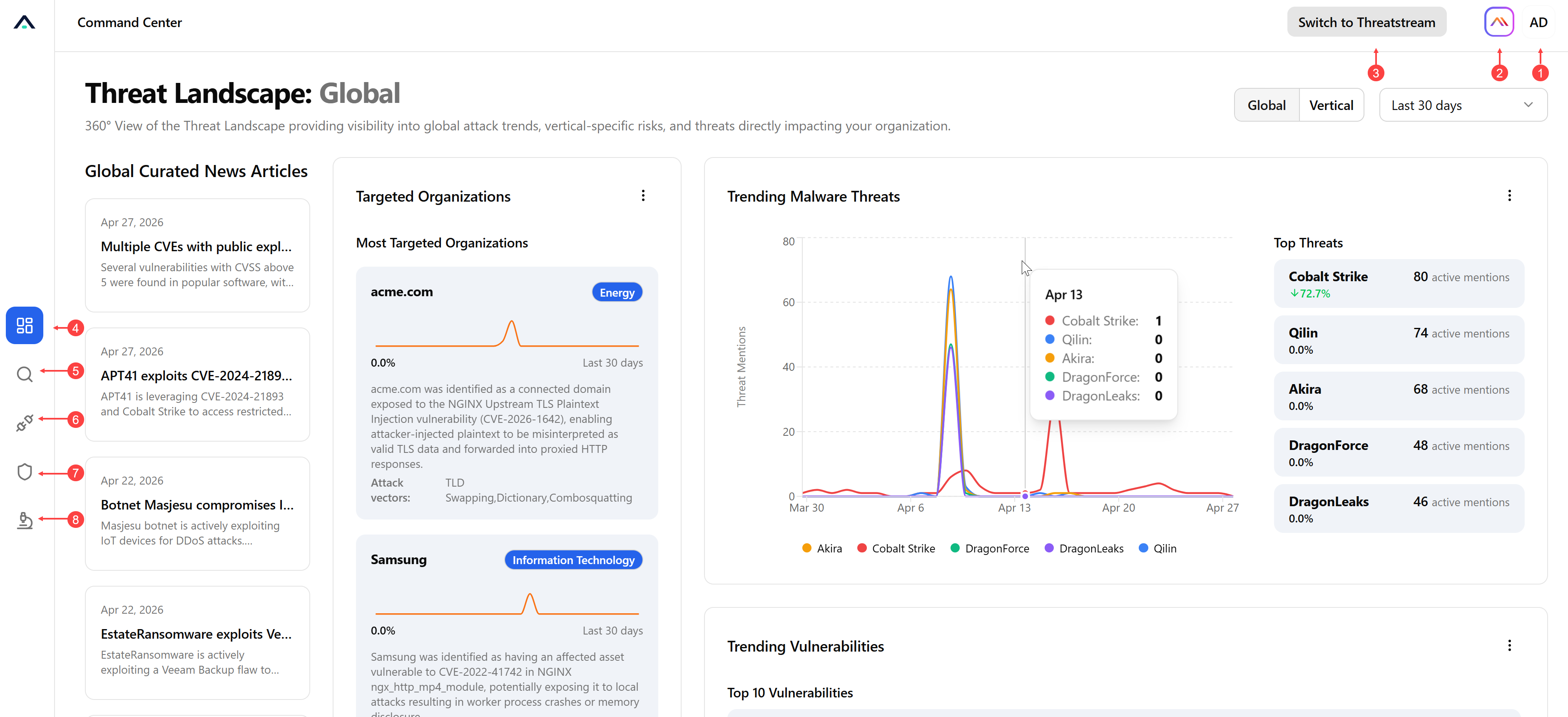
 Profile Settings:
-
Help—Access comprehensive context-sensitive online help for the area of ThreatStream Next Gen you are currently viewing.
-
Dark Mode—Switch the platform to a dark mode.
 Anomali AI: Access Anomali AI chat. See Using Anomali AI in ThreatStream Next Gen for more information.
 Switch to ThreatStream: Switch to classic ThreatStream.
 Command Center: View the ThreatStream Landscape: Global dashboard. See Command Center: Global Threat Landscape for details.
 Intelligence Search: Acces the unified search across all historical IOCs, Threat Bulletins, Threat Models, and feed data. See Intelligence Search for details.
 Integrations Marketplace: Configure available ThreatStream Next Gen integrations. See Integrations Marketplace for details.
 Priority Intelligence Requirements: Access PIRs created within your organization. See Priority Intelligence Requirements for details.
 Investigation & Analysis: Access cases and reports created within your organization.
For details on case management, see Case Management.
For details on security reporting, see Security Reporting.
Supported Browsers
-
Chrome
-
Edge
-
Firefox
-
Safari