Alerts Activity Searches
Search the Alerts index to examine alerts that match your search terms during the specified time period.
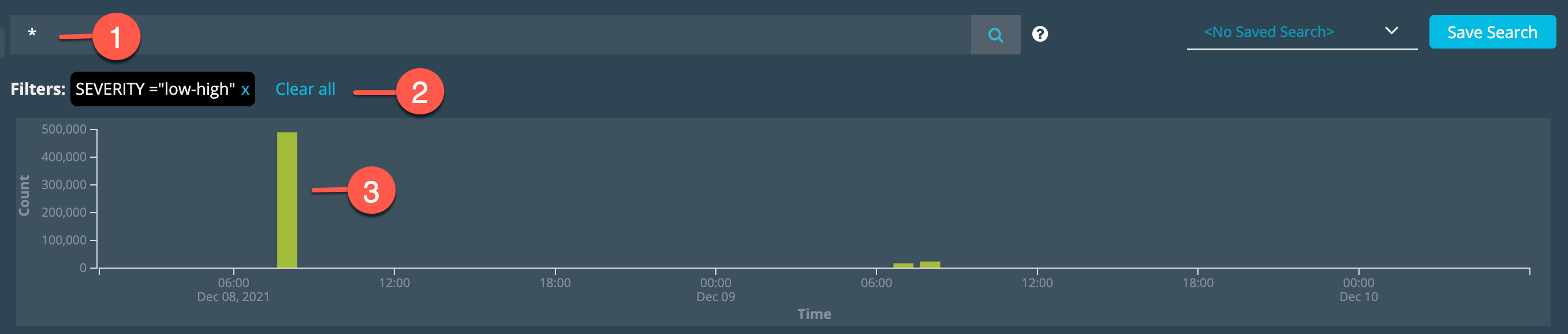

|
Search text box: Specify a keyword or field-based search expression. Keyword searches match any field. Specify field-based name-value pairs for more precise targeting. |

|
Applied Filters: Review and clear filters. |

|
Alerts Timeline: Click a bar to filter by date. Click and drag over two or more bars to set a date range filter. |
About Alerts Searches
The Alerts index is populated by alerts rules having the List on Activity Page action.
When you search the Alerts index, you search by alert fields. When you view a Security Analytics result details page, the record includes event log details for the match.
Filter UI
You can use the filter UI to apply the following filters to your search:
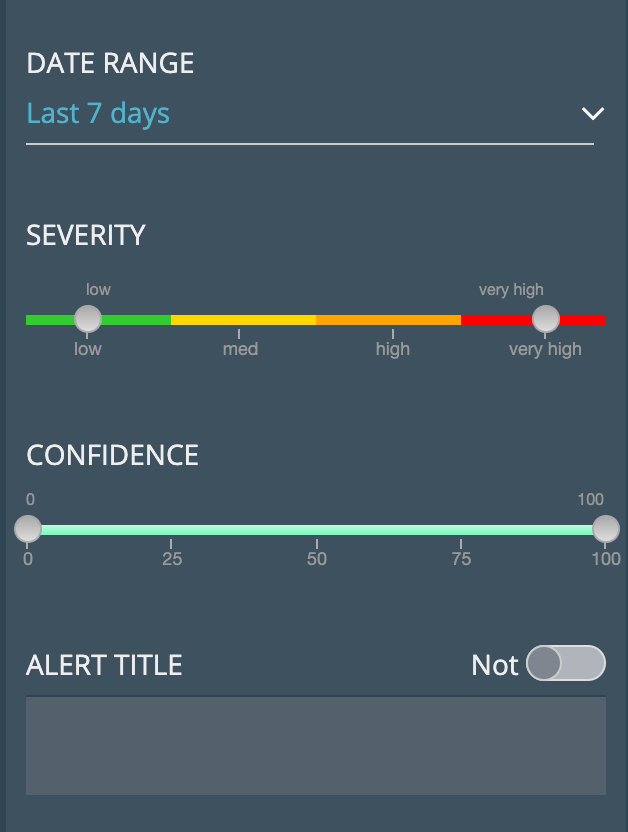
- Date Range
Select a time period, a relative expression, or a date range. The time period filter is based on alert time; in other words, the timestamp when the alert was triggered.
- Severity
Use the slider to specify an event severity range or drag both ends of the slider to a single severity to filter on just one. Event severity is determined by the indicator that matched the event log.
- Confidence
Use the slider to specify a confidence score range. Confidence score indicates the certainty that an observable exhibits or is connected to malicious behavior. Confidence score is set by a ThreatStream machine learning algorithm that takes many factors into account, but can be overridden by analysts.
- Alert Title
Select a title. The title field is populated by the rule configuration name.
Note: You can use negation in search expressions by selecting the NOT operator next to the filter heading. For example, to use negation with Alert Title, select the titles you do not want to search and toggle on the NOT operator next to the Alert Title heading.
Filter Examples
indicator contains .com
severity = (high or very-high)
itype in ["mal_url", "mal_domain"]
alert_time >= 2021-12-10T19:18:51.062760Z
match_description contains "no event was received"
match_description contains restored
Filter Operators
The following table describes the logical operators you can use to form complex field-based search expressions. Operator names are not case sensitive.
| Field Type | Use this Operator |
|---|---|
| String |
=, !=, contains, startswith, in (for lists) Note:
|
| Numeric |
=, !=, <, <=, >, >=, in (for lists) For example, Note: The |
| Date | =, !=, <, <=, >, >= |
| Logical | AND, OR, NOT, (specify a parenthetical expression) |
Filter Fields
The following table describes all of the possible Alert search fields. The fields listed in the first column correspond with results table column names. The field names listed in the second column are the fields you specify when you form field-based name-value pair search expressions.
Note: Not all fields are included as columns in the results table. When you search by fields without column names, you can locate the matching values in the details page. All of the fields listed in this table can be selected when you export results.
| Column Name | Field Name |
Type | Description |
|---|---|---|---|
| Age | age | Numeric |
Indicates the age of the indicator in days. Event time - intel first seen A negative age value indicates that the event data was added to Anomali Security Analytics through backfill. |
| Alert Time | alert_time | Date |
Timestamp when the alert was triggered. Notes:
|
| Link Type | app_type | String |
Link type that generated the event. Possible values: |
| ASN | asn | String | Autonomous System Number (ASN) for the IP associated with the indicator. |
| Criticality | asset_src_criticality | String |
Criticality associated with the asset that is the source of a logged event. Possible values: |
| Department | asset_src_dept | String |
Assigned department for an asset that is the source of a logged event.
Examples: |
| Hostname | asset_src_hostname | String |
Host name for an asset that is the source of a logged event.
Examples: |
| IP | asset_src_ip | String |
IP address for an asset that is the source of a logged event. Example: |
| Location | asset_src_location | String |
Assigned location for an asset that is the source of a logged event.
Example: |
| Vulnerability | asset_src_vulnerability | String |
Vulnerability CVE number associated with an asset that is the source of a logged event.
Examples: |
| Classification | classification | String |
Indicates the confidentiality level of an indicator. Possible values: Note: Private also includes Trusted Circles. |
| Confidence | confidence | Numeric |
Score from 0 to 100, as reported by the threat feed provider. |
| Count | count | Numeric | Aggregated number of events that matched the search criteria. |
| Country | country | String | Two-letter ISO country code for the IP associated with the indicator. For example, US, CN, DE, and so on. |
| DGA Probability | dga_prob | Numeric |
Relevant for email-specific events Probability based on Anomali Security Analytics's DGA algorithm that the domain in the event is a DGA domain. |
| DGA TAG | dga_tag | String |
Tags associated with the DGA domain that can be used to search for it. |
| do_alert | Boolean | Link alerts. Whether the option to send alerts when Link becomes available has been selected. | |
| Action | event.action | String |
Relevant for firewall and web proxy events Event log action taken by the source device; for example, |
| Answer | event.answer |
String |
Answers for the DNS query. |
| Application | event.app | String | The application detected. Example: Slack, Google Gmail, LinkedIn |
| Bytes In | event.bytes_in | Numeric |
How many bytes received by a network interface. Example: |
| Bytes Out | event.bytes_out | Numeric |
How many bytes transmitted by a network interface. Example: |
| Category | event.category | String |
Relevant for AWS VPC and Microsoft Defender logs. Traffic direction: |
| Command Line | event.command_line | String |
The full command string of the spawned process. Example: |
| Destination | event.dest | String |
Event log destination data. The
Indicators that have IP or Domain value types can match By default, Security Analytics correlates indicators and |
| Destination IP | event.dest_ip | String |
Event log destination IP address. The Indicators that have IP value types can match By default, Security Analytics correlates indicators and |
| Destination Port | event.dest_port | Numeric |
Event log destination port. Event log destination port field. The value for |
| Data Source ID | event.ds_id | Numeric | For Universal Link log sources, this is the log source configuration ID. For Splunk log sources, this field is not applicable. |
| Data Source Type | event.ds_type | String |
Event log data source type.
Examples: |
| Event ID | event.event_id | String |
A Windows identification number that specifies the event type. Example: |
| Event Name | event.event_name | String |
The name of an event. Example: |
| Filehash | event.file_hash | String |
Event log file hash field. For example, an endpoint management application might write a log that contains file hash values. The Indicators that have Hash value types can match By default, Security Analytics correlates indicators and |
| event.file_hash2 | String | A log might have multiple file hash fields. | |
| event.file_hash3 | String | A log might have multiple file hash fields. | |
| File Name | event.file_name | String |
Event log field containing filepath. |
| File Path | event.file_path | String |
The folder containing the file. Sigma name: FilePath Example: |
| Originated Host | event.host | String | Event log hostname field. For example, for events ingested from Splunk Link, the value for event.host is the hostname of the Splunk indexer that forwarded the event. |
|
HTTP Method |
event.http_method |
String |
The HTTP method used in the request. |
|
HTTP Referrer |
event.http_referrer |
String |
The HTTP referrer used in the request. |
| Image | event.image | String |
The executable name of the process. Sigma name: Image, ProcessName, OriginalFileName, TargetImage, TargetFileName Example: |
| Message ID | event.message_id |
String |
The globally-unique message identifier. |
| Original File Name | event.original_file_name | String |
Original name of the file that was changed. Example: |
| Parent Command Line | event.parent_command_line | String |
The full command string of the parent process. Example: |
| Parent Image | event.parent_image | String |
The executable name of the parent process. Example: |
| Parent Process ID | event.parent_process_id | String |
The numeric identifier of the process assigned by the operating system. Example: |
| Platform | event.platform | String |
The operating system of the asset. Sigma name: Platform Example: |
| Process ID | event.process_id |
Numeric |
The numeric identifier of the process assigned by the operating system. |
| Protocol | event.protocol | String |
Relevant for firewall and web proxy events Event log protocol field. The value for |
| DNS Query | event.query | String |
The domain that needs to be resolved in a DNS query. Example: |
| Email Receiver | event.receiver | String |
Relevant for email-specific events Event log receiver field. The value for Indicators that have Email value types can match By default, Security Analytics correlates indicators and |
| Record Type | event.record_type |
String |
The DNS resource record type. |
| Registry Key | event.reg_key | string |
Registry key that the recorded action was applied to. Sigma name: TargetObject Example: |
| Registry Value Name | event.reg_value_name | string |
Name of the registry value that the recorded action was applied to. Example: |
| Registry Value Data | event.reg_value_data | string |
Data of the registry value that the recorded action was applied to. Example: |
| Email Sender | event.sender | String |
Relevant for email-specific events Event log sender field. The value for Indicators that have Email value types can match By default, Security Analytics correlates indicators and |
| Source Type | event.sourcetype | String |
Source device type that generated the event. |
| Event Source | event.src | String |
Event log source IP field. The
Indicators that have IP type or Domain value types can match By default, Security Analytics correlates indicators and |
| Source IP | event.src_ip | String |
Event log source IP field. The Indicators that have IP value types can match By default, Security Analytics correlates indicators and |
| Source Port | event.src_port | Numeric |
Relevant for firewall and web proxy events Event log source port field. The value for |
| event.status | String |
The status of the service. |
|
| Subject | event.subject |
String |
The subject of the message. |
| URL | event.url | String |
Relevant for firewall and web proxy events Event log URL field. The value for Indicators that have URL value types can match By default, Security Analytics correlates indicators and |
| User | event.user | String |
Relevant for firewall and web proxy events Event log user field. The value for |
| User Agent | event.user_agent | String | Event log user agent field. The value for event.user-agent is user-agent directive data in an HTTP(S) connection request—for example, Mozilla/5.0 (platform; rv:geckoversion) Gecko/geckotrail Firefox/firefoxversion. |
| Event Time | event_time | Date |
Event log timestamp field. The value for Notes:
|
| Indicator | indicator | String |
Value of the indicator. This field contains the value that was matched and is always equal to the value of srcip, url, domain, md5, or email fields. |
| IOC Type | indicator_type | String |
Data type of the indicator. Possible values: |
| iType | itype | String |
Indicator type. For example, See ThreatStream Indicator Types for a complete list of available indicators. |
| last_activetime | Date | Link alerts. Time events were received from a Link. | |
| Latitude | lat | Numeric |
Latitude associated with the Geo location of the IP. The value displayed is rounded up to the nearest thousandth decimal place. For example: 32.789. Note: Search results are based on non-rounded values, so you might observe anomalous search results, such as a search for |
| link_id | String | Link alerts. Link ID. | |
| link_name | String | Link alerts. Link configuration name. | |
| link_type | String | Link alerts. Link type. | |
| Longitude | lon | Numeric |
Longitude associated with the Geo location of the IP. The value displayed is rounded up to the nearest thousandth decimal place. For example: 16.366. Note: Search results are based on non-rounded values, so you might observe anomalous search results, such as a search for |
| Malware Family | malware_family | String |
One or more public malware family names expected to have originated the domain. Note: Malware families are often known by multiple names or aliases. The name shown in the Anomali Security Analytics UI is one of those names or aliases. |
| match_count | Numeric | Sum of events included in the alert. | |
| match_description | String | Link alerts. Alert message. | |
| Event Time Range | match_records_time_window | Date |
The time window examined by the alert rule.
|
| Match Type | match_type | String |
Type of alert query filter that matched. Example: |
| originator | Numeric |
Indicates whether the connection was inbound or outbound
|
|
| Severity | severity | String |
Severity associated with the threat feed that supplied the indicator. Possible values: Note: The search index is tokenized. This means the text is broken down into individual terms during indexing to allow for partial matching. For example, searches for |
| Source | source | String |
Name of the feed provider or organization that reported the indicator. |
| Feed | source_feed_id | Numeric | Identifier associated with the feed that contained the indicator. |
| Event Source Host | src_host | String |
An event source host value derived from asset_src_hostname, event.src, or event_ip fields, in that order. The hostname provided by the asset enrichment would be most readable, so if it data exists for it, it is used. If not, then the other source fields are evaluated. |
| State | state | String |
Current state of the indicator as reported by the threat feed. Possible values: |
| Tags | tags | String |
Tags specified in the alert rule configuration. For link alerts, the tags field is populated with the Link ID (dcid) and a message indicating one of the following statuses: |
| TM ids | tm_ids | Numeric | Threat Model ID information from ThreatStream. |
| TM names | tm_names | String | Threat Model name information from ThreatStream. |
| TM type | tm_type | String | Threat Model type information from ThreatStream. |
| trusted_circle_names | String |
Names of the Trusted Circle with which this threat intelligence is shared on ThreatStream. Note: This field, not trusted_circle_id, is included in the export file when you export search results. |
|
| Raw Event ID | _raw_id | Numeric | Internal. |
Alerts Match Results Table
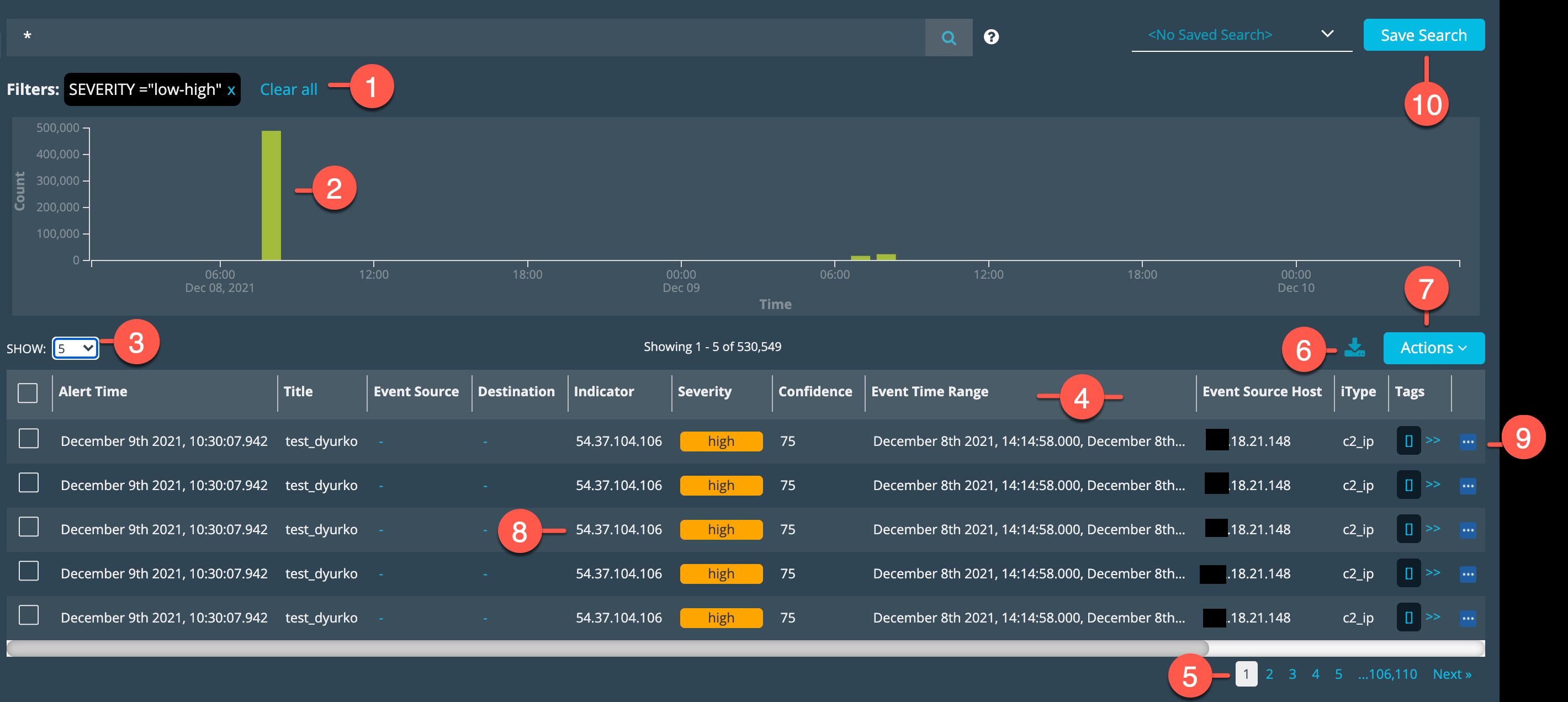
The following figure identifies the UI elements that you use to manipulate the displayed results to find information about Alerts matches.

|
Review and reset applied filters. |

|
Observe the graph of matches over time. |

|
Select a number of rows per page. |

|
Click the column header to sort the rows in ascending or descending order according to values in the column. Click a column header divider and drag it to make a column wider or more narrow. |

|
Go to the next page of results or another page by page number. |

|
Export the results table. See Export Search Results. |

|
Perform an action related to the selected row. See Perform Actions. |

|
Click a hyperlinked indicator value and select an action: search VirusTotal or run a retrospective search. |

|
Display the Details page for the matched event. See View Alert Details. |

|
Create a Saved Search configuration. See Saved Searches. |
Perform Actions
The Action menu above the results table allows you to perform the following actions.
| Action | Description |
|---|---|
| Configure Fields | Select this option to configure the fields (columns) that appear in the results table. |
| Retrospective Search |
Select this option to perform a retrospective search for the indicator correlated with the event. Note: This action is not applicable for Link alerts. |
| Investigate |
Select this option to add the result to a ThreatStream investigation. Configure one of the following choices:
Note: For information about ThreatStream investigations, refer to the ThreatStream online help. |
View Alert Details

|
Click the Details icon in the right-most column to display the details page. |
Alert Details for IOC Matches
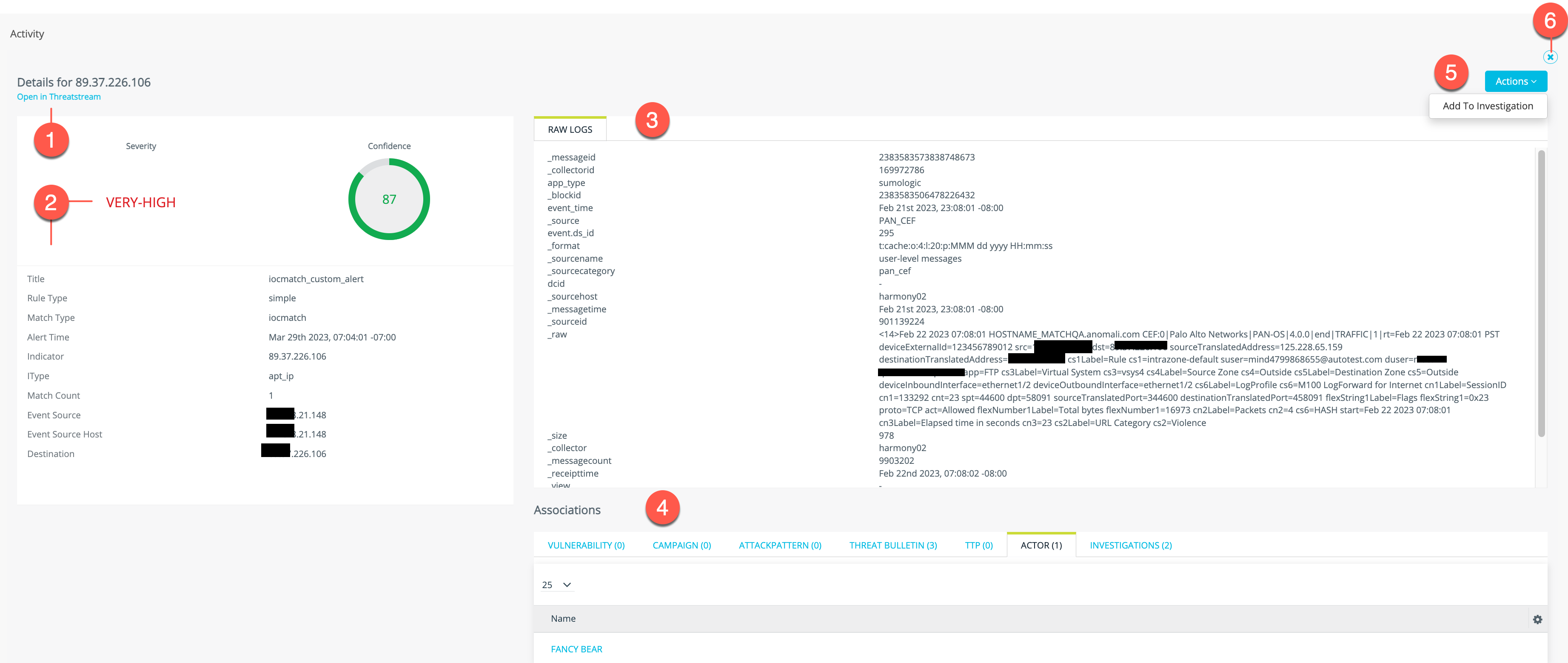
The following figure identifies the UI elements that you use to find information on the Alert Details page.
|
|
Open ThreatStream to view ThreatStream reports about the indicator. |
|
|
Review the indicator details and event details correlated in Security Analytics. |
|
|
Raw Logs: View more event data. When you click Get Raw Logs:
|
|
|
Use the tabs to review associated ThreatStream threat model entities and investigations. |
|
|
Click Actions and select Add to Investigation to add the log to a ThreatStream investigation. Note: For information about ThreatStream investigations, refer to the ThreatStream online help. |
|
|
Click the X to exit the details page and return to the results table. |
Alert Details for Link Alerts
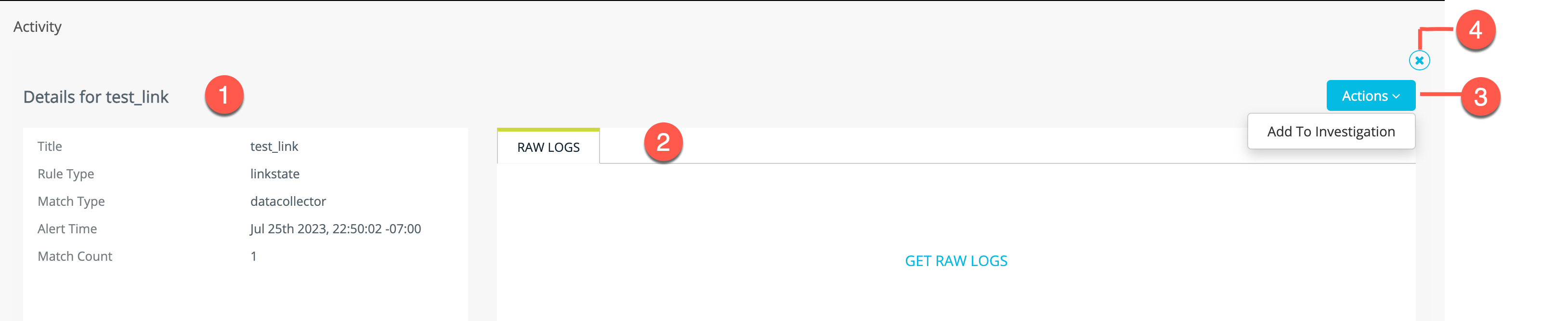
The following figure identifies the UI elements that you use to find information on the Alert Details page.
|
|
Review the Link alert rule and matching event details. |
|
|
Click Get Raw Logs to see the alert message JSON content. |
|
|
Click Actions and select Add to Investigation to add the log to a ThreatStream investigation. Note: For information about ThreatStream investigations, refer to the ThreatStream online help. |
|
|
Click the X to exit the details page and return to the results table. |
Alert Details for Event Search Alerts
Alert details works differently for Event Search alerts. When you click the Details icon  , Security Analytics opens a new browser tab to Event Search and loads the Event Search query and time range that was specified in the alert rule that was triggered. From there, you can modify the query as desired to hone in on details related to the condition that triggered the alert.