Adding a Log Source via HTTP Upload
Anomali Security Analytics can ingest event log data sent from your on premises or cloud environment to a provisioned Amazon API Gateway.
Network Topology and Requirements
In cases where other log source templates do not meet your requirements, you can set up log ingestion via a provisioned Amazon API Gateway.
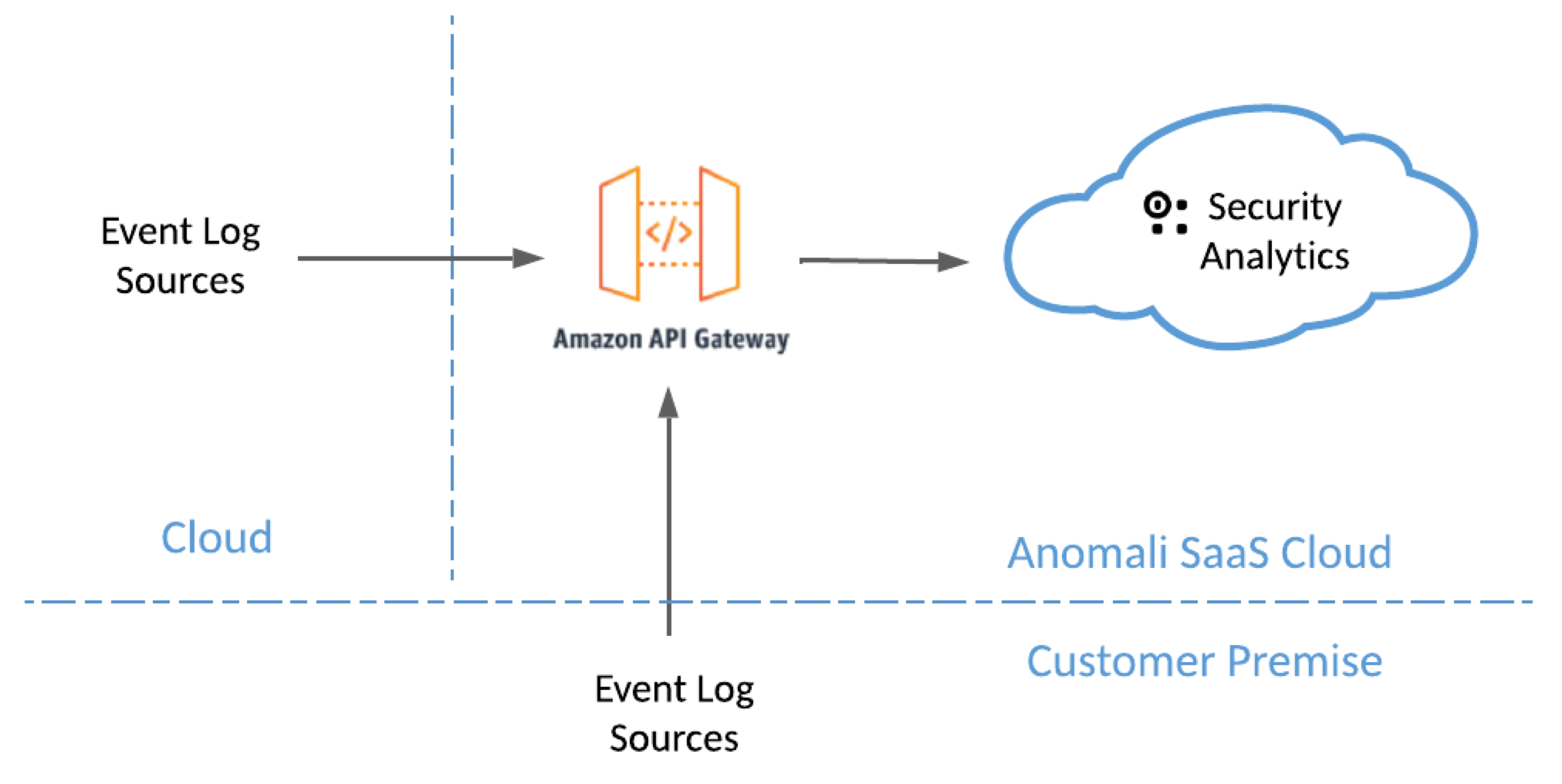
- Your network security rules must allow traffic from your log sources to https://upload.threatstream.com/upload/ (port 443/https).
- Connections are initiated from your environment to the Anomali SaaS Cloud.
About the Amazon API Gateway
This solution depends on an Amazon API Gateway provisioned by Anomali to ingest log data from Anomali customers. The gateway is an HTTPS endpoint that accepts authenticated POST requests with file upload payloads. The authentication details enable the file upload endpoint to sort the uploaded files into an S3 bucket dedicated for the particular organization.
Note: The maximum file size per file upload is 4,711,218 bytes (approximately 4.7 MB).
Setting Up Log Ingestion
Follow this process to start ingesting your logs to Anomali Security Analytics:
Step 1: Contact Anomali with Specific Details About Your Log Sources
Step 2: Develop a Client Application to Periodically Upload Data
Step 1: Contact Anomali with Specific Details About Your Log Sources
Send Anomali Customer Support a list of log source types that you intend to upload.
Anomali Customer Support can then provide you with the following details you will need to develop an application to periodically upload your data:
-
API URL: The API URL has the following form:
https://upload.threatstream.com/upload/{sourceType}, where{sourceType}varies by type. Anomali Customer Support needs the list of log source types from you, so it can provide you a list of URLs for you to specify in your file upload client application. -
HTTPS Authorization token: A base64 token to specify in the Authorization header in your file upload client application.
Anomali Customer Support will also assign a log source onboarding engineer to assist you throughout the process.
Step 2: Develop a Client Application to Periodically Upload Data
You must develop a script or lightweight client application to periodically upload data to the HTTPS endpoint. Typically, customers integrate with this endpoint by configuring it on their platform or data lake as an exporter endpoint that pushes bundles of files in .gz format to the specified location. The maximum file size per upload is approximately 4.7 MB. This section provides examples.
Command Line
The following is an example of a curl command that uploads file payload to the HTTPS endpoint:
curl -i \
-X POST \
-v \
https://upload.threatstream.com/upload/<sourcetype> \
-d '{"event": {"host": "localhost", ...}}' \
-H "Content-type: application/json" \
-H "Authorization: Token <token>"
Replace the highlighted placeholder text with information obtained from Anomali in Step 1.
Python
The following is an example of a python script that uploads file payload to the HTTPS endpoint:
import requests

payload = {"events": [{"time": "...", "action": "...", "host": "..."}, ...]}
token = "<token>"

requests.post(
    "https://upload.threatstream.com/upload/<sourcetype>",
    headers={
        "Authorization": f"Token {token}",
    },
    json=payload,
)
Replace the highlighted placeholder text with information obtained from Anomali in Step 1.
Step 3: Contact Anomali to Schedule Initial Log Ingestion
Contact Anomali Customer Support to let them know when you are ready to begin log ingestion. An Anomali log source onboarding engineer will help you with the integration.
Step 4: Verify Logs Are Ingested into Security Analytics
An Anomali log source onboarding engineer will help you verify the integration.