About the Sankey Diagram Visualization Type
Use the Sankey Diagram visualization type to display flows where the width of the lines is proportional to the flow rate.
(Click the image to enlarge it.)
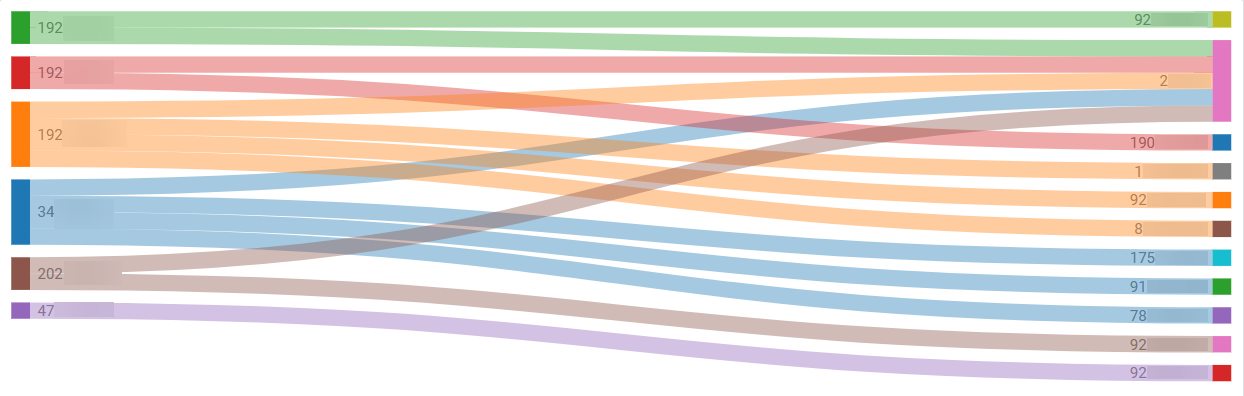
Sankey diagrams can be effective for visualizing how resources, data, or processes are distributed or moving between different stages or categories.
You can use Sankey diagrams to illustrate the flow of data, the relationships between systems or events, and to understand attack paths or the movement of threats within a network. For example:
-
To visualize the flow of network traffic between different segments or devices.
A Sankey diagram can show the volume of traffic moving between different network zones, such as from external sources to the DMZ and then to the internal network. This can help identify unusual traffic patterns that might indicate lateral movement or data exfiltration.
-
To correlate events across different sources and understand the relationships between them.
A Sankey diagram can illustrate how different log sources contribute to a correlated security incident, showing the flow of events from initial detection in a firewall to correlation and then the alert generation.
-
To understand how an attacker might move through the network from initial compromise to their end goal.
A diagram can show an attacker's journey from phishing to initial compromise, privilege escalation, lateral movement, and finally, data exfiltration. This visualization can help in comprehending the complexity and potential impact of an attack.
AQL Expression Requirements
The Sankey diagram visualization type is used to show many-to-many connections between values of two columns. The width of each connection is proportionate to counts in each pair of values.
The query must have the following elements to return the required data:
-
At least 2 fields that will serve as the source and target of the flow.
-
1 field that will serve as the flow value (for example, volume of traffic).
-
Use the
aggroperator, which returns a numeric value.
The following is an example of a query that returns the required data:
eventlog | where src is not null and src!="" and dest is not null and dest!='N/A' and bytes_in>0
|aggr sum(bytes_in) as bytes, count as cnt by src, dest
|sort cnt desc
Panel Options
Use the options in the Panel tab to customize the options described in the following table.
| Setting | Description | |
|---|---|---|
| Settings | Panel title | Titles appear at the top of a panel. |
| Description | Descriptions appear as tooltips. Markdown and links are supported. | |
| Transparent | Display panel without a background. |