SCIM 2.0
To synchronize users and groups from a SCIM 2.0-compatible identity provider with the Anomali Agentic SOC Operations for identity management, you must first configure the SCIM 2.0 integration on the Integrations Marketplace page. For details on identity management within the Anomali Agentic SOC Operations, see Identities.
Before You Begin
Before configuring the SCIM 2.0 integration, ensure your environment meets the following requirements:
-
Identity Provider Requirements
-
Expose a publicly accessible HTTPS endpoint. Endpoints on local hosts or private IP ranges are not supported and will fail to connect.
-
Implement RFC 7644 (SCIM 2.0 protocol). This includes support for the standard SCIM resource endpoints and HTTP methods used for user and group provisioning.
-
Issue a Bearer token for authentication. The Anomali Agentic SOC Operations uses this token to authenticate outbound SCIM requests. Have it available before beginning configuration.
-
-
Supported Providers
-
Ping Identity
-
ForgeRock
-
OneLogin
-
JumpCloud
-
Any othe identity provider or directory service that is fully RFC 7644-compliant
-
Configuring the SCIM 2.0 Integration
To configure the SCIM 2.0 integration:
-
Navigate to ThreatStream Next Gen > Integrations Marketplace > Entity Sources.
-
Click the three-dot vertical menu on the SCIM 2.0 tile and then click Configure.
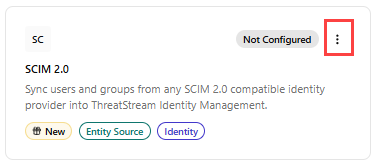
Alternatively, click the SCIM 2.0 tile and click Connect.
-
On the Configure SCIM 2.0 page that opens, enter the following details:
Field Name Description Name Name of the integration. Description (Optional) Description for the integration. Credentials SCIM Base URL HTTPS base URL of the SCIM 2.0 server. For example,
https://scim.company.com/v2.Bearer Token Authorization token for API access. Sync Configuration Batch Size Number of identity records written per database operation. Default: 500. Note: Anomali recommends keeping the default batch size value unless you experience memory issues. Large values reduce database round trips but consume more memory.Filter Incremental Updates When enabled, fetches only changed records. Automatically falls back to full sync if the server does not support this filter. Full Sync Interval (days) Interval in days after which a full sync is forced regardless of incremental sync state. Default: 1. Users Per Page Number of users fetched per paginated API request. Default: 200. Field Mapping Field mappings let you override which source attribute is used for each canonical identity field. This is useful when your directory uses non-standard attribute names or you want to prefer a specific field over the default. Display Name Source attribute to use as the user's display name. Email/Hostname Source attribute to use as the primary identity key. Department Source attribute for department. Job Title Source attribute for job title. Manager Source attribute for the manager reference. Status Source attribute that determines active/disabled state. Source ID Source attribute to use as the stable internal identity ID. Custom Field Mappings Custom field mappings.
To add a custom field mapping, click + Add Field, select a source field, and enter a field name to which you want to map the source field.
Sync Settings Sync Frequency Interval for incremental syncs. Default: Hourly. -
Click Create.
The SCIM 2.0 integration is activated. On the integration details page, you can view the integration status, health, the date and time of the last synchronization with the source, the synchronization schedule, and the number of identities available in the configuration. On this page, you can also force sync, edit, deactivate, and delete the integration configuration. For details, see Managing Integrations.