Managing Assets
Note: The Manage Entities permission is required to manage assets. For details, see Managing Roles.
The Assets list page supports both bulk and individual actions. You can set a risk override, add to a peer group, or export assets—either for multiple assets at once or for a single asset. Individual assets also support additional actions such as viewing asset details, editing assets, and removing assets from the platform.
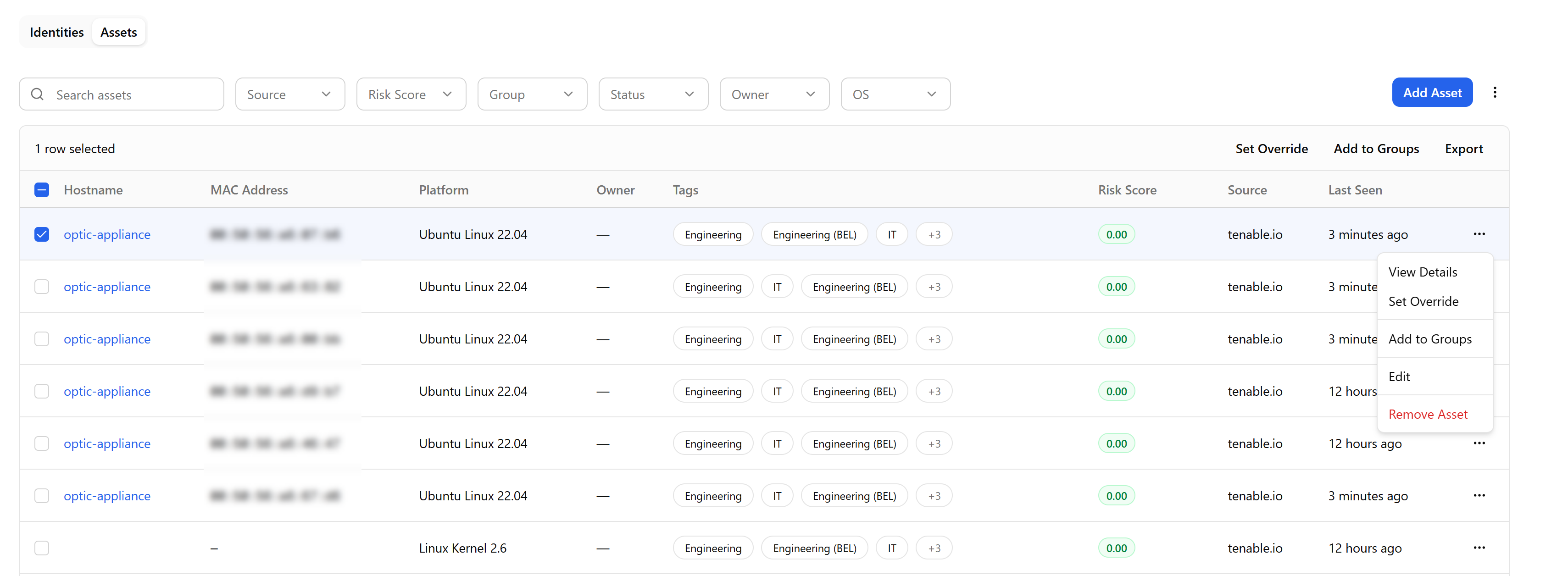
Setting a Risk Override
You can apply a risk override multiplier to the selected assets. The override range is 0.1 to 2.0, where 1.0 is neutral. This action applies the same override value to all selected assets in a single operation.
To set a risk override:
-
Navigate to ThreatStream Next Gen > Entity Management > Entities > Assets.
-
Select one or more assets.
-
Click Set Override in the toolbar.
-
Set the override value and confirm.
See Entity Risk Score Override for more information on how risk scoring and overrides work.
Adding Assets to a Peer Group
You can assign the selected assets to one or more peer groups. Group membership determines which risk multipliers apply to the score for an asset.
To add assets to a peer group:
-
Navigate to ThreatStream Next Gen > Entity Management > Entities > Assets.
-
Select one or more assets.
-
Click Add to Group.
-
Search for and select the peer group, then confirm.
See Peer Groups for more information.
Exporting Assets
You can export selected asset records in CSV format.
To export assets:
-
Navigate to ThreatStream Next Gen > Entity Management > Entities > Assets.
-
Select one or more assets.
-
Click Export in the toolbar.
The downloading process starts immediately.
Taking Individual Asset Actions
Each asset row has an options menu (...) that provides actions for that specific asset without requiring a selection.

The options menu includes the following actions:
-
View Details—opens the Asset Details side panel. See Viewing Asset Details for more information.
-
Set Override—applies a risk override multiplier to this asset. See Entity Risk Score Override for more information.
-
Add to Group—assigns this asset to a peer group. See Peer Groups for more information.
-
Export—downloads the asset record.
-
Edit—opens the asset form in Edit mode.
-
Remove Asset—permanently removes the asset from the platform.