Editing a Trusted Circle
Note: You must be a Trusted Circle administrator for the Trusted Circle you want to edit. For more information, see Understanding the Role of a Trusted Circle Administrator.
To edit a Trusted Circle:
-
Navigate to ThreatStream > Manage > Trusted Circles.
-
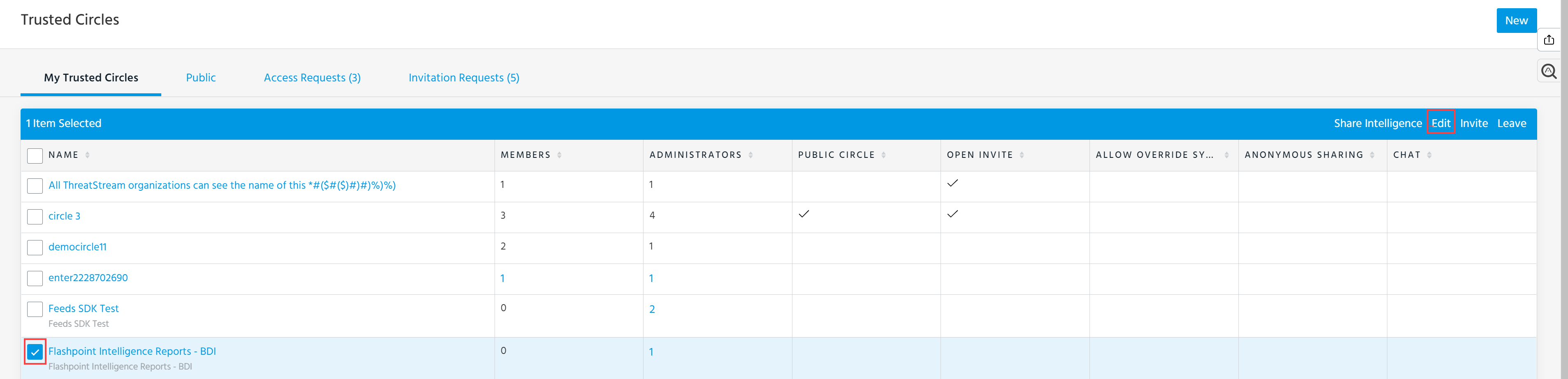
Select the Trusted Circle you want to edit from the My Trusted Circles list.
The Trusted Circles you are permitted to edit display an active Edit option.
-
Click Edit and make the changes.
For information about the fields, see Creating a Trusted Circle.
Note: If you disable anonymous sharing for a trusted circle, data previously shared with the trusted circle does not remain anonymized. If anonymous sharing is enabled for a trusted circle, existing data shared with the trusted circle is made anonymous.
-
Click Update.