Automating Investigation Tasks in ThreatStream
In ThreatStream, you can automate your investigation tasks. When you need to run several checks on an observable, you can use an automated task—a predefined sequence of enrichments applied to a specific type of the observable during the investigation.
Automated tasks can be run on the following types of nodes:
-
Domain
-
Email
-
IP
-
Hash
-
URL
Automated tasks can be created by anyone from your organization. You can create your own custom automated tasks. You can edit and delete your automated tasks except those that are active and used by the other users in your organization.
All automated tasks are available on the ThreatStream > Manage > Task Automation page.
The Task Automation page displays a list of every automated task associated with your organization that is visible to you.
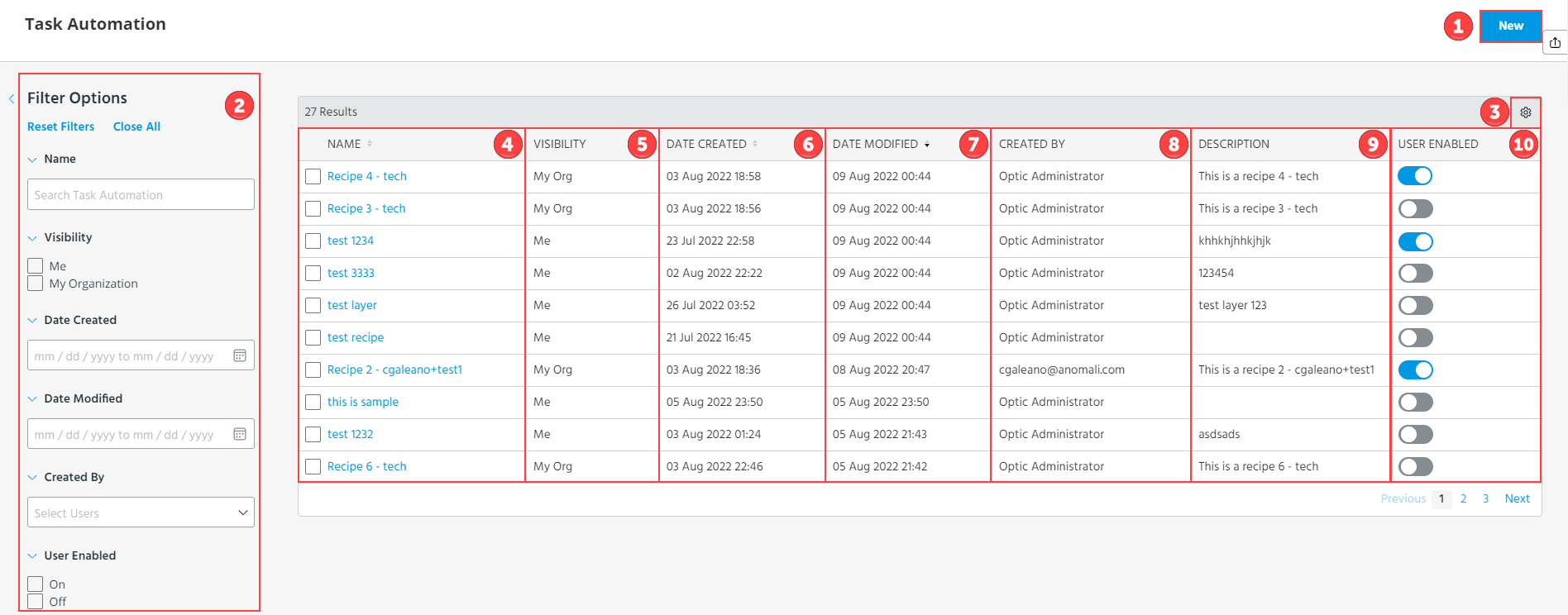
 New: Create a new automated task. For more information, see Creating Automated Tasks.
 Search and Filter: Search for an automated task by its name or filter the automated tasks by visibility, creation date, modification date, the user who created the task, or the availability of the task to the users (that is whether the task is active or inactive).
 Settings: You can select columns to be displayed or hidden in the list of automated tasks. By default, all columns are displayed.
 Name: You can click the name of an automated task to view details. For more information, see Viewing the Details of an Automated Task. You can select a check box next to one or several tasks and delete them. For more information, see Deleting Automated Tasks.
 Visibility: You can view the following automated tasks:
-
Automated tasks that you have created.
-
Automated tasks that anyone at your organization has created and made visible to your organization.
 Date Created: The date and time when the automated task was created.
 Date Modified: The latest date and time when the automated task was edited. For more information, see Editing Automated Tasks.
 Created By: User who created the automated task.
 Description: Task description, if available.
 User Enabled: Whether the automated task is available in investigations. You can make the automated tasks that you have created available or unavailable in investigations from the Task Automation page without editing them.