fit DecisionTreeRegressor
Use the DecisionTreeRegressor algorithm when you want to fit a model that predicts a continuous variable using the scikit-learn decision tree regression estimator. When applying the model, predictions are appended to the full dataset, allowing you to directly compare actual and predicted values.
Syntax
fit DecisionTreeRegressor [option_name]=[value]... <field_to_predict> from <explanatory_fields> [kfold_cv=<enter_max_cross-val_fields>] [into '<model_name>']
[option_name]=[value]
|
Specify model parameters:
For information on the model parameters, refer to the official Scikit-learn documentation. |
|
|
Specify the maximum depth of the decision tree. Providing the depth preempts the model from growing too large and overfitting, ensuring reliable results when visualizing the tree. Default value: Note: |
<field_to_predict>
|
Specify the target field name. |
<explanatory_fields>
|
Specify input fields used to train the model. Note: When applying the model, the name of the explanatory fields need to be exactly the same as the one used to create the models. Any deviation from the name may lead to errors. For example: Copy
|
<enter_max_cross-val_fields>
|
Specify this option to support k-fold validation. When specified, the validation result will be returned. Substitute a number of folds for n. The number of folds must be at least two. Note: This option cannot be used together with the
into option to save the model.
|
into
|
Specify the into keyword to store the learned model in an artifact that can later be applied to new search results with the apply operator. |
'<model_name>'
|
Specify the name of the model to save as an artifact, so that it can be used with the |
Usage
Use DecisionTreeRegressor to predict a continuous numeric value from historical security data. For example, you can determine the expected logon counts per time window or model typical outbound bytes for a connection. The model learns decision rules from labeled training data and appends predictions alongside actual values when applied, making it easy to spot deviations.
This approach ensures DecisionTreeRegressor is:
-
Effective for understanding normal behavior and flagging deviations in numeric security metrics.
-
Interpretable, that is, the resulting tree structure can be visualized to understand which features drive predictions.
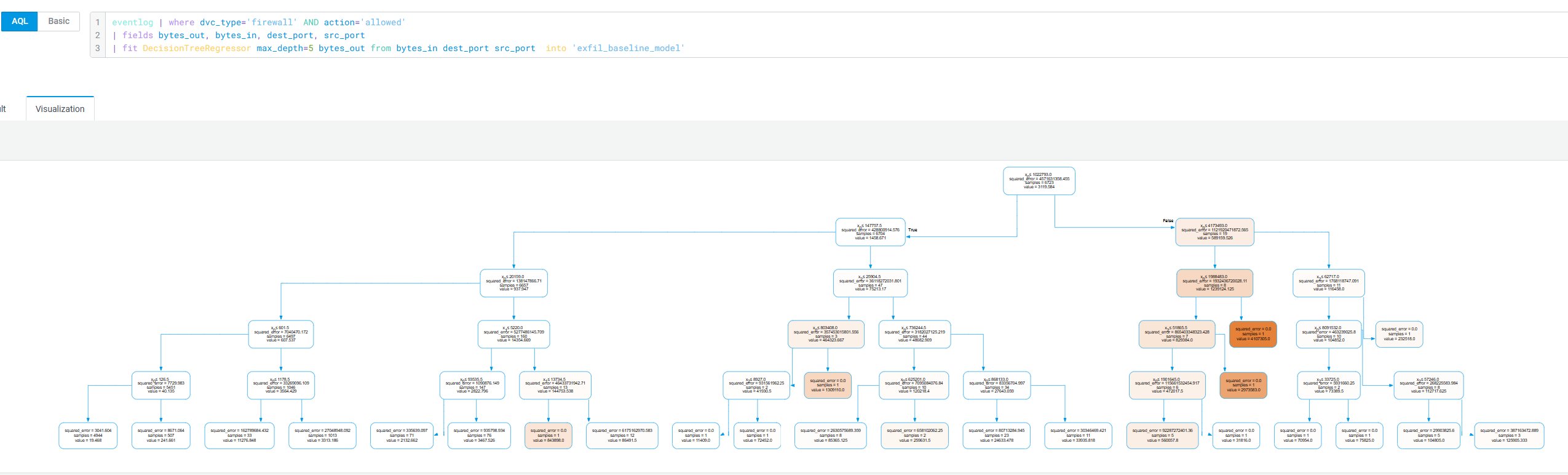
See About the Decision Tree Visualization Type for more information on how to visualize decision trees.
Examples
Example 1: Trains a decision tree on allowed firewall traffic to expected outbound bytes from inbound volume and port pair, for detecting data exfiltration anomalies.
eventlog | where dvc_type='firewall' AND action='allowed'
| fields bytes_out, bytes_in, dest_port, src_port
| fit DecisionTreeRegressor max_depth=5 bytes_out
  from bytes_in dest_port src_port
  into 'exfil_baseline_model'
After the search is complete, use the Decision Tree visualization to visualize your results. The query above produces a decision tree visualization to identify ambiguous traffic patterns. To view the tree, switch to the Visualization tab on the Search page, as follows:
Example 2: Buckets IAM logon events hourly, then trains a decision tree to baseline expected logon frequency per time window for insider threat detection.
ocsf
| where category_name='Identity & Access Management'
  AND activity_name='Logon'
| bin event_time span=1h
| aggr count() as logon_count by event_time, actor.user.name
| fit DecisionTreeRegressor max_depth=5 logon_count
  from event_time into 'logon_baseline_model'