Dotted notation
Use the dotted notation when handling a JSON field in order to expedite the use of it with different operators.
Anomali Search supports dotted notation for both eventlog schema fields (extracted from JSON messages) and OCSF Version 1.2 schema fields.
OCSF uses dotted notation natively for nested object structures. For example, OCSF fields like src_endpoint.ip, actor.user.name, and dst_endpoint.port use dotted notation to represent hierarchical data. See OCSF Schema Overview for more information on OCSF field naming conventions.
Syntax
To access a JSON array using notation, use the following syntax:
<json_field_name>.<json_path>
<json_field_name>.<json_path>.<json_array_element>{0}
|
|
Name of the table field containing the JSON data. |
.<json_path>
|
Specifies the JSON path of the attribute to be used in the operator. To specify any nested property, a dot (" For JSON data that is extracted using the For more information about the syntax used in |
<json_array_element>
|
The child element in the array. |
{0}
|
For more information about the syntax used in |
Usage
You can use the dotted notation to perform any operation on the JSON fields, in conjunction with other operators as per need. JSON keys can be nested.
Common Event Format logs
In the case of Common Event Format (CEF) logs, the following rules apply:
-
Only the first CEF log is parsed.
-
Must be named using dotted notation, such as:
-
Example 1:
message.cef.version -
Example 2:
message.cef.deviceVendor
-
-
The following fields are supported for CEF format:
-
version -
deviceVendor -
deviceProduct -
signature -
name -
severity
-
Key-value pairs:
In the case of key-value pairs, the following rules apply:
-
Pairs can contain equal sign ("=")
-
Empty value in a key-value pair will be handled as an empty string
-
Pairs can be line-separated or space-separated
-
Pairs do not support nesting.
Examples
The following examples demonstrate dotted notation usage with both eventlog JSON extraction and OCSF Version 1.2 fields. For eventlog data, dotted notation extracts nested values from JSON messages on-the-fly. For OCSF data, dotted notation is the native field naming convention for hierarchical structures. Both approaches allow you to access nested data using the same familiar syntax.
Eventlog JSON Extraction
On the Anomali Search platform, here is an example of a typical raw message (in JSON format) from Okta logs whose fields can be extracted on-the-fly.
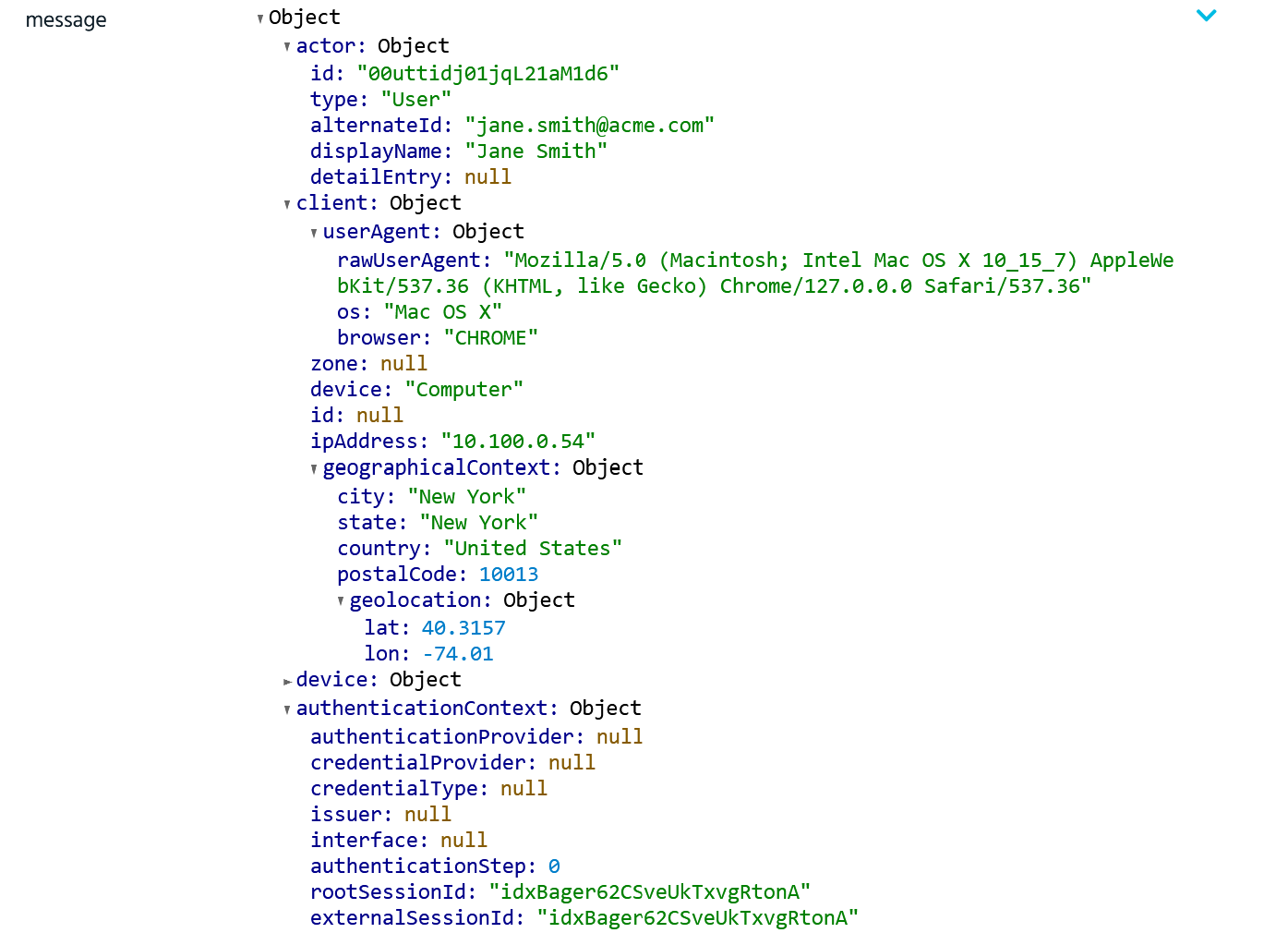
Field examples:
Example 1: Extract nested object fields using dot notation.
message.actor.idExample 2: Access array elements with bracket notation.
message.client.userAgent.browserExample 3: Navigate complex nested data structures.
message.request.ipChain{0}.geographicalContext.postalCodeExample queries with other operators:
Example 1: Filter Okta logs where the client device is a computer.
eventlog | where sourcetype = "okta" | where message.client.device = "Computer"Example 2: Filter Okta logs by client geographical context country.
eventlog | where sourcetype = "okta" | where message.client.geographicalContext.country = "United States"Example 3: Filter Office 365 logs by risk event type array element.
eventlog | where sourcetype = "office365" | where message.riskEventTypes{0} = "unfamiliarLocation"OCSF Version 1.2 Fields
Using the OCSF Version 1.2 field conventions, you can create queries using OCSF fields with dotted notation.
Note: For OCSF schema fields, array indexes start at array[1] and not array[0].
Example queries with OCSF fields:
Example 1: Filter OCSF Network Activity events by source IP address.
ocsf | where category_name = "Network Activity" and src_endpoint.ip = "1.2.3.4"Example 2: Filter OCSF Authentication events by user name.
ocsf | where class_name = "Authentication" and actor.user.name = "example_admin"Example 3: Filter OCSF Security Finding events by severity and product name.
ocsf | where class_name = "Security Finding" and severity_id = 3 and metadata.product.name = "CrowdStrike"