Connecting to Your ThreatStream TAXII Server From a TAXII Client
You can connect to your ThreatStream TAXII server using the TAXII Discovery URLs listed on the TAXII page within ThreatStream settings (Settings > TAXII).
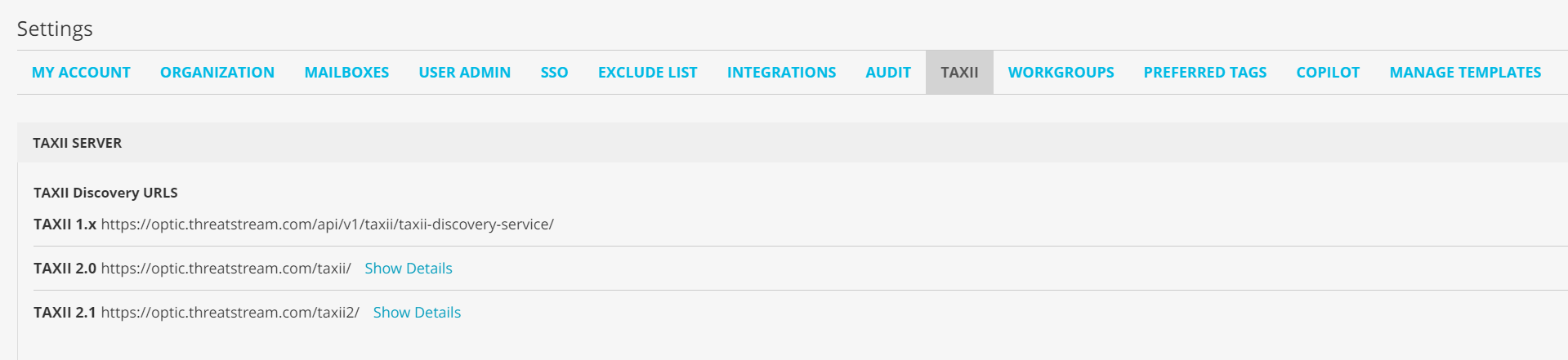
This enables you to poll data from your TAXII feeds on ThreatStream into TAXII clients and push data from your TAXII client to ThreatStream.
The ThreatStream TAXII server provides TAXII 1.x, 2.0, and 2.1 services, enabling you to poll data in the appropriate format depending on TAXII client requirements. All URLs can serve the same intelligence to clients—choosing one over another simply impacts the format the intelligence is served in.
Basic Authentication is enabled by default. You can use your ThreatStream login credentials to access your ThreatStream TAXII server via Basic Authentication.
Note:
-
You can push data containing any valid STIX entities to the ThreatStream TAXII server; for a full list, see Supported Attributes for STIX Entities. However, only indicators can be polled from the ThreatStream TAXII server.
-
To receive TAXII requests from ThreatStream on your network, ensure that 3.225.1.124 can connect to your TAXII client.
-
IPv6 observables cannot be pushed or polled.
-
LogRhythm does not support the TAXII discovery service. To connect to your ThreatStream TAXII server from LogRhythm, use the following TAXII collection management URL:
https://optic.threatstream.com/api/v1/taxii/collection_management/
-
Anomali enforces the following default rate limits:
-
300 TAXII poll requests per hour per organization
-
120 TAXII push requests per hour per organization
-
TAXII 1.x Collection Naming Conventions
When you connect to the ThreatStream TAXII 1.x Discovery URL, your TAXII feeds, trusted circles, and saved searches appear as poll collections. Poll collections adhere to the following naming conventions:
-
TAXII feed collections: <TAXII Feed Name>_F<TAXII_feed_ID>
Example: TAXII_Feed_1_F23
-
Trusted circle collections: <Trusted Circle Name>_C<Trusted Circle ID>
Example: Government_C548
-
Saved search collections: <Saved Search Name>_S<Saved Search ID>
Example: Covid_S345
TAXII 2.0 and 2.1 API Root URLs
When you connect to the ThreatStream TAXII 2.0 or 2.1 Discovery URL, collections are available through three API root URLs in the response of the discovery API request. These URLs enable you to access TAXII feed collections, trusted circle collections, and saved search collections.
Sharing TAXII Intelligence with Trusted Circles
When you create TAXII feeds, you can associate them with trusted circles. In addition to accessing data from feeds on ThreatStream, trusted circle organizations can leverage trusted circles to poll data into TAXII clients.
When you configure your ThreatStream TAXII server as a data source on a TAXII client, trusted circles you are a member of appear as available TAXII collections, alongside your TAXII feeds. While data can only be pushed to TAXII feeds owned by your organization, data can be polled from trusted circles in addition to your TAXII feeds.
The following chart illustrates the relationship between TAXII feeds and trusted circles with regard to sharing TAXII data.
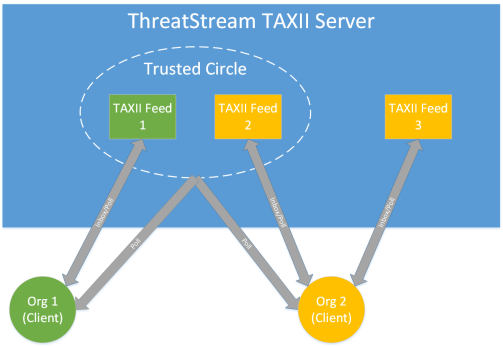
- Org 1 owns TAXII Feed 1, which is shared with a trusted circle that Org 2 is also a member of.
- Org 2 owns TAXII Feed 2, which is shared with the trusted circle, and TAXII Feed 3, which is classified as My Organization and not shared with any trusted circle.
- Org 1 can poll the trusted circle to pull data that Org 2 pushes to TAXII Feed 2.
- Org 2 can poll the trusted circle to to poll data that Org 1 pushes to TAXII Feed 1.
- Org 2 has exclusive access to data it pushes to TAXII Feed 3, which is not shared with any trusted circle.
Sharing TAXII Intelligence via Saved Searches
Saved searches you create on ThreatStream can also be polled by TAXII clients. After authenticating using the ThreatStream TAXII Discovery URL and your ThreatStream credentials, your saved searches appear as poll collections on the TAXII client. Only the saved searches created by the user whose credentials you used for authentication are available. Saved searches created by other users in your organization are not available.
To share intelligence from ThreatStream through saved searches filters using TAXII 2.1:
-
Save a search filter for your required dataset in ThreatStream.
See Saving Observable Search Filters for a complete procedure.
Once you have created the search filter, this search filter and related observables are automatically available to you via the TAXII 2.1 API root URL as a saved search collection.
-
Configure your TAXII 2.1 client. Depending on the configuration, you may need to specify the following:
-
Discovery URL: https://optic.threatstream.com/taxii2/
-
API root URL for search filter collections: https://api.threatstream.com/api/v1/taxii21/search_filters/collections/
-
ID of the search filter using which you want to share intelligence. For this, go to Observables > Advanced > Manage, locate the needed seach filter, and then copy its ID from the Id column.
-
-
Use the following API call to get observables and context from the needed search filter:
https://api.threatstream.com/api/v1/taxii21/search_filters/collections/<search_filter_id>/objects/where
<search_filter_id>is the ID of the needed saved search filter.
The observables from ThreatStream are shared with your TAXII 2.1 client.