Anomali Security Analytics Overview
Anomali Security Analytics delivers a powerful, integrated cybersecurity solution that empowers organizations to enhance their defenses with advanced features such as log aggregation, a scalable data lake for rapid insight retrieval, and customized analytics dashboards. Security Analytics offers automated multilayer threat detection, behavior analytics, and an interactive investigation workbench, complemented by alert enrichment and automated response capabilities. With tools for detection triage, domain prediction, and proactive threat hunting, Anomali ensures that your enterprise can swiftly identify, analyze, and respond to potential security threats, safeguarding your digital environment against current and future risks.
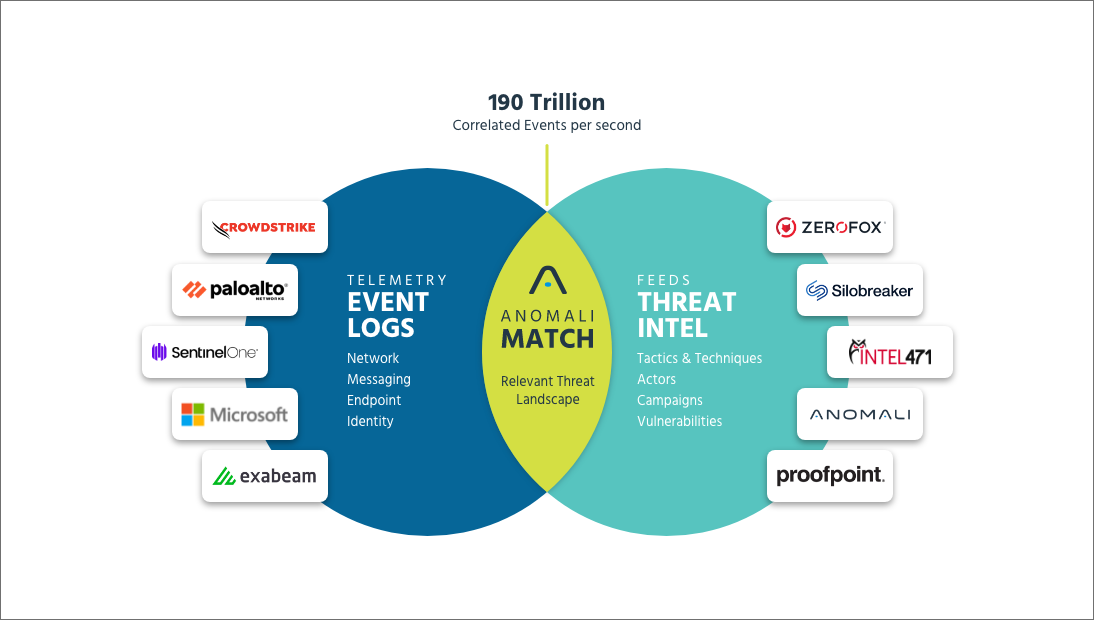
Anomali Security Analytics Key Objectives
With an easy-to-use, web-based interface that provides interactive dashboards and predefined reports, the Anomali Security Analytics platform enables your security team to:
- Gain visibility over events matching indicators of compromise (IOCs)
- Gain visibility over events matching connections to Domain Generated Algorithm (DGA) domains
- Perform retrospective searches for advanced forensics
- Generate alerts based on criteria that you specify
By filtering out the noise, correlating event data from your network, and analyzing this data to identify real threats, Anomali Security Analytics helps your security team prioritize, focus, and optimize threat response efforts.
Anomali Security Analytics Deployment Components
The following illustration shows a basic Security Analytics deployment. Security Analytics ingests event telemetry and asset data from your organization's cloud sources and on-premise sources. Security Analytics correlates events with ThreatStream intelligence and enriches the matching results with asset details. Optionally, you can configure Security Analytics alert actions to send outbound messages or add tags to ThreatStream IOCs and use ThreatStream Integrator to update outbound destinations.
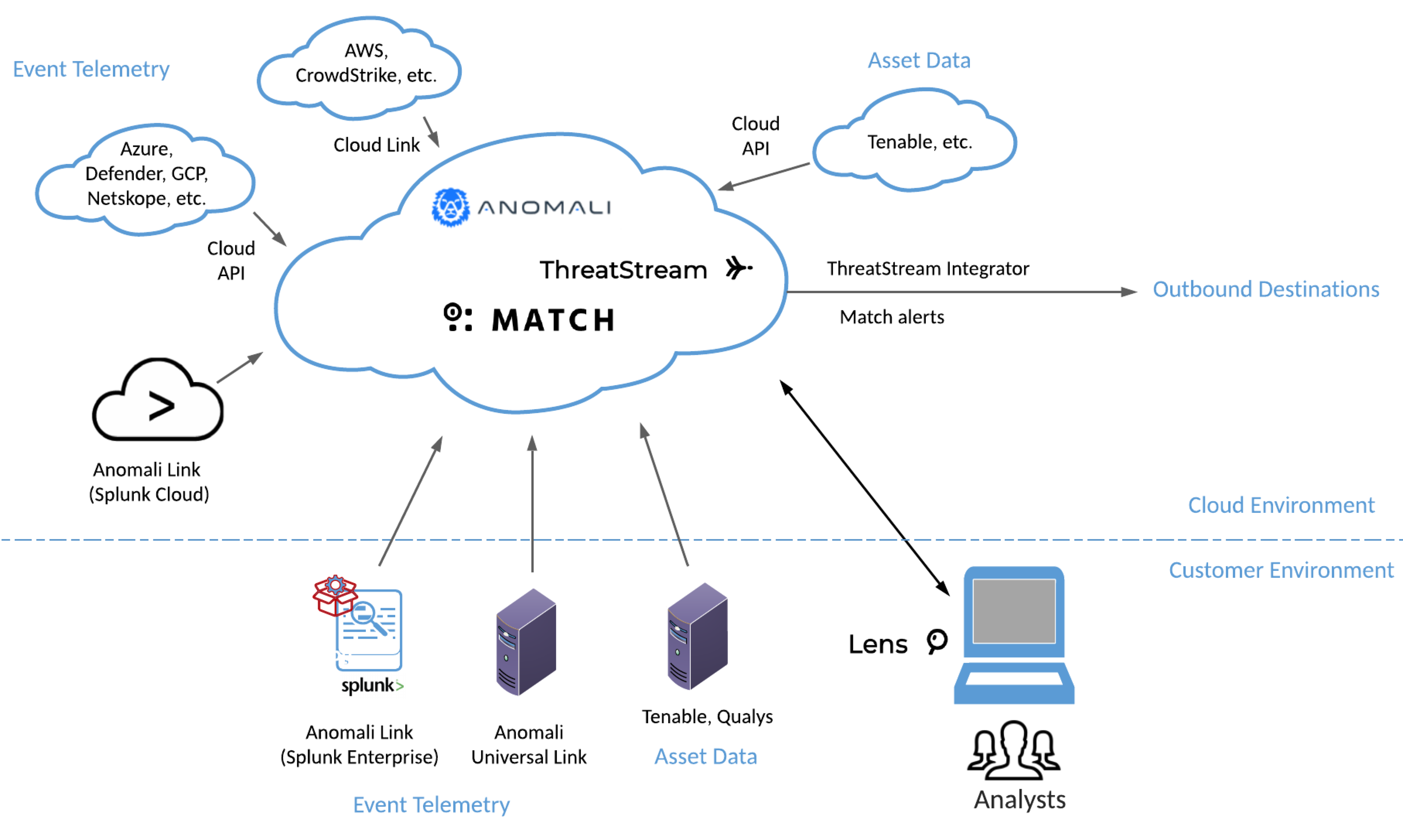
The following sections describe the basic components in detail.
Anomali Security Analytics
The Anomali Security Analytics system has the following specialized components:
- Web-based user interface
- Network security event telemetry collection
- Security intelligence and asset details correlation
- Forensic service
- Alert service
Threat Intelligence
Anomali Security Analytics correlates event logs with intelligence your organization maintains in Anomali ThreatStream. ThreatStream is a Threat Intelligence Platform (TIP) that aggregates threat intelligence from diverse sources, provides an integrated set of tools for fast and efficient investigations, and delivers operationalized threat intelligence to your security controls at machine speed.
Security Analytics serves information about detected observables (sometimes referred to as sightings) to the ThreatStream observable details pages and the My Attacks report. In cloud deployments, you do not need to do anything to enable this integration.
Refer to ThreatStream online help for complete details.
Anomali Link Software
You deploy one or more Anomali Link software instances. Link software is deployed on the SIEM system or on another system in your environment—sources on premises in your local network. A Link instance connects to Security Analytics on one side and to a SIEM (or other event source) on the other side. Links perform the following work:
-
Collect data from the event source
-
Parse the data into normalized event log fields
-
Upload the normalized event log data to Security Analytics
Anomali Copilot
Anomali Copilot is a free browser extension for Google Chrome, Microsoft Edge, and Mozilla Firefox from Anomali. Copilot uses natural language processing (NLP) to scan the contents of a web page you are currently viewing. On the web page, Copilot highlights all cyber threat information—actors, malware, and observables. Copilot integrates with Security Analytics in the backend. As you view a web page, Copilot highlights the indicators that have matched events on your network. You can drill down directly from Copilot to Security Analytics to get more details about the matched events and view the details about the indicator.
You can find Copilot browser extension package files, Office 365 add-in package files, and the Anomali Copilot User Guide on ThreatStream Downloads.