Slack MCP Integration
You can integrate Slack MCP with ThreatStream Next Gen to send PIR updates and results directly to Slack channels and direct messages. This allows you to share intelligence, notify stakeholders, and keep teams aligned without leaving ThreatStream Next Gen.
Activating Slack MCP Integration
To start using Slack integration in ThreatStream Next Gen, you need to activate the Slack MCP Endpoint integration on the Integrations Marketplace page.
Before You Begin
Before configuring Slack MCP integration, you must:
-
Navigate to
https://api.slack.com/appsand create an OAuth app from scratch to authenticate to the remote MCP server from Threatstream Next Gen. For details, see Creating an app. - After creating an app, add the following permission scopes to your app:
search:read.publicsearch:read.privateusers:readchat:write
- Add the following MCP server URL to your app configuration:
https://api.threatstream.com/api/v1/mcp_integration/oauth_callback/(US Cloud)https://api-eu.threatstream.com/api/v1/mcp_integration/oauth_callback/(EU Cloud)
- Generate a User OAuth Token.
Note that a Bot User OAuth Token will not work. If a User OAuth Token is not available, you must reinstall the app to generate a User OAuth Token.
To configure Slack MCP integration:
- Navigate to ThreatStream Next Gen > Integrations Marketplace.
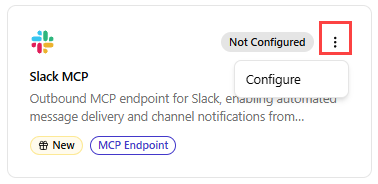
- Locate the Slack MCP tile.
- Click the three-dot vertical menu and then click Configure.
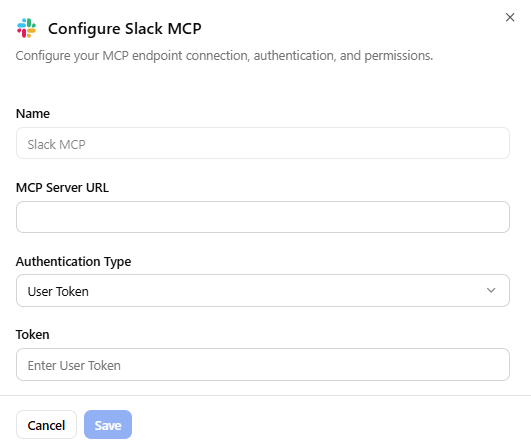
- Provide a Slack MCP Name.
- Enter the MCP Server URL:
https://mcp.slack.com/v1 - Select an Authentication Type— User Token or OAuth 2.0 - Manual Client Registration.
- Enter one of the following:
- If you selected User Token as your authentication type, enter your user OAuth token.
- If you selected OAuth 2.0 - Manual Client Registration as your authentication type, enter your Client ID and Client Secret.
- Click Save.
The Slack MCP Integration is configured and is now ready for use. You can now configure your PIRs to send their results to public Slack channels or direct messages. For details on enabling Slack integration in PIRs, see Configuring Slack Output.