Creating Incidents
Incidents can be created manually from the Incidents page, or by escalating an existing alert. See Escalating Alerts to Incidents for details on creating an incident from an alert.
To create a new incident:
-
Navigate to ThreatStream Next Gen > Security Operations > Incidents.
-
Click Create Incident in the top right corner of the Incidents page.
-
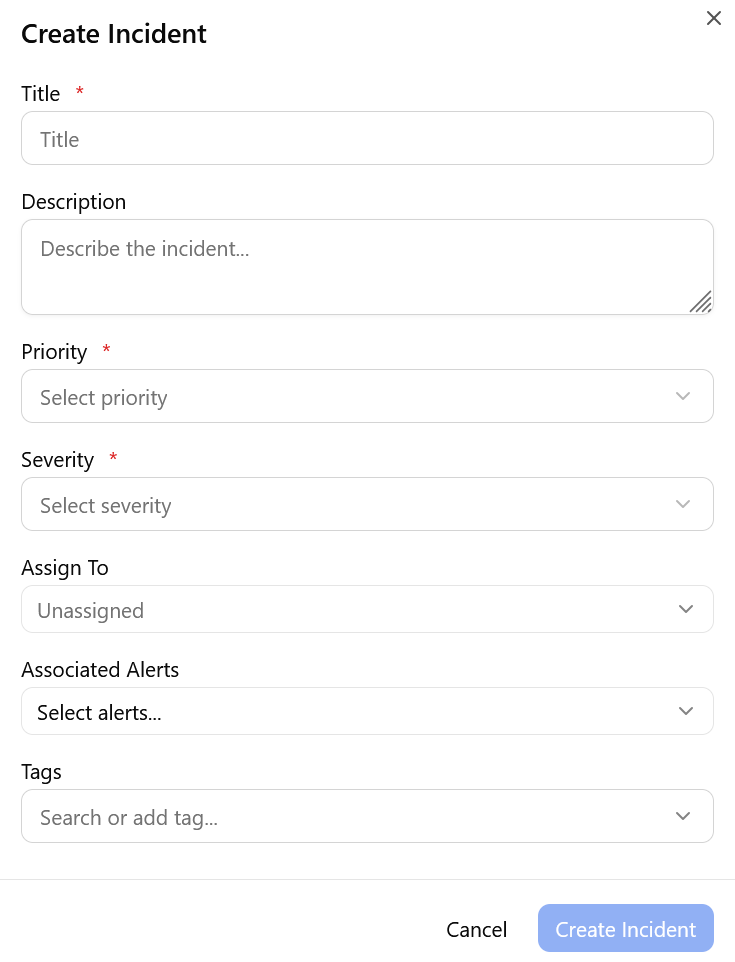
In the Create Incident dialog, provide the following:
-
Title (required) — a descriptive name for the incident
-
Description (optional) — a summary of the incident context
-
Priority (required) — P1, P2, P3, or P4
-
Severity (required) — Critical, High, Medium, or Low
-
Assign To (optional) — defaults to Unassigned
-
Associated Alerts (optional) — search and select existing alerts to link to this incident
-
Tags (optional) — analyst-applied tags for categorization and filtering
-
-
Click Create Incident.
The incident is created and added to the Incidents board.