Cloning Observables
Cloning an observable creates a separate instance of the observable. When you clone an observable, an import session is initiated, which must be approved to add the cloned observable to your threat intelligence.
Cloned observables are completely independent from the observables they are cloned from. Once a cloned observable is imported and added to your threat intelligence, it is treated like any other observable in ThreatStream.
Reasons to Clone Observables
Cloning observables can be helpful when...
- you encounter Inactive observables imported by other organizations. Cloned observables become Active after successfully moving through the regular Import process.
For more on the ThreatStream Import process, see Importing Observables with Import Assistant - you want a private copy of an observable for internal use. Cloned observables are always My Organization.
Cloned Attributes
When you clone an observable, the following intelligence fields are copied from the source observable: Value, Type, iType, Confidence, Tags, and Severity.
Cloned observables maintain the Threat Model entity associations held by the source observable. As a result, threat model entities associated with a source observable also list the cloned observable in their Intelligence associations.
Cloning Restrictions
The following observables cannot be cloned:
- Observables assigned a string indicator type. For a list of string indicator types, see Indicator Types in ThreatStream.
- Observables with the status Pending
- Observables imported by your organization
To clone an observable:
- Navigate to the observable details page of the observable you want to clone.
-
Under Intelligence, locate the instance of the observable that you want to clone and click Clone.
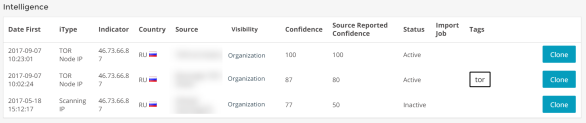
If Clone is not displayed, the observable cannot be cloned due to one or more of the above restrictions.
- On the dialogue box, click Clone to initiate the cloning process.
- If you are authorized to approve import sessions, you can click Approve Now to immediately add the cloned observable to your threat intelligence, or Review Now to review the observable details on the Import Review page. For more on approving import sessions, see Approving Import Jobs.
Note: Only users with Approve Import privileges can approve observable imports.