Inviting Members to Join a Trusted Circle
You can invite members of your organization to join Trusted Circles that you administer. See Understanding the Role of a Trusted Circle Administrator for details. You can also invite members to join Trusted Circles that have the Open Invite setting enabled.
When inviting someone to join a Trusted Circle:
-
You can choose to invite them as an administrator of that Trusted Circle. See Understanding the Role of a Trusted Circle Administrator for more details.
-
You can extend an invitation to a person who does not have an account on ThreatStream. The person will need to create an account on ThreatStream before joining the Trusted Circle.
To invite other members to join a Public Trusted Circle:
- Navigate to ThreatStream > Manage > Trusted Circles.
-
Select the Trusted Circle to which you want to invite additional members.
- Click Invite.
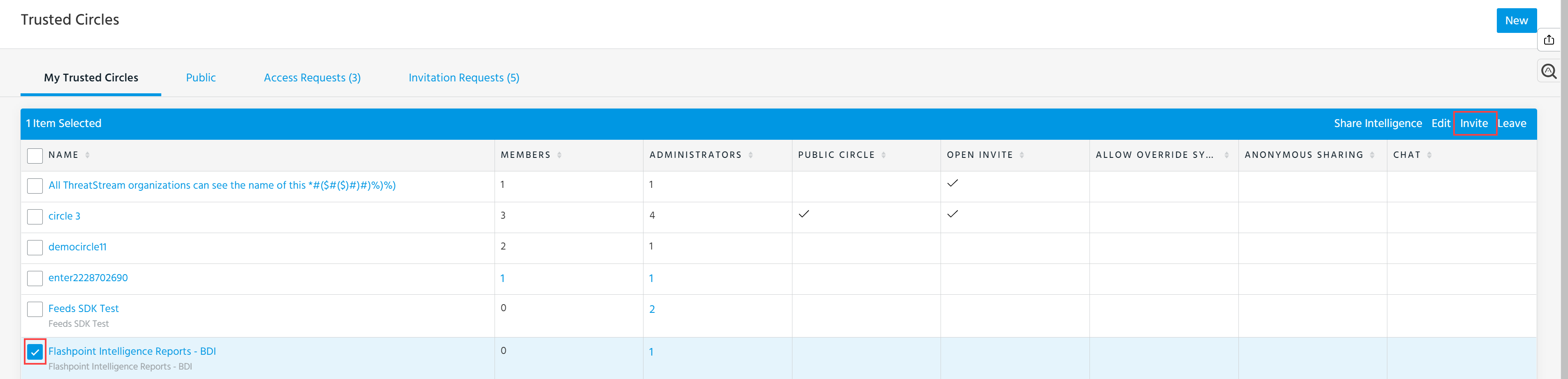
-
In the windows that opens, enter the email address of the person you want to invite.
To invite someone to join as the administrator of a Trusted Circle, select Invite as an administrator of this Trusted Circle.
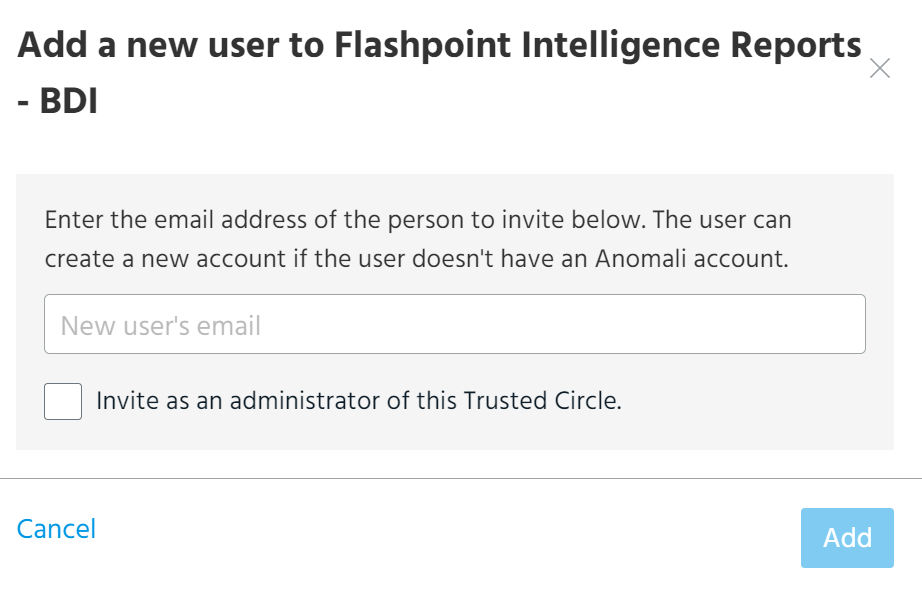
-
Click Add.
The invited person will receive an email notifying them of the invitation. After receiving the invitation, they must accept or decline the invitation inThreatStream. If they do not have an account ThreatStream, they must first register with ThreatStream. See Managing Invitations to Join Trusted Circles for more details.