Using Copilot Asset Analyzer
The Copilot Asset Analyzer is one of the Anomali Copilot features designed to help analysts eliminate the need to follow the typical alert workflow and automate playbooks used by SOC analysts and SOARs for threat detection.
The Copilot Asset Analyzer provides an inside-out analysis of your organization's assets based on ingested logs, which are added to Security Analytics as a lookup table. This lookup table data is designed for high-level analysis focused on internal assets, offering a clear and manageable overview of the organization’s network exposure and security posture. Anomali updates this table daily to ensure real-time relevance. The same lookup table is used to leverage Custom Copilot capabilities, which allow you to ask impactful questions in natural language and receive actionable insights related to your organization's assets.
Currently, the Copilot Asset Analyzer includes the following out-of-the-box Custom Copilots available at the top of the Custom Copilot tab:
-
Asset Assessment Agent: Delivers valuable insights into the assets of your organization. This includes the following information about each detected asset: open and externally accessible ports, running services, end-of-life software, expired or invalid certificates, the number of detected CVEs (including those with known exploits), and associated domains. Furthermore, the agent provides a risk score for every reachable asset. The risk score of an asset is determined by the total number of trusted attack detection engines that have flagged indicators related to the asset as malicious.
-
Indicators Assessment Agent: Provides information about indicators observed within your organization's network. Anomali thoroughly investigates these indicators to filter out data, label detected indicators (for example, proxy IPs, benign scanners, ad servers, etc.), and determine which of these indicators are malicious. Additionally, Anomali detects which assets have already interacted with malicious indicators.
These out-of-the-box Custom Copilots can be used the same way regular Custom Copilots are used. You can ask questions about your assets, view the lookup table in Search, and modify the Custom Copilot's title. See Anomali Custom Copilot for details.
However, unlike user-created Custom Copilots, you cannot permanently delete Custom Copilots of the Asset Analyzer. If you delete them, they will re-appear on the Custom Copilot tab the next day as Anomali runs logs analysis and generates the lookup table for the Copilot Asset Analyzer daily.
Below is an example of the Copilot Asset Analyzer user interface.
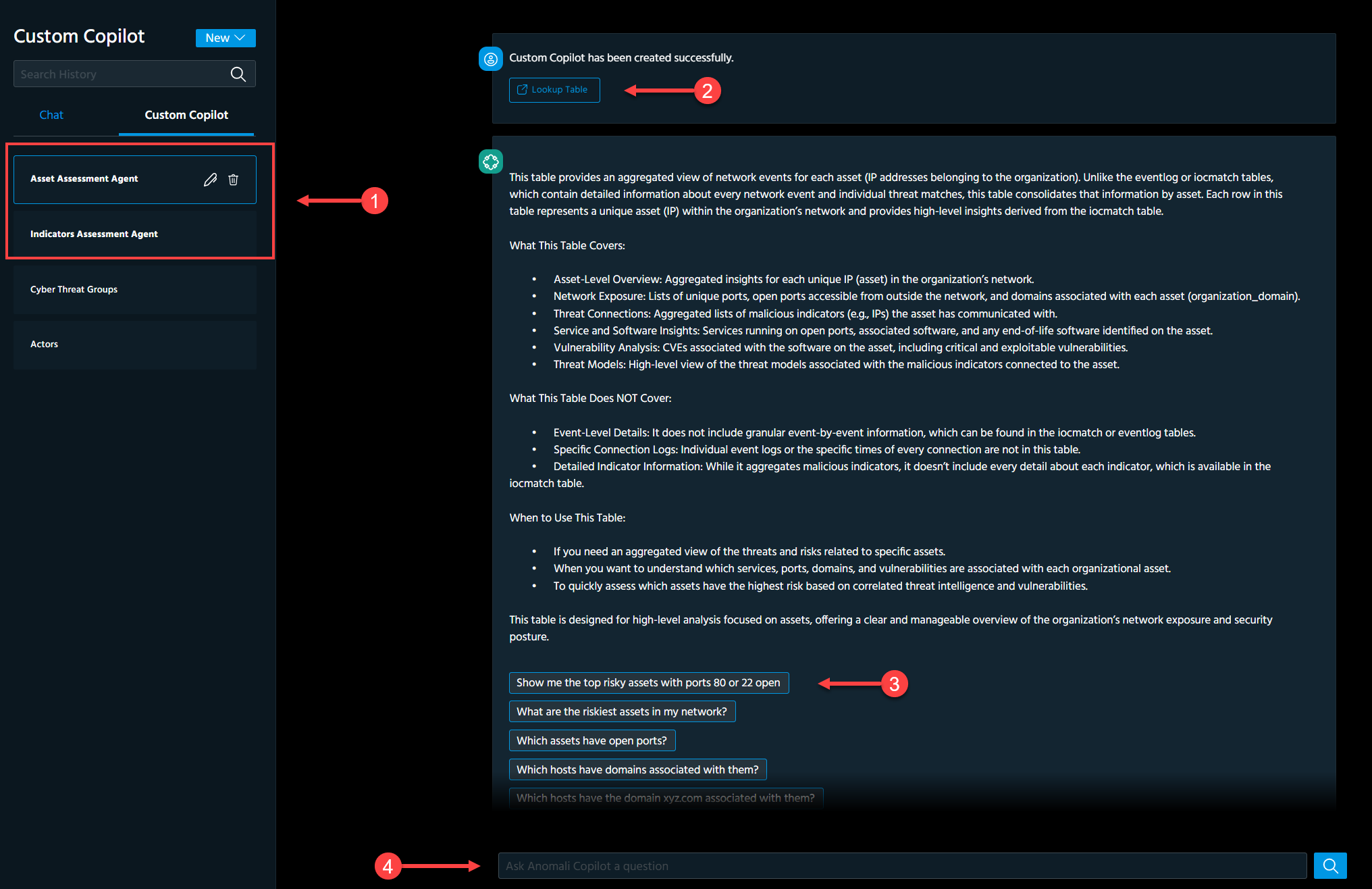
 Out-of-the-box Custom Copilots of the Copilot Asset Analyzer.
 Lookup table that includes information about your organization's assets.
 Suggested questions related to your organization's assets.
 Search field for entering a custom question about your organization's assets.