Enriching Data with Tenable Security Center
The Tenable Security Center enrichment renders vulnerable assets in your network from your on premise appliance on details pages of CVE-compliant vulnerabilities in ThreatStream. The availability of this network-specific information alongside vulnerability details in ThreatStream enables you to quickly determine the number of assets affected by a particular vulnerability in your network.
Using the Tenable Security Center Enrichment on ThreatStream OnPrem
Each time you open the Tenable Security Center tab in the Enrichments section of vulnerability details pages, the enrichment queries vulnerable assets in Tenable Security Center associated with the CVE identifier in the Title or Tags field of the vulnerability in ThreatStream. If results are returned, vulnerable assets are displayed on the Tenable Security Center tab. Results are returned for multiple CVEs in cases where the Title or Tags fields contain more than one CVE identifier.
Note: The enrichment can only retrieve results for vulnerabilities in ThreatStream which have a CVE identifier, such as CVE-2019-0124, in the Title or Tags field.
(Click the image to enlarge it.)
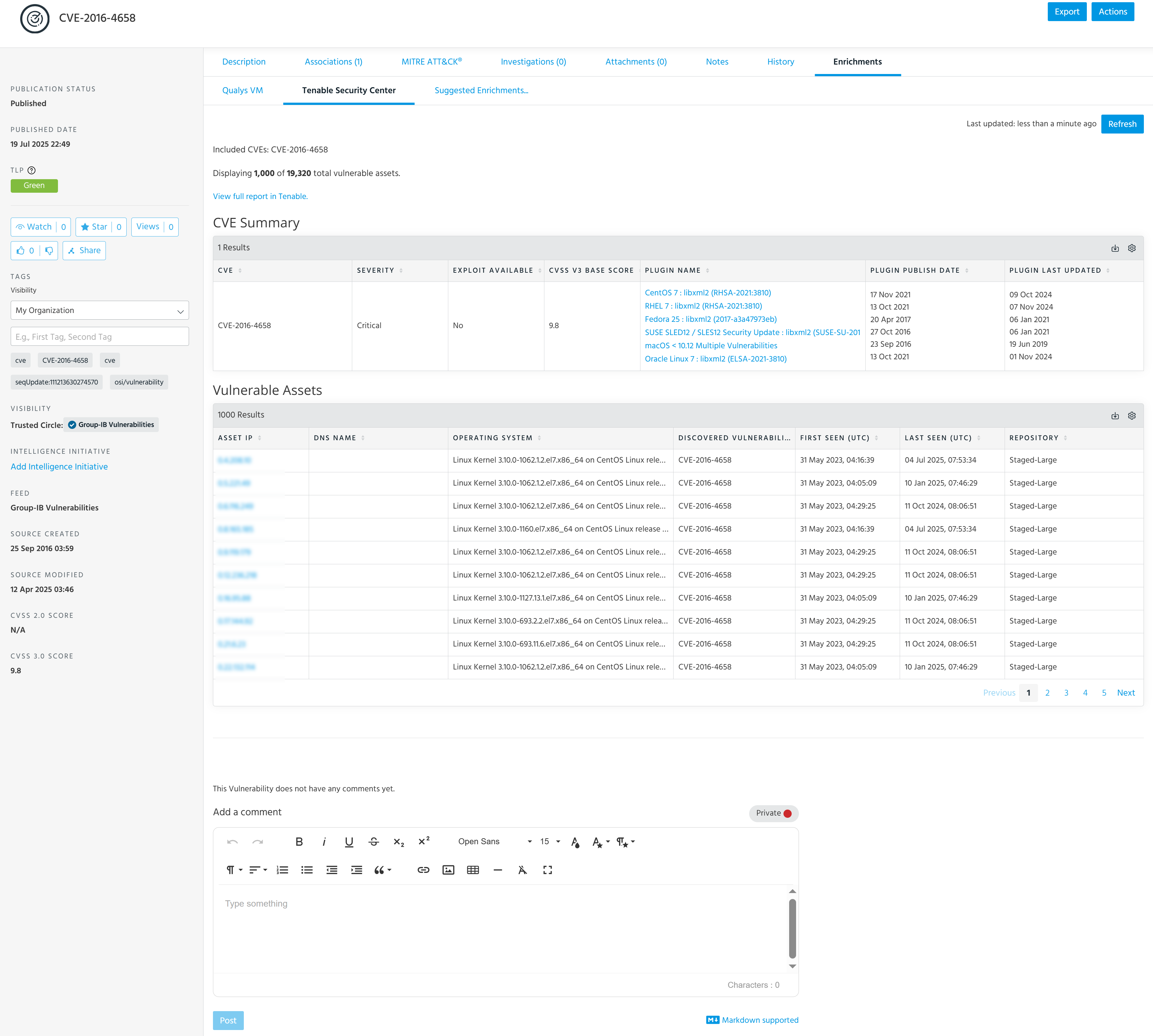
The enrichment returns up to 1000 distinct instances of vulnerable assets. It also returns all occurrences of relevant vulnerabilities. Therefore, more than one instance of the same vulnerability may be displayed. The Vulnerabilities Distribution charts are displayed in cases where the enrichment queries multiple vulnerabilities.
Activating the Tenable Security Center Enrichment
The enrichment activation process includes specifying your Tenable credentials. To activate the enrichment, your Tenable Security Center appliance must be accessible to ThreatStream. If you are deploying the Tenable Security Center enrichment on a ThreatStream OnPrem or ThreatStream AirGap appliance, you must ensure that your Tenable Security Center appliance is accessible to your ThreatStream OnPrem or ThreatStream AirGap appliance. ThreatStream honors proxies configured on your Tenable Security Center appliance.
Note: If deploying the Tenable Security Center enrichment on a ThreatStream OnPrem appliance, Anomali recommends against activating a second instance of the enrichment on ThreatStream Cloud. In these cases, only the Tenable Security Center enrichment deployed on your ThreatStream OnPrem appliance will function.
To activate the Tenable Security Center enrichment:
-
Navigate to ThreatStream > APP STORE > APP Store.
-
Click Get Access on the Tenable Security Center tile.
- On the wizard page that opens, click I have credentials.
-
On the next wizard page that opens, click Credentials and enter your Tenable API URL, Access Key, and Secret Key.
-
Click Activate.
The Tenable Security Center enrichment is now active.
Exporting Tenable Security Center Data in CSV Format
Returned data displayed in the table can be exported in CSV format.
To export Tenable Security Center information in CSV format:
-
Navigate to the details page of the vulnerability of interest.
To search for a vulnerability:
- Navigate to ThreatStream > Analyze > Threat Model.
- Select Vulnerabilities in the filter on the right side of the screen. Vulnerabilities are not included in search results unless this filter is selected.
- Enter your search query.
- Click the name of the vulnerability of interest in the search results to visit its details page.
See Accessing Threat Models for more information on searching for Threat Model entities.
- On the vulnerability details page, open the Enrichments tab and click Tenable Security Center. If available, details on the vulnerable assets in your network are displayed.
-
To export these results in CSV format, click
 > Export to CSV.
Your download starts automatically.