Enriching Data with Tenable Vulnerability Management
The Tenable Vulnerability Management enrichment is a cloud-based risk and vulnerability management solution provided by Tenable. The enrichment enables you to access vulnerability data within your cloud and IT environments, providing insights into affected assets of your organization. The details of the affected assets can be viewed in ThreatStream and exported in CSV format for further analysis.
Activating the Tenable Vulnerability Enrichment
The activation process involves specifying your Tenable Access Key and Secret Key.
To activate the Tenable Vulnerability Management enrichment:
-
Navigate to ThreatStream > APP STORE > APP Store.
-
Click Get Access on the Tenable Vulnerability Management tile.
- On the wizard page that opens, click I have credentials.
-
Click Credentials and enter your Tenable Access Key and Secret Key.
-
Click Activate.
The Tenable Vulnerability management enrichment is now active. Allow ThreatStream up to 15 minutes to sync up with your Tenable account.
Using the Tenable Vulnerability Enrichment in ThreatStream
After activating the Tenable Vulnerability Management enrichment, assets and vulnerabilities data for the last 30 days will be imported from your Tenable account to ThreatStream. After the initial import, ThreatStream will sync up with your Tenable account every hour. Cached data older than 30 days will be removed.
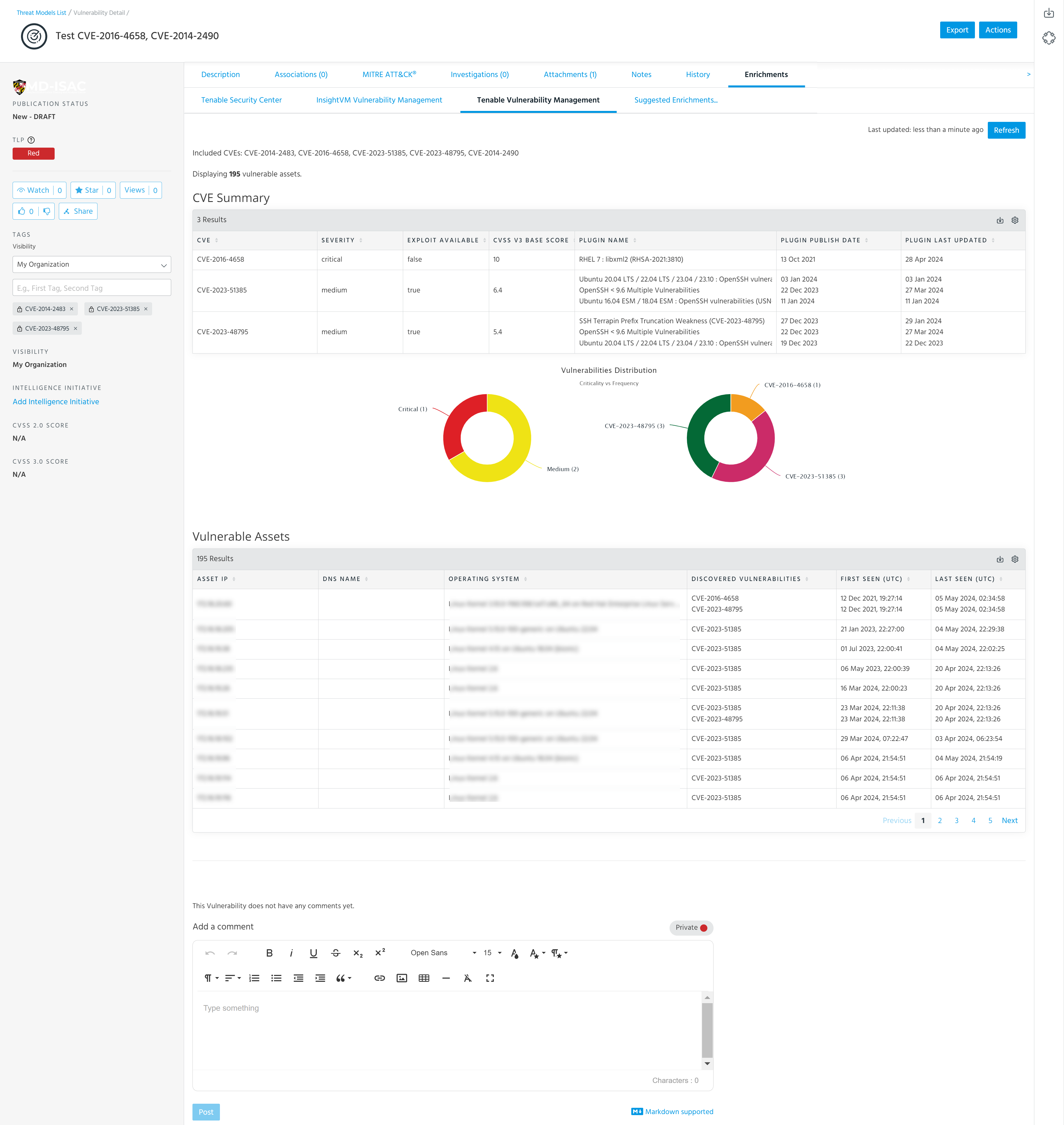
Imported assets and vulnerability data appears under the Tenable tab of Vulnerability details pages. It includes the CVE Summary table displaying CVEs, severity of vulnerabilities (medium, high, or critical), CVSS V3 base score, plugin name, plugin publish date, and plugin last updated date. The Vulnerabilities Distribution charts display the criticality and frequency of vulnerabilities in your IT environment. Below the charts, the Vulnerable Assets table is displayed. The table includes the following information about vulnerable assets: asset IP, DNS name, operating system, discovered vulnerabilities, first seen, last seen, and repository.
Below is an example of the Tenable Vulnerability Management tab on the Vulnerability details page.
Exporting Tenable Vulnerability Management Data in CSV Format
Imported data displayed in the table can be exported in CSV format.
To export Tenable.sc information in CSV format:
-
Navigate to the details page of the vulnerability of interest.
To search for a vulnerability:
- Navigate to ThreatStream > Analyze > Threat Model.
- Select Vulnerabilities in the filter on the right side of the screen. Vulnerabilities are not included in search results unless this filter is selected.
- Enter your search query.
- Click the name of the vulnerability of interest in the search results to visit its details page.
See Accessing Threat Models for more information on searching for Threat Model entities.
- On the vulnerability details page, open the Enrichments tab and click Tenable Vulnerability Management. If available, details on vulnerable assets in your network are displayed.
-
To export these results in CSV format, click
 > Export to CSV.
Your download starts automatically.