Enriching Data with Risk IQ
The Risk IQ enrichment enables you to leverage Risk IQ data from observable details pages and the Explore pivoting tool.
View documentation on the Risk IQ enrichment for Anomali
You must obtain your API Key from the settings page within Risk IQ to configure the Risk IQ service.
To activate the Risk IQ enrichment:
-
If you do not have a Risk IQ Community Edition account, use these steps to register and obtain your API key:
- Visit the Risk IQ registration page, enter the required information, and click Register. After completing this step, Risk IQ sends you an activation email.
- Locate the Risk IQ activation email in your inbox and complete the enclosed steps required to activate your account.
- Login to your Risk IQ account.
-
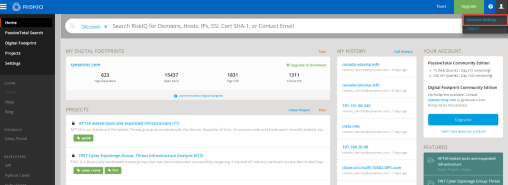
Click Account Settings in the Risk IQ menu at the top right of the screen.
- Click Sources and scroll down to the API Access section.
-
Click Show to expose your User API key.
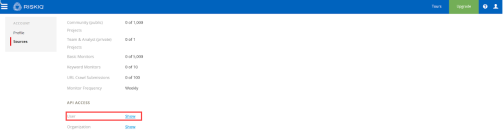
You will use your API key to activate the enrichment.
-
On the ThreatStream user interface, navigate to APP Store>APP Store.
- Click Get Access on the Risk IQ tile.
- Click I have credentials. Alternatively, if you do not have the required credentials, click Request Access. An Anomali Sales representative will contact you and provide the necessary information.
- Enter the API Username associated with your Risk IQ account.
- Enter your API Key.
- Click Activate.
Note: To learn more about the Risk IQ public API, visit http://api.passivetotal.org/api/docs/
The Risk IQ public API limits requests from individual users to 15 per day.