Threat Model Search
To search for threat model entities from ThreatStream.
Request
/api/v1/threat_model_search/
HTTP Method: GET
| Search for threat model entities |
GET Note: When this request is used for basic search of threat model entities, the search is performed within all threat model types except vulnerabilities. To search for vulnerabilities, a model type must be specified.
For example, /api/v1/threat_model_search/?model_type=vulnerability |
| Search for local threat model entities only (for ThreatStream OnPrem only) | GET /api/v1/threat_model_search/?local_only=true |
| Search for remote threat model entities only (for ThreatStream OnPrem only) |
GET Only use this attribute when searching remote threat model entities on ThreatStream Cloud. Set this attribute to Do not set this attribute to |
For attributes that can be used for filtering, see the table below.
Response
Format: JSON
Number of rows returned (by default): 20
Attributes: See the table below
Order of attributes: By default, attributes are sorted by the modified_ts attribute, in descending order.
Attributes
| Attribute | Type | Filter Operators | Description |
|---|---|---|---|
| alias | string | "exact", "startswith", "contains" | Other names by which the actors are known. |
| circles | string | Not available for filtering | Trusted circles with which the actor is shared. |
| created_by | string | Not available for filtering | Email address of the user who created a threat model entity. |
| created_ts | date | "exact", "lt", "lte", "gte", "gt" |
Time stamp of when the entity was created on ThreatStream, in UTC format. Date is in this format: YYYYMMDDThhmmss where T denotes the start of the value for time. For example, 2014-10-02T20:44:35. Note: This attribute is returned in the response to a GET call and is set by ThreatStream; it cannot be configured.
|
| end_date | date | "exact", "lt", "lte", "gte", "gt" |
Time when a campaign was known to have ended. Date must be specified in this format: YYYYMMDDThhmmss and in UTC format. where T denotes the start of the value for time. For example, 2014-10-02T20:44:35. |
| feed_id | string | "exact" |
Numeric ID of the threat feed that provided the threat model entity. |
| full_count | integer | "exact" |
Set |
| id | string | Not available for filtering | Unique ID assigned to the entity. |
| is_email | boolean | "exact" | Whether the threat bulletin was created as a result of an email import. |
| is_public | boolean | "exact" |
Whether the entity is public or private (including belonging to a trusted circle). False—if the entity is private or belongs to a Trusted Circle True—if the entity is public Default: False |
| local_only (for ThreatStream OnPrem only) | boolean | "exact" |
Whether to search for only local entities on ThreatStream OnPrem. True—search for local entities only See remote_api (for ThreatStream OnPrem only) to search for remote entities only. |
| locations | list of dict | "exact" |
Same as target_locations. See target_locations. In responses, the locations field includes IDs, names, and values of target locations associated with the threat model entity. |
| model_type | string | "exact" |
Type of the threat model entity: actor, attack pattern, campaign, incident, malware, signature, tipreport (Threat Bulletin), ttp, vulnerability. Note: The
model_type attribute is required for searching vulnerabilities. |
| modified_ts | date | "exact", "lt", "lte", "gte", "gt" |
Time stamp of when the entity was last updated on ThreatStream, in UTC format. Date is in this format: YYYYMMDDThhmmss where T denotes the start of the value for time. For example, 2014-10-02T20:44:35. |
| name | string | "exact", "startswith", "contains" | Name of the entity. |
| organization | string | Not available for filtering | Organization that owns the entity. |
| organization_id | string | "exact" | ID of the organization that owns the entity. |
| owner_user | string | Not available for filtering | ThreatStream user that created the entity. |
| owner_user_id | string | "exact" | ID of the ThreatStream user that created the entity. |
| publication_status | string | "exact" | Entities can be in new, pending_review, review_requested, reviewed, published statuses. |
| published_ts | datetime | "exact", "lt", "lte", "gte", "gt" |
Time stamp of when the entity was published on ThreatStream, in UTC format. Date is in this format: YYYYMMDDThhmmss where T denotes the start of the value for time. For example, 2014-10-02T20:44:35. |
| remote_api (for ThreatStream OnPrem only) | boolean | "exact" |
Whether to search for only entities that are remote (stored on Cloud). This attribute does not need to be set to search for local entities. Only use this attribute when searching remote entities from ThreatStream Cloud. Set this attribute to Do not set this attribute to See local_only (for ThreatStream OnPrem only) for searching local entities. |
| resource_uri | string | Not available for filtering | URI for the entity. |
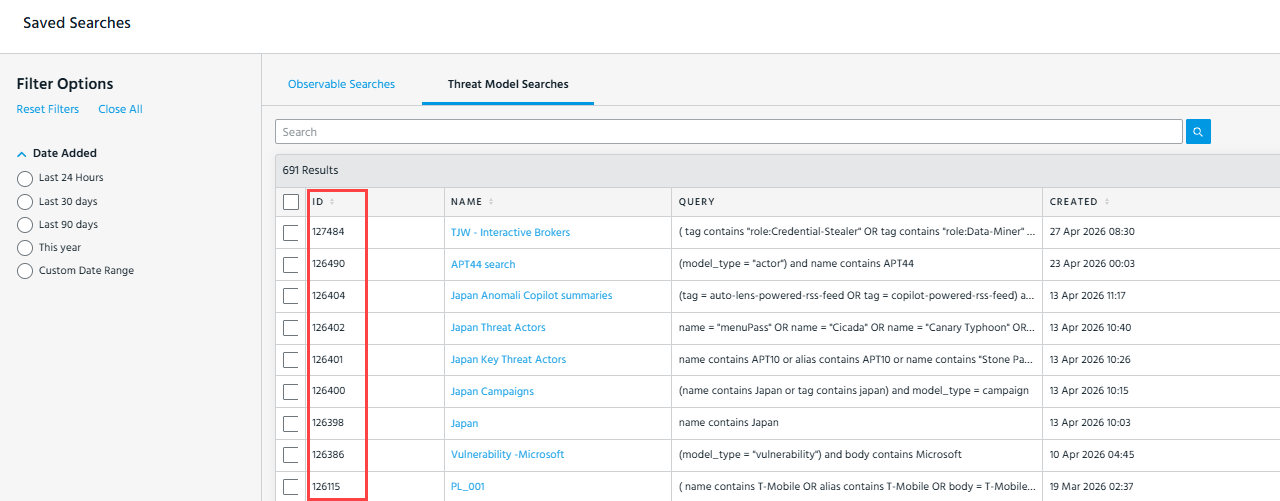
| search_filter | integer | "exact" |
ID of the saved search filter you want to execute. There are two methods of retrieving saved search filter IDs:
Important:When using
search_filter, it cannot be combined with q (advanced search) or basic search filters. Pagination and sorting parameters such as limit and sort are still supported.Note: For ThreatStream OnPrem users only: the Threat Model Search API does not support a merged view of local and remote threat models when you use the
|
| signature$type | string | "exact" |
Type of signature. Possible values include:
Note: You must specify
model_type=signature when using signature$type in a query. |
| source_created | datetime | "exact", "lt", "lte", "gte", "gt" | Time stamp of when the entity was created by its original source. |
| source_locations | list of dicts | "exact" |
Source location associated with the threat model entity. Possible values include letter codes of regions, countries, and administrative areas (US States and Washington DC only) as defined by STIX 2.1. For example, Note: ThreatStream retrieves threat model entities that come from all locations that are part of the specified region/country/administrative area. For example, if you specify
source_locations=europe, ThreatStream will retrieve threat model entities from all European countries such as Germany, Poland, France, Belgium, and so on. |
| source_modified | datetime | "exact", "lt", "lte", "gte", "gt" | Time stamp of when the entity was last updated by its original source. |
| start_date | date | "exact", "lt", "lte", "gte", "gt" |
Time when a campaign was known to have started. Date must be specified in this format: YYYYMMDDThhmmss and in UTC format. where T denotes the start of the value for time. For example, 2014-10-02T20:44:35. |
| status | string | Not available for filtering | Status of a campaign: ongoing, historic, future. |
| subtype | string |
For hash observables—those with type=md5—subtype provides additional metadata on the type of hash associated with the observable. Possible values: MD5, SHA1, SHA256, SHA512. |
|
| tags | string |
Additional comments and context associated with the observable when it was imported from its original threat feed. Note: The API response may return several tags.* attributes (namely, tags.id and tags.name). Those attributes are for ThreatStream's internal tracking and can be ignored. |
|
| target_industry | string | "exact" |
Target industries associated with the threat model entity. Possible values are defined by the STIX 2.1 Industry Sector vocabulary. For example, |
| target_locations | string | "exact" |
Target locations associated with the threat model entity. Possible values include letter codes of regions, countries, and administrative areas (US States and Washington DC only) as defined by STIX 2.1. For example, Notes:
|
| trusted_circle_ids | string | "exact" | Used for querying entities associated with specified trusted circles. |
| tlp | string | "exact" | TLP setting associated with the entity. |
| value | string | "exact", "startswith", "contains" |
threat model keyword search. Specifying a value yields the same results as a keyword search through the ThreatStream user interface. The following fields are queried: Actors: Aliases, Description, Name, Tags Attack Patterns: Aliases, Description, Name, Tags Campaigns: Aliases, Description, Name, Tags Courses of Action: Description, Name, Tags Incidents: Name, Description, Tags Infrastructure: Aliases, Description, Name, Tags Identities: Description, Name, Tags Intrusion Sets: Aliases, Description, Name, Tags Malware: Aliases, Description, Name, Tags Signatures: Description, Name, Tags Threat Bulletins: Description, Name, Tags Tools: Aliases, Description, Name, Tags TTPs: Aliases, Description, Name, Tags Vulnerabilities: Aliases, Description, Name, Tags |
| workgroups | Not available for filtering | Not used. |
Examples
As Intelligence API calls can yield large numbers of results, the following examples use the limit attribute to limit the number of results displayed in an API call.
By default, if the limit parameter is not specified, 20 records are fetched at a time. However, when limit=0, a maximum of 1000 the total records that meet the query are fetched.
-
To retrieve the 100 most recently modified threat model entities in ThreatStream:
Copycurl 'https://api.threatstream.com/api/v1/threat_model_search/?limit=100' -H 'Authorization: apikey <username>:<api_key>' -
To retrieve the 10 most recently modified threat model entities from a feed whose ID is 72:
Copycurl 'https://api.threatstream.com/api/v1/threat_model_search/?limit=10&feed_id=72' -H 'Authorization: apikey <username>:<api_key>' -
To retrieve the 20 (default) most recently modified threat model entities tagged with "malware" and "community-threat-briefing":
Copycurl 'https://api.threatstream.com/api/v1/threat_model_search/?tags.name=malware,community-threat-briefing' -H 'Authorization: apikey <username>:<api_key>' -
To retrieve the 20 (default) most recently modified threat model entities that are shared with a trusted circle whose ID is 20:
Copycurl 'https://api.threatstream.com/api/v1/threat_model_search/?trusted_circle_ids=20' -H 'Authorization: apikey <username>:<api_key>' -
To retrieve the 20 (default) most recently modified threat model entities that are assigned the TLP setting red:
Copycurl 'https://api.threatstream.com/api/v1/threat_model_search/?tlp=red' -H 'Authorization: apikey <username>:<api_key>' -
To retrieve a list of Actors (20 by default if the limit parameter is not specified):
Copycurl 'https://api.threatstream.com/api/v1/threat_model_search/?model_type=actor' -H 'Authorization: apikey <username>:<api_key>' -
To retrieve the Actor whose name is "Fancy Bear":
Copycurl 'https://api.threatstream.com/api/v1/threat_model_search/?model_type=actor&name='Fancy Bear'' -H 'Authorization: apikey <username>:<api_key>' -
To retrieve the 20 (default) most recently modified campaigns in "new" publication status:
Copycurl 'https://api.threatstream.com/api/v1/threat_model_search/?model_type=campaign&publication_status=new' -H 'Authorization: apikey <username>:<api_key>' -
To retrieve the 20 (default) most recently modified Signatures of the Snort type:
Copycurl 'https://api.threatstream.com/api/v1/threat_model_search/?model_type=signature&signature$type=Snort' -H 'Authorization: apikey <username>:<api_key>' -
To retrieve the 20 (default) most recently modified Actors and Signatures of the signature type CybOX:
Copycurl 'https://api.threatstream.com/api/v1/threat_model_search/?model_type=signature,actor&signature$type=CybOX' -H 'Authorization: apikey <username>:<api_key>' -
To retrieve Threat Models filtered by a specified saved search:
Copycurl 'https://api.threatstream.com/api/v1/threat_model_search/?search_filter=<filter_id>' -H 'Authorization: apikey <username>:<api_key>' -
(Only on ThreatStream OnPrem) To retrieve the 100 most recently modified threat model entities from ThreatStream Cloud:
Copycurl 'https://<ThreatStream_OnPrem_IP_or_FQDN>/api/v1/threat_model_search/?limit=100&remote_api=true' -H 'Authorization: apikey <username>:<api_key>' -
(Only on ThreatStream OnPrem) To retrieve a list of Actors (20 by default if the limit parameter is not specified) from ThreatStream Cloud:
Copycurl 'https://<ThreatStream_OnPrem_IP_or_FQDN>/api/v1/threat_model_search/?model_type=actor&remote_api=true' -H 'Authorization: apikey <username>:<api_key>'