Intelligence Enrichments
This article details the ThreatStream API resources that pertain to the retrieval of third-party observable enrichment data. You can use the API to retrieve enrichment data from the following services:
-
AbuseIPDB
- Passive DNS
- Recorded Future
-
Shodan Database
Note that enrichment data will not be returned for services to which your organization does not subscribe.
AbuseIPDB
Use the Integration Package API to access data returned from the AbuseIPDB enrichment.
Request
/api/v1/integration_package/direct/ip/<IP_address>/?name=AbuseIPDB
HTTP Method: GET
Example
To return data from the AbuseIPDB enrichment:
curl 'https://api.threatstream.com/api/v1/integration_package/direct/ip/<IP_address>/?name=AbuseIPDB' -H 'Authorization: apikey <username>:<api_key>'Response
Format: JSON
Example
[
  {
    "status_code": 200,
    "results": {
    "data":{
        "numDistinctUsers": 0,
        "countryName": "USA",
        "domain": "abcd.us",
        "isp": "Telecomunications-US",
        "lastReportedAt": null,
        "countryCode": "US"
        "isPublic": true,
        "usageType": null,
        "reports": [],
        "ipVersion": 4,
        "hostnames": [],
        "abuseConfidenceScore": 0,
        "isWhitelisted": null,
        "ipAddress": "190.15.150.101",
        "totalReports": 0
       }
    }
  },
]
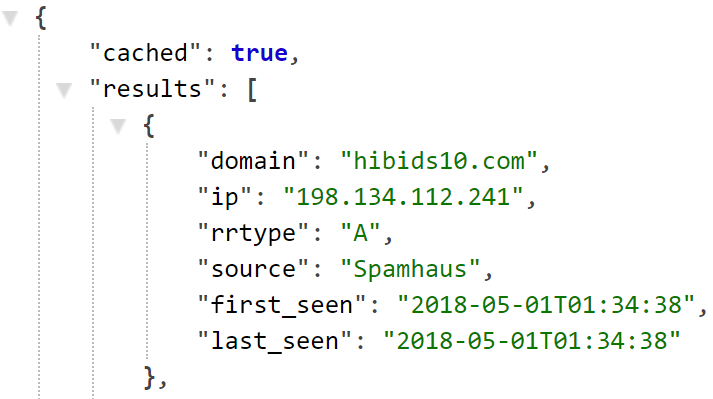
Passive DNS
Use the Passive DNS API to return enrichment data for domain, IP, and URL observables available to you on ThreatStream. The Passive DNS API leverages data from the following providers:
-
Spamhaus
-
Farsight
-
OpenDNS Investigate
-
Google Threat Intelligence
-
Microsoft Defender Threat Intelligence
Request
/api/v1/pdns/
HTTP Method: GET
Examples
To return Passive DNS enrichment data for a domain:
curl 'https://api.threatstream.com/api/v1/pdns/domain/<observable_value>/' -H 'Authorization: apikey <username>:<api_key>'To return Passive DNS enrichment data for an IP address:
curl 'https://api.threatstream.com/api/v1/pdns/ip/<observable_value>/' -H 'Authorization: apikey <username>:<api_key>'
Response
Format: JSON
Example
Recorded Future
Use the Integration Package API to return Recorded Future data for domains, IPs, hashes, or URLs available to you on ThreatStream.
Request
/api/v1/integration_package/direct/
HTTP Method: POST (recommended)
OR
HTTP Method: GET
Examples
HTTP Method: POST
curl --location 'https://api.threatstream.com/api/v1/integration_package/direct/' \--header 'Content-Type: application/json' \
--header 'Authorization: apikey <username>:<apikey>' \
--data '{
"name": "Recorded Future",
"type": "<IoC_type>",
"value": "<IoC_value>"
}'
Possible type values include ip, url, domain, and hash.
HTTP Method: GET
curl 'https://api.threatstream.com/api/v1/integration_package/direct/?name=Recorded%20Future&type=ip&value=<ip_value>' -H 'Authorization: apikey <username>:<api_key>'Possible type values include ip, url, domain, and hash.
Response
Format: JSON
Example
[
  {
    "status_code": <Recorded Future response status code>,
    "results": <Recorded Future response message>
  }
]
Successful response status code: 201
Shodan Database
Use the Integration Package API to access data returned from the Shodan Database enrichment.
Request
/api/v1/integration_package/direct/ip/<IP_address>/?name=Shodan+Database
HTTP Method: GET
Example
To return data from the Shodan Database enrichment:
curl 'https://api.threatstream.com/api/v1/integration_package/direct/ip/<IP_address>/?name=Shodan+Database' -H 'Authorization: apikey <username>:<api_key>'
Response
Format: JSON
Example
[
  {
    "status_code": 200,
    "results": {
    <JSON results here>
    }
  },
]
- A call to the Shodan Database endpoint may invoke multiple endpoints, and some endpoints may not pass data. Therefore, multiple status codes and results are returned as a list of dictionaries.
-
Some vendors may not support IPv6.