Viewing the Workgroups Dashboard
The Workgroups dashboard gives you insight on the latest activity from the workgroups of which you are a member. You can use the dashboard to track recent investigations assigned to your workgroups, rule matches whose visibility is restricted to your workgroups, and intelligence created by your workgroups.
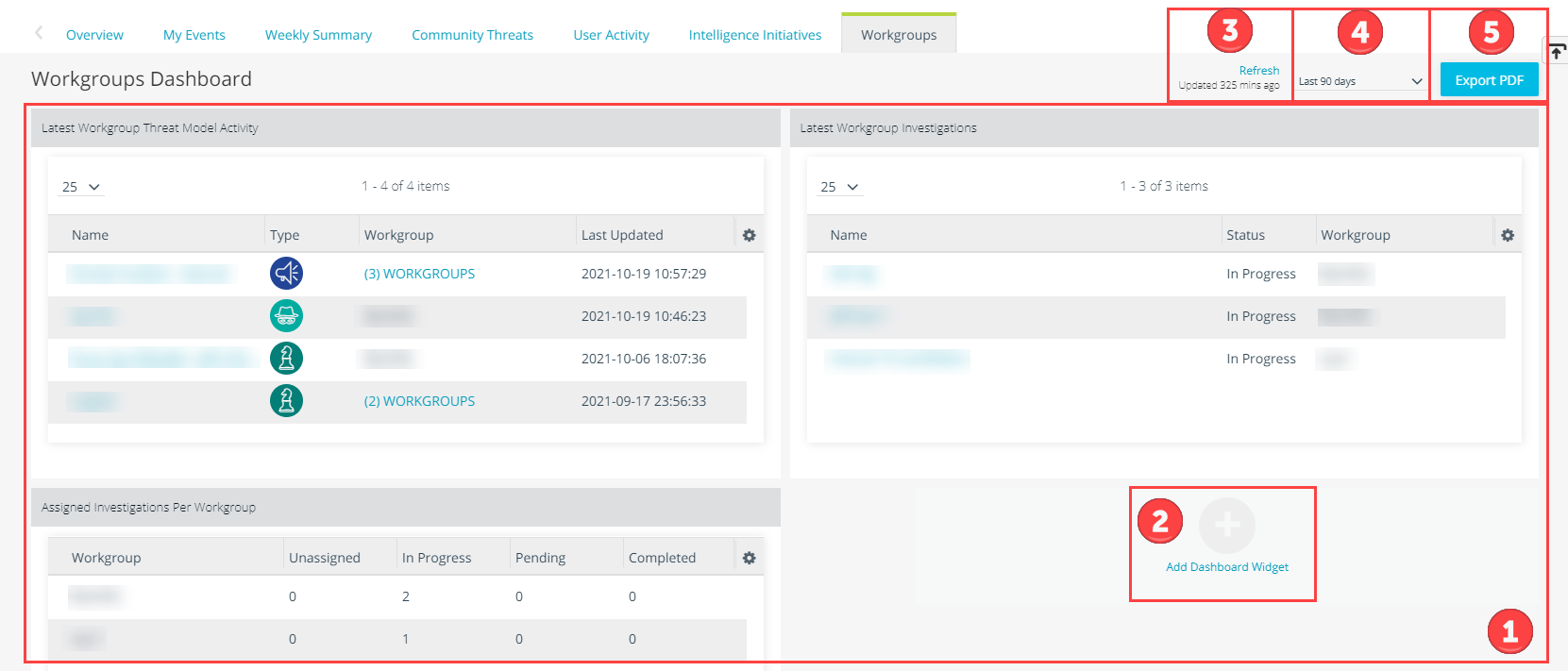
 Widgets: The following widgets are available:
| Widget | Description |
|---|---|
| Assigned Investigations Per Workgroup | Count of investigations assigned to your workgroups, listed by the current investigation status. |
| Latest Workgroup Investigations | List of the most recently updated investigations assigned to your workgroup. Click the investigation name to drill down on investigation details. |
| Rule Matches Per Workgroup | Count of keyword matches from rules whose visibility is restricted to your workgroups. |
| Latest Workgroup Rule Matches | List of the most recent keyword matches from rules whose visibility is restricted to your workgroups. Click the rule name to drill down on rule details. |
| New Intelligence Entities Per Workgroup | Count of recently created Threat Model entities and observables whose visibility is restricted to your workgroups. |
| Latest Workgroup Threat Model Activity | List of the most recently updated Threat Model entities whose visibility is restricted to your workgroups. |
 Click Add Dashboard Widget to select additional widgets to display on your dashboard.
 Refresh: Manually refresh the dashboard. The dashboard automatically refreshes every 30 minutes.
 Select a date range for the data displayed on the dashboard. By default, data from the last seven days is displayed.
 Export PDF: Click Export PDF to download a point in time snapshot of the dashboard widgets. Your download begins immediately. If you use a popup blocker, you will see the following message:
Downloading the exported PDF was blocked by your pop-up blocker. Please click HERE to download the PDF instead.
Click Here to download your PDF.