Adding Organization Shared Custom Dashboards
In addition to creating your own custom dashboards, you can add shared dashboards created by other members of your organization to your home page. For non-creators, shared dashboards are read only.
You can clone shared dashboards to create an editable version. See Cloning Shared Dashboards for more information.
To add a shared custom dashboard to your home page:
- Click Dashboard in the top navigation menu.
- Click + Add Dashboard.
-
On the Add Existing tab of the Create a New Dashboard window, select the shared dashboard you want to add to your home screen.
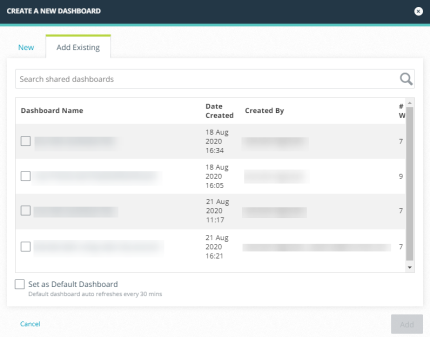
- (Optional) Select Set as Default Dashboard if you want the new dashboard to launch automatically each time you navigate to the Dashboard screen. Default dashboards refresh automatically every 30 minutes.
- Click Add. The shared dashboard is added to your home page.
Cloning Shared Dashboards
You can clone shared dashboards for the purpose of creating customizable versions.
Read Only users cannot clone dashboards.
To clone a shared dashboard:
- Click Dashboard in the top navigation menu.
- Navigate to the shared dashboard you want to clone.
- Click Clone Dashboard in the Actions menu.
- Enter a Dashboard Name.
- Specify a Visibility setting for the cloned dashboard. Dashboards can be visible only to you (Private) or shared with other users in your organization (My Organization).
- (Optional) Select Set as Default Dashboard if you want the new dashboard to launch automatically each time you navigate to the Dashboard screen. Default dashboards refresh automatically every 30 minutes.
- Click Save. You are directed to the cloned dashboard.