Viewing Weekly Summaries for Your Organization
The Weekly Summary page contains reports regarding organization data
If data is not available for a particular chart, the chart is not shown. Reports are read only and cannot be exported. Data is refreshed every Sunday at midnight.
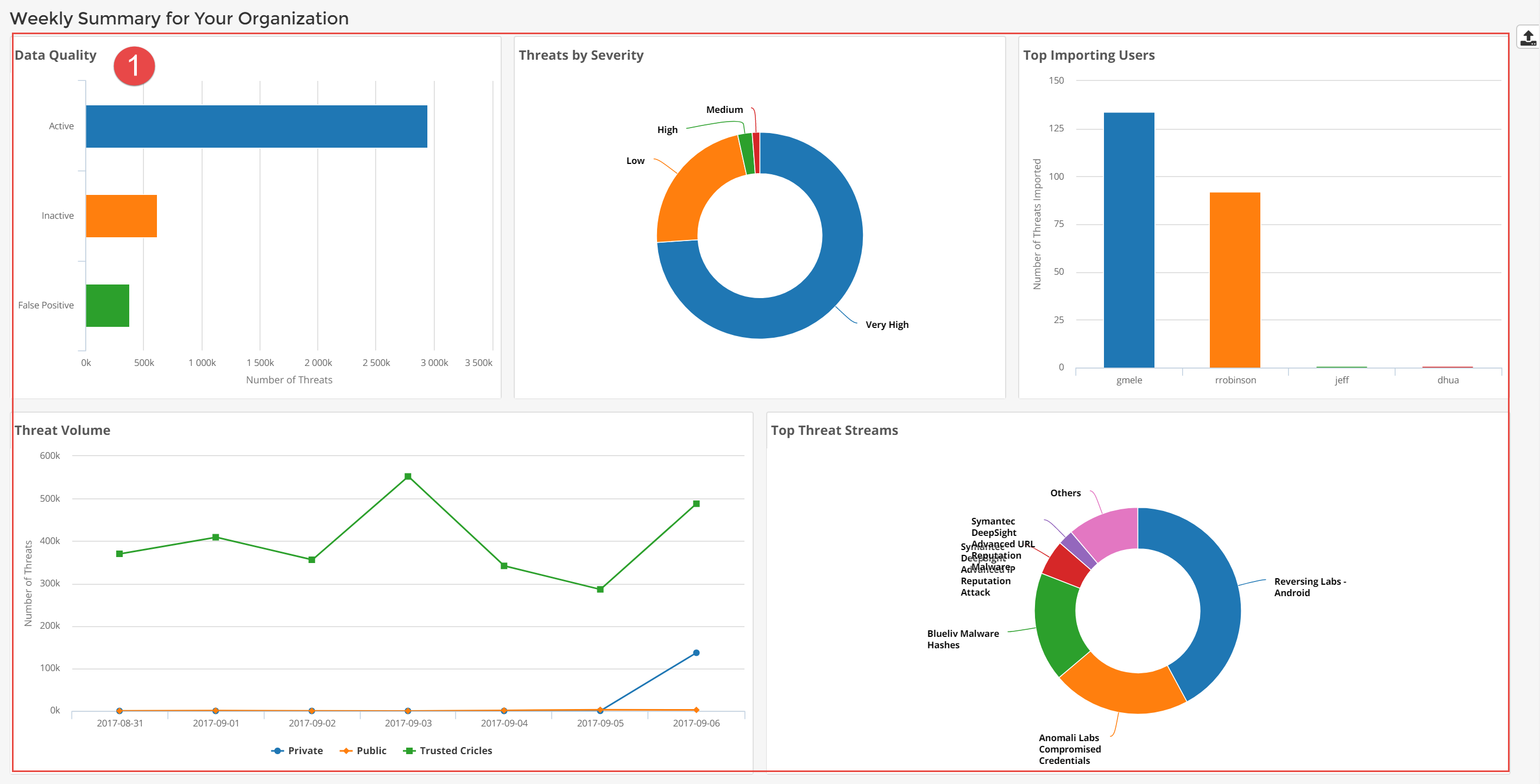
 Organization Intelligence Summaries
- Data Quality: View the total number of observables from the last seven days by status. The ratio of False Positive to Active threats is a primary gauge of data quality.
- Threats by Severity: View the severity of data collected over the last seven days.
- Top Importing Users: View the users in your organization who have imported the most threat intelligence data over the last seven days.
- Threat Volume: View which type of data provided the largest number of threats—data shared with Anomali Community, data from your trusted circles, or data restricted to your organization. Streams purchased in the Anomali APP Store are classified as private streams.
- Top Threat Streams: View which feeds have provided the most intelligence for your organization over the last seven days.
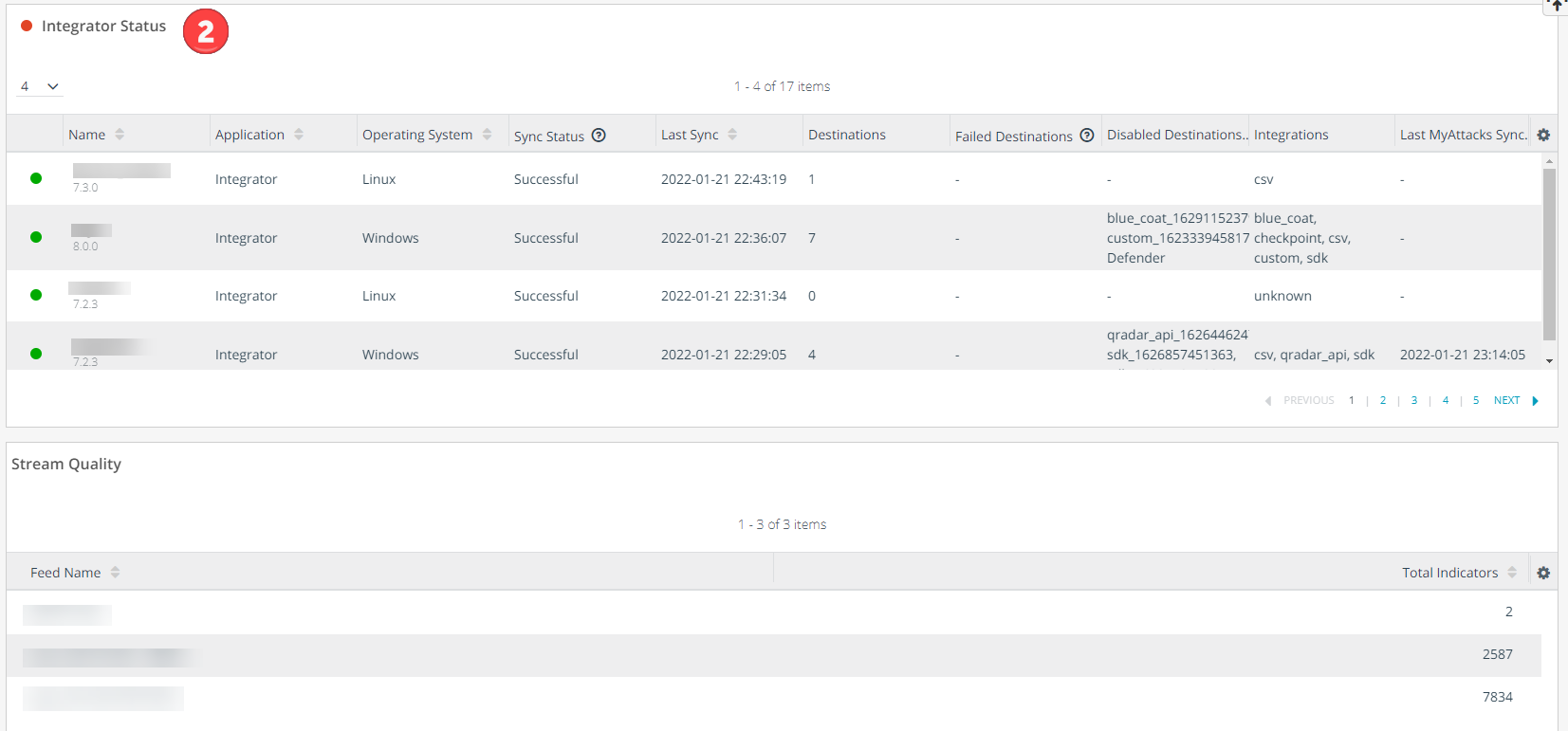
 ThreatStream Integrator Summaries
-
ThreatStream Integrator Status: View recent connections from your ThreatStream Integrator integrations. The widget updates each time ThreatStream Integrator synchronizes data.
A general status is displayed in the top left corner of the widget:
Green: All ThreatStream Integrator instances are synchronizing data as expected.
Red: One or more ThreatStream Integrator instances listed in the widget cannot synchronize data due to errors.
Column Definition Status Green:ThreatStream Integrator is synchronizing data as expected.
Red:ThreatStream Integrator cannot synchronize data due to errors.
Note: This status relates to the Sync Status of the ThreatStream Integrator instance and not individual destinations. Therefore, in some cases, errors can exist on Integrator destinations while the Sync Status of the ThreatStream Integrator is listed as successful.
Name Name and version number of the ThreatStream Integrator instance.
Application ThreatStream Integrator or Security Analytics. Operating System Operating System on which the application is deployed. Sync Status Status of the most recent scheduled synchronization.
-
Successful: Integration is pulling data on a scheduled interval.
-
Failed: Integration has missed pulling data for two scheduled intervals.
-
Manual: Integration is not pulling on a schedule.
Last Sync Timestamp of the most recent synchronization. Destinations Number of destinations configured on the ThreatStream Integrator deployment. Failed Destinations Names of destinations with which ThreatStream Integrator cannot synchronize due to errors.
Note: Destination status is available for ThreatStream Integrator instances on version 7.3 and beyond.
Disabled Destinations Names of destinations currently disabled on ThreatStream Integrator. Integrations List of integrations configured on ThreatStream Integrator. For Security Analytics, this column displays log sources. Last MyAttacks Sync Timestamp of the most recent synchronization of MyAttacks data between ThreatStream Integrator and ThreatStream. -
- Stream Quality: View the number of observables provided by each stream your organization subscribes to.