Bolstering Your Security Controls Against the Sunburst Supply Chain Attacks
In the wake of the Sunburst supply chain attacks, the Anomali Threat Research team is working hard to provide the Anomali community with late breaking intelligence and analysis as the situation develops.
Visit the Anomali Sunburst Attack Resource Center: https://www.anomali.com/learn/sunburst
Read a blog post on the attacks from the Anomali Threat Research team: https://www.anomali.com/blog/fireeye-solarwinds-hacks-show-that-detection-is-key-to-solid-defense
Listen to an episode of Anomali Detect Podcast on the attacks: https://www.anomali.com/resources/podcasts/the-fireeye-solarwinds-hacks-adversaries-want-access-how-to-protect-your-organization
Watch this video on using Security Analytics and Anomali Lens to discover whether you've been impacted: https://www.anomali.com/resources/videos/have-i-been-impacted-retrospective-search-with-anomali-match-and-lens
ThreatStream has the following resources, features, and tools available for you to understand and analyze the latest threat intelligence and automate its ingestion in your downstream security controls and integrations.
- Threat Model Entities
- Observables
- Themed Custom Dashboard
- My Events Map (customized to Sunburst attacks)
It is strongly recommended that you leverage all of these resources and the latest threat intelligence on ThreatStream to ensure the best possible defense for your infrastructure. Additionally, review your current filters to ensure Sunburst specific threat intelligence is properly forwarded and ingested into your downstream integrations and other security controls.
Threat Model Entities
The Anomali Threat Research team has issued a set of Threat Model entities about cyber threats related to the Sunburst attacks, including Threat Bulletins and Signatures.
The following Threat Bulletins are available to grant you context on the attacks and provide a single source for associated intelligence:
-
FireEye Threat Bulletin: https://ui.threatstream.com/tip/1870242
- SolarWinds Threat Bulletin: https://ui.threatstream.com/tip/1876480
The following Signature search filters are available to grant you easy access to all Signature entities associated with the attacks:
- FireEye Red Team Tool Countermeasures Signature filter: https://ui.threatstream.com/threatmodels?model_type=signature&value=%22FireEye%20Red%20Team%20Tool%20Countermeasures%22
- SolarWinds Supply Chain Compromise Signature filter: https://ui.threatstream.com/threatmodels?value=%22solarwinds%20supply%20chain%20compromise%22&model_type=signature
These Threat Model entities are associated with observables, sandbox analysis reports, and other related threat models thus allowing you to obtain the latest threat intelligence from one central location and ingest it into your downstream integrations through Integrator, match against your event logs on Anomali Match, and ingest into your Splunk instances to automatically scan events in Splunk against the observables associated with the bulletin.
Observables
The Anomali Threat Research Team is tagging and associating observables related to the Sunburst attacks as they are discovered. You can use the following observable search filters to stay up to date on the observables to watch out for in your infrastructure:
-
FireEye Red Team Tool Countermeasures Observables: https://ui.threatstream.com/search?value__re=.*FireEye%20Red%20Team%20Tool%20Countermeasures.*
- SolarWinds Supply Chain Compromise Observables: https://ui.threatstream.com/search?value__re=.solarwinds%20supply%20chain%20compromise
Themed Custom Dashboard
The Anomali Threat Research team has developed a rapid response dashboard to surface the latest observables related to the Sunburst attacks.
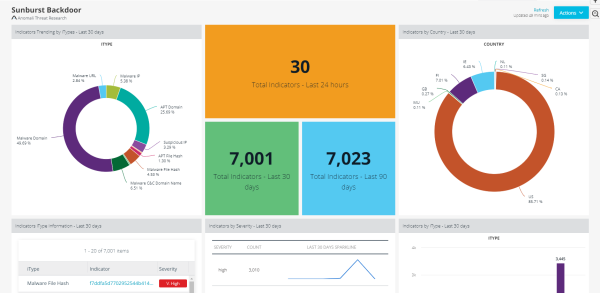
Use the instructions in to add this dashboard to your home screen on ThreatStream. Look for the Sunburst Backdoor dashboard on the Add Existing tab.
My Events Map (customized to Sunburst attacks)
Anomali recommends enabling the My Events Map to visualize threats tagged with Sunburst specific threat information from around the world.
To create a My Events Map for Sunburst:
-
Create a Saved Search:
- Navigate to Analyze > Observables.
- Click Advanced.
-
For FireEye related observables, enter this in the search text box:
(value contains "FireEye Red Team Tool Countermeasures" or tags contains "FireEye Red Team Tool Countermeasures")For SolarWind related observables, enter this in the search text box:
(value contains "SolarWinds Supply Chain Compromise" or tags contains "SolarWinds Supply Chain Compromise") - Click Filter: Save as.
- Enter a name for the new filter. For example, Sunburst.
- Click Save.
- Click Dashboard > My Events.
- Click Recent Intelligence at the lower right corner of the map to locate the saved search you created earlier.
-
Select the saved search (for example, Sunburst).
The My Events Map will start populating with threat intelligence related to Sunburst.