Reporting False Positives
You can report observables you believe to be benign as false positive on ThreatStream.
Reporting My Organization observables as false positive does not require approval from Anomali. Reporting Anomali Community observables and those shared with your organization via trusted circles does require approval from Anomali. Therefore, there are distinct procedures for each scenario.
For ThreatStream OnPrem users only: For local observables, follow the procedure under Reporting My Organization Observables as False Positives. For remote observables, follow the procedure appropriate for the Visibility of the observable.
Note: Observables imported through feeds to which ThreatStream assigns a confidence score less than or equal to 15 are automatically marked false positive. Observables imported and approved through the ThreatStream user interface are never automatically marked false positive by ThreatStream. Since an observable can have multiple instances, cases occur in which observable values—imported through a feed—are automatically marked false positive by ThreatStream due to their confidence scores, while identical values—imported and approved through the ThreatStream user interface—have active status.
Reporting My Organization Observables as False Positives
Reporting My Organization observables—those owned by your organization—as false positive does not require approval from Anomali. To mark a My Organization observable false positive, simply edit the observable and change its Status to False Positive.
When you change the Status of a My Organization observable to False Positive it is removed from your downstream integrations but not added to your Exclude List.
To report a My Organization observable as false positive:
-
Navigate to the details page of the observable you want to report as false positive.
-
In the Intelligence table click Edit.
Note: Only users with the Approve Import privilege can edit observables.
- Under Status, select False Positive.
- Click Update.
Reporting Anomali Community or Trusted Circle Observables as False Positives
Reporting Anomali Community observables or those shared with your organization via trusted circles as false positive requires approval from Anomali. You can report these observables as false positives from observable details pages.
When reported, observables are immediately added to your Exclude List and also sent to Anomali for approval. Reported observables are also automatically removed from your downstream integrations via ThreatStream Integrator at your next scheduled data synchronization. If false positives are rejected by Anomali, they continue to be part of your Exclude List but remain active on ThreatStream.
For more on managing your Exclude List entries, see Updating Organization Exclude List.
Note: Once approved by Anomali, the false positive status of a Anomali Community and trusted circle observables cannot be revoked. If you need to revoke the false positive status of an observable, contact Anomali Customer Support.
To report a Anomali Community or trusted circle observable as false positive:
- Navigate to the details page of the observable you want to report as false positive.
-
Click Report as False Positive.
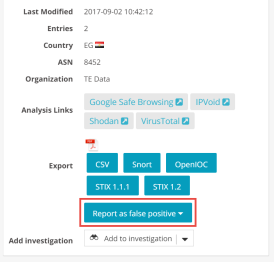
-
Select the reason why the observable is a false positive.
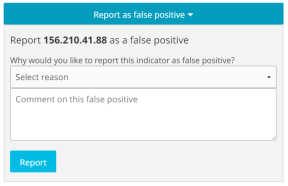
- (Optional) Enter an additional comment to provide more details.
- Click Report.