Chatting With Your Organization
Chat enables you to send direct messages to organization users, begin group messages with up to 7 users, and post in organization-wide channels.
To chat with your organization, select your organization icon the top left corner of the Chat screen.
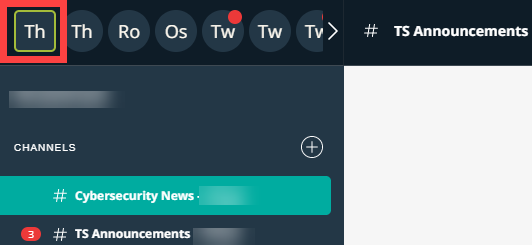
All organization chat rooms contain organization wide Cybersecurity News and TS Announcements channels. You can also send direct messages to individual organization members, group messages to multiple organization members, and create new channels for wide communication.
Sending Direct Messages
Direct messages are conversations between you and individual members of your organization on ThreatStream. These messages are private and accessible only by you and the user with which you are chatting.
To send a direct message, click + next to Direct Messages and select the user with whom you want to chat.
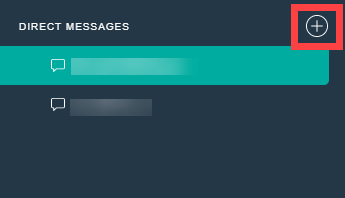
After you start a chat with an organization member, the conversation is listed under Direct Messages.
Sending Group Messages
Group messages can be created by any Chat user and contain up to 7 organization members.
To begin a group message:
- Navigate to Collaborate.
-
Click the + icon next to Direct Messages.
- Select the users you want to add to the group.
- Click Start.
Note: If you create a group message that contains the same users as a group message you have previously created, a new group message is not created. In these cases, the display name of the existing group is simply updated to reflect the name of the new group message you attempted to create.
Sending Channel Messages
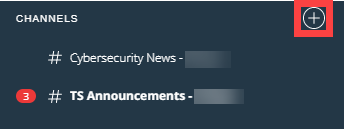
Unlike groups, channels do not have a limit for number of users. Channels are means for wider topical communication and announcements within a chat room. In addition to the default organization wide Cybersecurity News and TS Announcements channels, you can create new channels.
To create a new channel:
- Navigate to Collaborate.
- Click the chat room within which you want to create the channel.
-
Click the + icon next to Channels.
-
Enter a Name for the new channel.
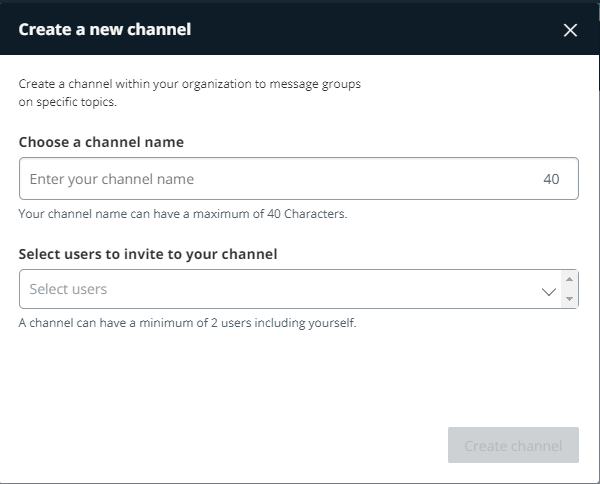
- Select the users you want to add to the channel.
- Click Create channel.