Using the Anomali Targeted Threat Monitoring Dashboard
The Anomali Threat Research team maintains an ATTM themed custom dashboard that you can leverage after subscribing to ATTM.
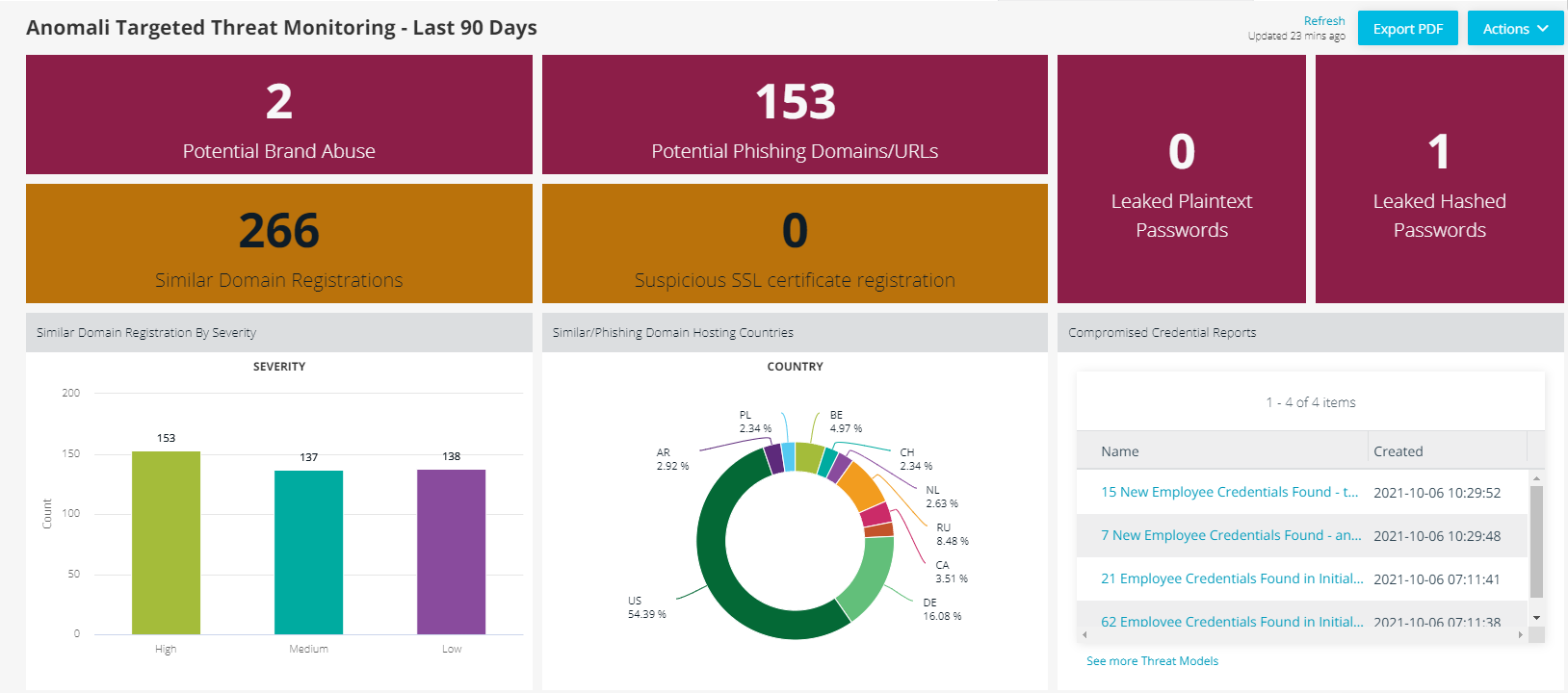
The dashboard provides alert counts, similar domain registration alerts by severity and country, and a list of Threat Bulletins related to compromised credential alerts. Click any chart element to drill down on the data.
To add the ATTM dashboard to your home screen:
- Click Dashboard in the top navigation menu.
- Click + Add Dashboard.
-
On the Add Existing tab of the Create A New Dashboard window, select Anomali Targeted Threat Monitoring - Last 90 Days.
- (Optional) Select Set as Default Dashboard if you want the dashboard to launch automatically each time you navigate to the Dashboard screen. Default dashboards refresh automatically every 30 minutes.
- Click Add.
The ATTM dashboard is now available for use.
Using the ATTM+ Dashboard
The Anomali Threat Research team maintains an additional ATTM+ themed custom dashboard for ATTM+ subscribers.

The dashboard provides alert counts and a list of Threat Bulletins related to ATTM+ alerts. Click any chart element to drill down on the data.
To add the ATTM+ dashboard to your home screen:
- Click Dashboard in the top navigation menu.
- Click + Add Dashboard.
-
On the Add Existing tab of the Create A New Dashboard window, select ATTM+ Brand Monitoring - Last 90 Days.
- (Optional) Select Set as Default Dashboard if you want the dashboard to launch automatically each time you navigate to the Dashboard screen. Default dashboards refresh automatically every 30 minutes.
- Click Add.
The ATTM dashboard is now available for use.